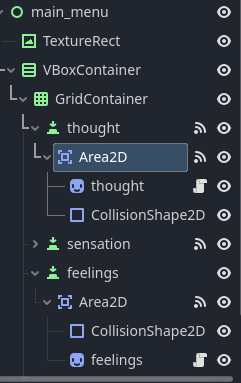
was trying to text some animations that i wanted to play for when the player selects an option on the menu,could not make it work,tryed multiple methods and tutoriais
extends Area2D

@onready var feelings: Sprite2D = $"../../../feelings"

var fade_in = create_tween()
var fade_out = create_tween()
# Called when the node enters the scene tree for the first time.
func _ready() -> void:
	pass

# Called every frame. 'delta' is the elapsed time since the previous frame.
func _process(delta: float) -> void:
	_on_area_2d_mouse_entered()
	_on_area_2d_mouse_exited()

func _on_area_2d_mouse_entered() -> void:
	fade_in.tween_property($"../../../feelings","position", Vector2(268.0,349.0),0.4)


func _on_area_2d_mouse_exited() -> void:
	fade_out.tween_property($"../../../feelings","position", Vector2(-268.0,349.0),0.4)
Move your tween variable declaration inside the function.
You should also connect your functions to signals, not run them in the _process().
Also, you already have declared the feelings variable that reference the node at "../../../feelings", so you can just use feelings instead of the full path again in your tweener.
Having said all that, it’s a rather bad practice to reference long chain of parents up the tree (usually anything more than 1 parent up the tree is already a red flag and you should try to redesign the model), because if you change the structure of your tree, this whole script will stop working. I would suggest you to instead put this script on your Feelings node and connect the signals down the tree to the Area2D node.
Something like that should work, this script should be put on your Feelings node:
extends Sprite2D

@export var area_2d: Area2D # Remember to assign your area node in the inspector.
var fade_duration: float = 0.4

func _ready() -> void:
	area_2d.mouse_entered.connect(_on_area_2d_mouse_entered)
	area_2d.mouse_exited.connect(_on_area_2d_mouse_exited)

func _on_area_2d_mouse_entered() -> void:
	var fade_in = create_tween()
	fade_in.tween_property(self, "position", Vector2(268.0,349.0), fade_duration)

func _on_area_2d_mouse_exited() -> void:
	var fade_out = create_tween()
	fade_out.tween_property(self, "position", Vector2(-268.0,349.0), fade_duration)
I also don’t like the Vector2(268.0,349.0) part, but I’ll leave it up to you to fix this, if you want. It should rather be some relational move instead of absolute and very specific like you set up here.