For such a simple task I’ve been messing around with it for hours and still haven’t figured it out so I’ll try asking here.
I created a simple face in blender and exported it to godot as GLB. I’m trying to create a “scene” (prefab) of it so I can easily drag it into the 3D scene to build a level out. It’s just a simple non moving plane to be used for floors/walls/etc so it will need a collider.
What is the node structure supposed to look like?
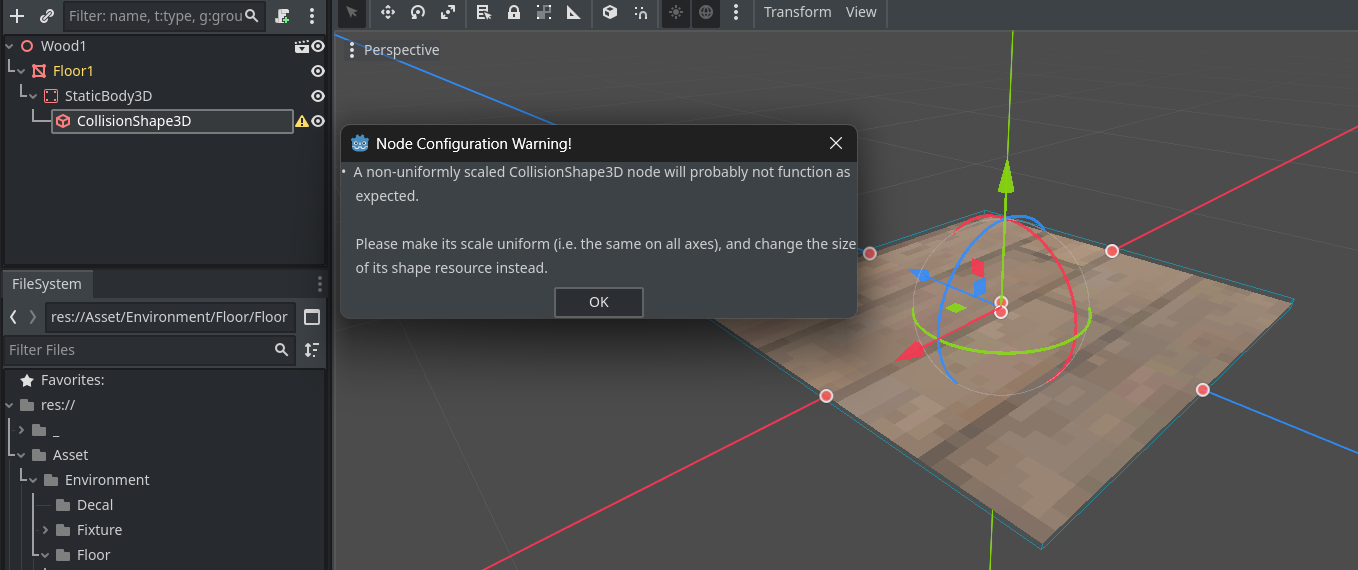
Google and AI is telling me its supposed to be Node → MeshInstance3D → StaticBody3D → CollisionShape3D. That seems incredibly complex for a simple non moving floor collider but ok I tried it out but when I set the shape of the collider to BoxShape3D it makes a large box around the plane so I tried to change the scale so its in more of a plane shape but I get that error in the attached image.
I’m coming from unity where its as simple as adding a BoxCollider component and it automatically takes the shape of the mesh so I feel like I’m doing something wrong here.
Google and AI is lying, apparently. Try StaticBody3D as root node, and MeshInstance3D and CollisionShape3D as child nodes. Also, change the size of the BoxShape3D inside the BoxShape3D resource. Do not scale the CollisionShape3D.
It’s StaticBody3D -> CollisionShape3D
Strictly speaking, colliders have nothing to do with mesh instance nodes. They can be completely separated. However a MeshInstance3D node is typically parented under static body node for convenience, so the collider and the mesh can be transformed together via the body node.
Ok thx guys. It took awhile but I think I figured out a way.
Export GLB from blender to godot.
Drag the GLB file to a scene and it will show up as a Node3D.
To the right of it click on the movie looking icon thingy “Open Editor” and then select “New Inherited”.
In the next screen that pops up click on the MeshInstance3D → right click → copy.
In the 3D viewport click on the + icon to create a new scene and then select “StaticBody3D” as the root node.
Right click the staticbody3D root node → paste and your GLB mesh will show up as a child.
You can then add the collisionshape3D as a child node as well.
Save the scene as a new scene in filesystem, this will act as a “prefab” now which you can drag to whatever scenes you want. The downside is you have to create a new “prefab” for each different material you want to use on the GLB.
I have to say the process was extremely aggravating and confusing and I just randomly got it working when I decided to try copying/pasting the MeshInstance3D of the GLB as a child node.
There’s gotta be an easier way, what does your guys blender workflow look like?