Godot Version
v4.6.stable.mono.official [89cea1439]
Question
I’ve tried to pull this off, but Godot has defeated me. I give up, I need help.
What I want to do, is to populate an array through GUI, because I think it will be more convenient in the long run than hardcoding stuff.
public partial class Level : Node2D
{
	[ExportSubgroup("Settings")]
	[Export] private int _waveCount;
	[Export] private Godot.Collections.Array<EnemyInWave> _enemyWaves;
}
[GlobalClass]
public partial class EnemyInWave : Resource
{
    [Export] public int Id { get; set; }
    [Export] public EnemyType Enemy { get; set; }
    [Export] public SpawnType SpawnType { get; set; }
}
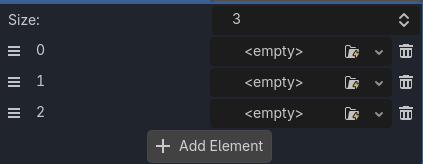
I can create new empty elements of the array, but GUI prevents me from actually filling them with data.
New button is greyed out.
I’ve initially tried to do this using resources, but it seems to be needlessly complicated, and as far as I understand it’s meant to be used for different things (like distinct game items, like a weapon with specific set of stats). All I want is to just fill things up through GUI.
P.S
I know my current system is not robust enough to support multiple waves, but this is a thing I will do later once Godot starts to cooperate.
If declared array type is a resource class, you should be able to create the objects via gui.
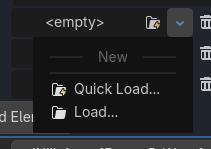
The only thing I can do is to press Quick Load which opens empty menu, or Load which opens res:// folder, but I don’t want to load anything, I want to create new object. Maybe bug in newest version?
Could be. You can try it in a previous version.
Are you sure there are no errors in any of your scripts? Also check for circular dependencies.
Ok, this is probably rookie mistake. I did save and build, but in order to make it work I had to restart Godot. Made no further changes, and it works.
But I’m trying to go step further, and changed it to this:
[Export] private Godot.Collections.Dictionary<int, Godot.Collections.Array<EnemyInWave>> _enemyWaves;
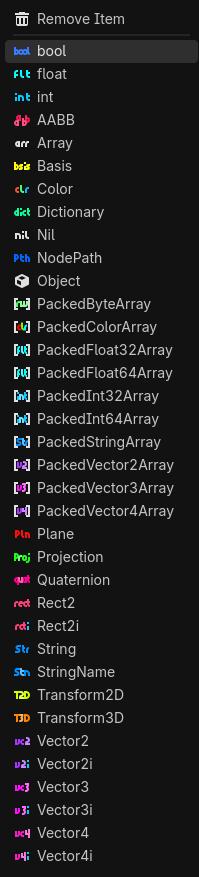
Which should handle exactly what I need. But again GUI does not allow me to create new custom object. I can only create this:
This time restarting Godot does not help.
Afaik, you can’t nest typed containers.
I’ve figured this out. You need to click on Object, and then you will get new dropdown where you can choose your custom type (after scrolling all the way down). There is so much scrolling and clicking involved that I think I will actually hardcode it. But at least I’ve learned something new.
When there’s plenty of data, I prefer initializing from spreadsheet tables. Inspector is a nightmare for entering data.