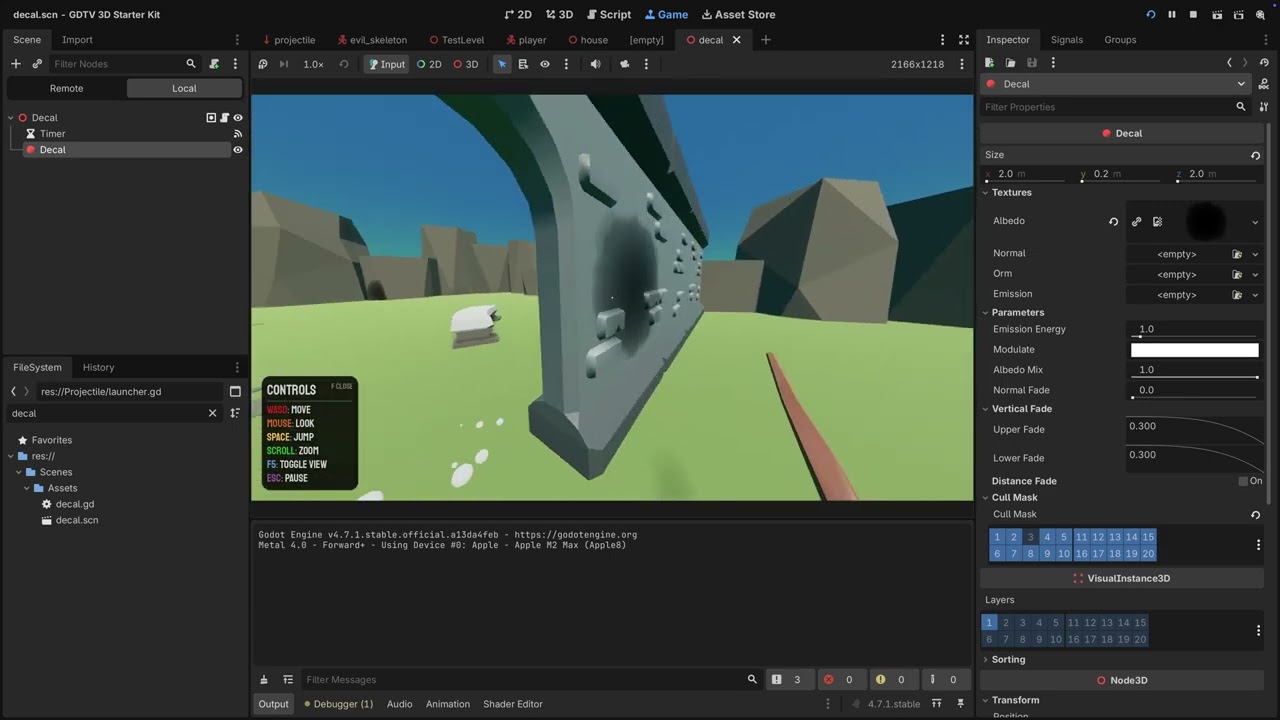
For the door, the decal gets added to current_scene, so it’s parented to the world and might stay frozen at the impact point while the door swings away. Maybe parenting the decal would work:
var decal := decal_scene.instantiate()
collider.add_child(decal)
decal.global_position = point
decal.quaternion = rotate_up
Set the global position after add_child so it lands on the impact point in the door’s space. From then on the decal inherits the door’s movement for free, no RemoteTransform needed. RemoteTransform would also work but it’s an extra node and an extra thing to clean up for the same result.
I think I see why the snippet fell apart at low thickness. After add_child the decal lives inside the door’s transform, and decal.quaternion sets the local rotation. rotate_up was computed in world space, so if the door node has any rotation of its own, the projection box ends up tilted by that same amount. At Y 2.0 the box is deep enough that it still crosses the surface even when tilted, but at 0.2 a tilted box can miss the wall entirely, which matches what you’re describing.
Try setting the whole transform in global space after parenting:
var decal := decal_scene.instantiate()
collider.add_child(decal)
decal.global_transform = Transform3D(Basis(rotate_up), point)
Two other things worth checking. If the door mesh has a scale on it (KayKit assets sometimes do), a child decal inherits that scale and the thin projection box gets squashed or skewed, so parent to a node in the door that has no scale if you can. And if you’d rather keep a bigger Y size for tolerance without the decal showing on the far side of the wall, push the decal center out along the normal so most of the depth sits in front of the surface:
decal.global_position = point + normal * (decal.size.y * 0.5 - 0.05)
That keeps around 5cm reaching into the wall while the rest of the depth faces outward, so a 0.5m Y size won’t reach the other side anymore.
So I made update but don’t see a much of difference.
func _physics_process(delta: float) -> void:
	position += global_basis * Vector3.FORWARD * delta * speed
	target_position = Vector3.FORWARD * delta * speed
	force_raycast_update()
	var collider = get_collider()
	if is_colliding():
		if collider.has_method("take_damage"):
			collider.take_damage(5.0)
		audio_stream_player_3d.stop()
		var point := get_collision_point()
		var normal := get_collision_normal()
		var rotate_up := Quaternion(Vector3.UP, normal) # gertenko magic

		var explosion := explosion_scene.instantiate()
		var decal := decal_scene.instantiate()
		collider.add_child(decal)
		explosion.position = point
		#decal.position = point
		decal.global_transform = Transform3D(Basis(rotate_up), point)
		#decal.quaternion = rotate_up # gertenko magic
		get_tree().current_scene.add_child(explosion)
		explosion.blast()
		queue_free()
In sense of scale I changed door scene, but it all defaults.
Maybe it should be attached as child of wall_doorway_door node to copy rotation from animation?
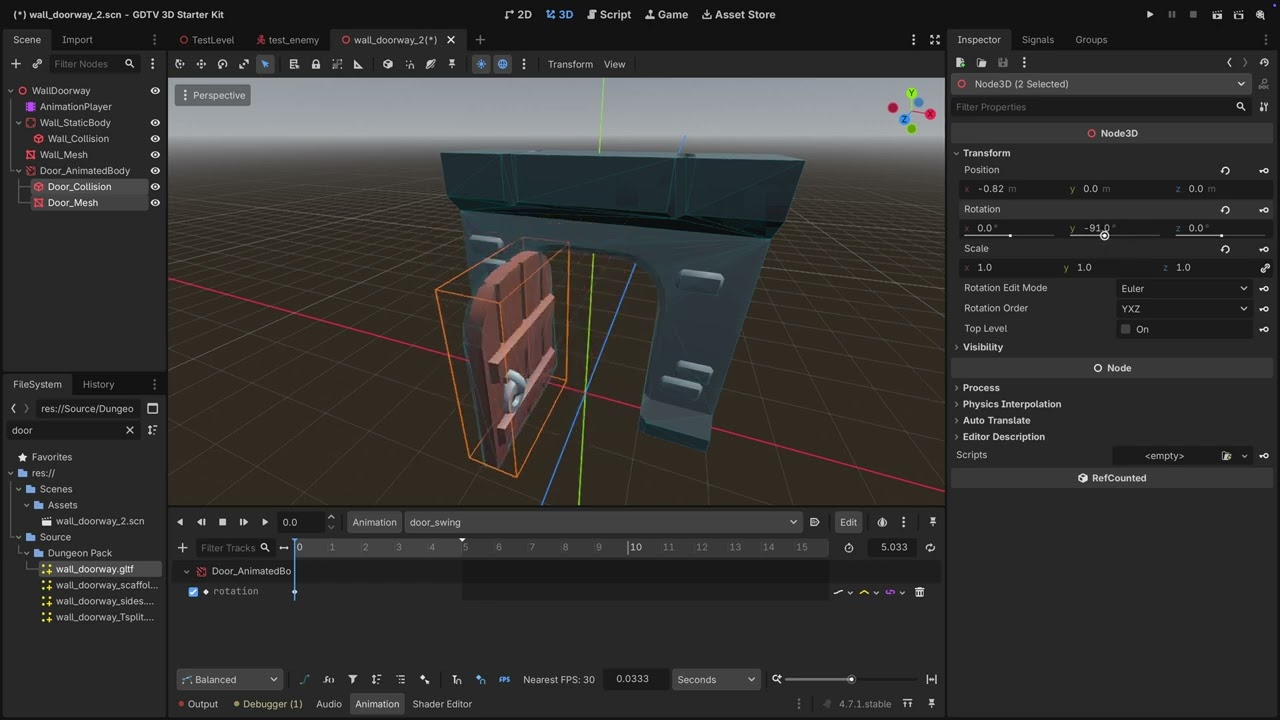
Your tree looks a little bit crooked. Do I understand it correct, that the AnimationPlayer is animating only the mesh (wall_doorway_door)? And the StaticBody3D is a child of this animated door mesh? And the Decal is a child of this StaticBody? That all feels wrong.
A StaticBody shouldn’t be animated, which it is in your case.
If you want forces to move the door, you could use a RidgitBody as the parent. If you want to animate it with the AnimationPlayer, it should be an AnimatableBody3D as the parent.
Under this parent node place the mesh and CollisionShape and the Decal as children.
EDIT: and animate the parent (the AnimatableBody3d), so the mesh and decal will follow the animation.
Why is “Doors” child of a mesh?
I would keep trees as flat as possible. Just from the names I would build it
Walls (Node3D)
– WallDoorway01 (StaticBody3D)
— CollisionShape (for the doorway)
— wall_doorway (MeshInstance3D, as sibling of Door)
— Door01(AnimatableBody3D)
---- CollisionShape
---- wall_doorway_door (MeshInstance)
---- Decal
Then animate the Door01.
And why is it plural (Doors)? Isn’t it only one entity? You can have multiple “Door” maybe in a Node3D “Doors”, but than it’s not a child of a specific doorway. Is it Important that the Door is a child of the doorway? Just to be sure that there will only be the one Door that will get animated.
I would place the wall_mesh under the Wall_StaticBody. The Wall_StaticBody is the object, the mesh is just the visual representation of that object in the world.I would handle meshes just as the visual attachment of an object, it’s not the object itself.
Haven’t analyzed the code. The tree looks better. Not sure what all the Node3Ds are below DoorAnimatedBody.
I would switch Debug → Visible Collision Shapes to on. Just to ensure that all Collisions are correct.
I would rename every node that get instantiated to avoid Nodes with names like “@Node3D@49”, before attaching it as a child.
You could pause (with expanded Remote view) the runtime and analyze the orientation of the decal in the world. (Selecting it in the remote view). You have to switch the “Input” to 3D, after the pause, it’s above the game view.
You have to understand the state of your world at that moment.
That’s a tricky situation, if the decal slices the wall it will draw there. Every mesh has a VisualInstance3D, there you can define layers. In decal there are CullMasks. Default the decal is drawn on all layers, you coud divide the wall and door mehes to different layer, and a decal can draw on only one of them. But you would need a more complex Decal logic to detect if it should draw on the wall layer or on the door layer.
So here is clearest demo what I mean by offset it’s relative z axis to door, but also it cause projection once on wall and once not which looks a bit odd.
Maybe duplication of decal, but how would I even check it ?
would I need to check decal itself if collide with some other instance to add child there ?
Yep, the effect is as expected.
The Ray gives the object it collided with, there you could detect doors, maybe they are all in a group. A group like “moveable_objects” or something like that. They are all on one layer other than 1 and the rest of the world is on layer 1.
If the collided object is in the group, set the CullMask to that layer, else let it at 1.
Alternative:
The moveable objects on one layer and the world on another. I’m sure you can get the VisualInstance3D layer from the collided object. And set the cull mask of the decal to that layer before adding it to the world.
I have used cull_mask for water to avoid decal for it.
Will need to do some research for methods what’s available in engine.
What about offset?
How should I approach it?
He mentioned that bit of code, but I guess making decal size bigger on Y would make issue with wall more obvious unless I do this visual instance split.
In the example the decal is set to the point (the hit point of the ray), than adds 1/2 of the size in Y to moves the decal in the direction of the hit normal, as the origin of the decal is in the center, so the decal will sit with it’s outer face on the hit surface, than in the example it’s moved 0.05m into the wall.
I’m not sure that this is the best solution, as a decal can have a fade out, to fade out over distance to the surface.
How far the decal reaches is defined by it’s Y size. But you have already a relative flat decal. It’s still visible on the other side of the wall/door?
IMHO controlling it by the size is the better solution, as you did.