Update (July 18, 2025):
After further testing, I discovered a major issue with this extension:
when renaming C# files in VS Code, the .uid file is renamed correctly, but the Godot editor does not update the script reference in .tscn files.
This can lead to broken script attachments without any warnings.
Because of this, I’ve decided to stop recommending the extension for now.
=====
Hi everyone,
I’m quite new to Godot — I’ve only been using it for about 4 days — but I ran into a minor inconvenience when working with Visual Studio Code, especially around how .uid files are handled.
So, I made a small VS Code extension to help solve this problem in a way that works for me.
You can get it on the Visual Studio Code Marketplace
https://marketplace.visualstudio.com/items?itemName=masatoko.godot-uid-sync
 Background
While working in VS Code on Godot projects, I noticed some small annoyances with how .uid files behave — regardless of whether you’re using GDScript, C#, or another language.
 Existing Solution
I tried two common approaches to deal with .uid files:
-
Excluding
.uidfiles withfiles.exclude- Hiding them via
files.excludeseems like a simple solution. - But if you rename or move the original file, the
.uidfile gets left behind, breaking the reference in Godot.
- Hiding them via
-
File nesting behavior
- When
.uidfiles are nested under the original file, the little icon>on the left makes it hard to tell at a glance whether it’s a folder or a file. - When files with and without .uid files are listed together, the different indentation levels make the structure harder to follow.
- When
 My Solution
I created a VS Code extension that solves this problem in the way I wanted:
- As a preparation, add
"**/*.uid": trueto thefiles.excludesection in your VS Code settings. This will hide.uidfiles from the explorer to keep things clean.
"files.exclude": {
    "**/*.uid": true
}
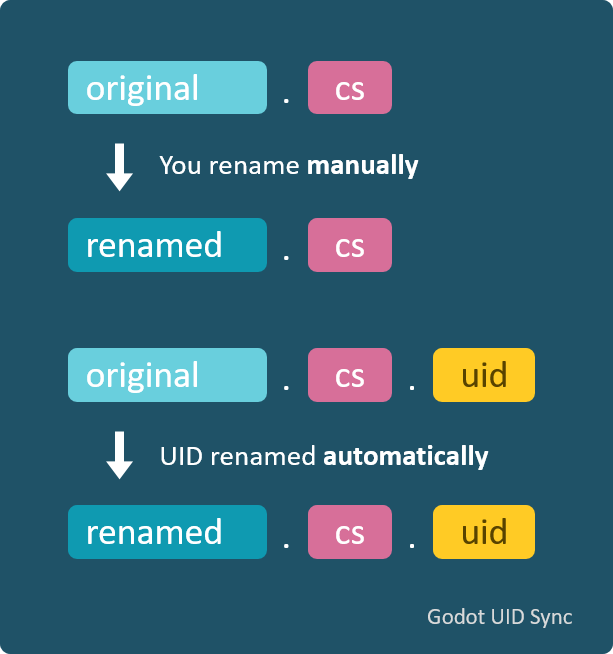
- When you rename or move a resource file (e.g.
.tscn,.cs, etc.), the extension automatically renames/moves the corresponding.uidfile as well. - This way, you can work without having to worry about the presence of .uid files.
Here’s a visual example of what it does:
 Notes / Tips
-
When renaming or moving a file, make sure the corresponding .uid file was also renamed or moved by checking the popup message. If no popup appears, the operation likely failed.
-
If you want this extension to run only in Godot projects, set the following setting to
true:{ "godotUidSync.enabledOnlyInGodotProjects": true }(By default, it’s
false.)You can set it to
falseto prevent the tab from popping up, but you should still keep an eye on whether.uidfiles are being renamed properly, since failures can happen silently.
 Links
Links
-
Visual Studio Code Marketplace:
https://marketplace.visualstudio.com/items?itemName=masatoko.godot-uid-sync -
GitHub repository:
https://github.com/masatoko/godot-uid-sync
This extension is still in early development, so feedback is very welcome.
Thanks for checking it out!
If there’s already a better or more standard solution to this problem that I missed, I apologize in advance.