Determining the UI position via world-to-screen projection

Godot Version

4.6

Question

Hello,

I have a question about UI and “ingame” elements.

In many games, text is displayed when the some entites are hurt, for example. Sometimes we want to display some text or icon close to a world entity.

I’m trying to do this, but I don’t find a correct solution to the problem.

In many places I read that I have to create a Scene with Control node as root and a Label inside. Then attach, instanciate to a Node2D. For example, attaching it to a CharacterBody2D)
If I have a decent font size and after scaling down the whole control node, this will work but there is some problems that arise, as the text will go behind other elements.
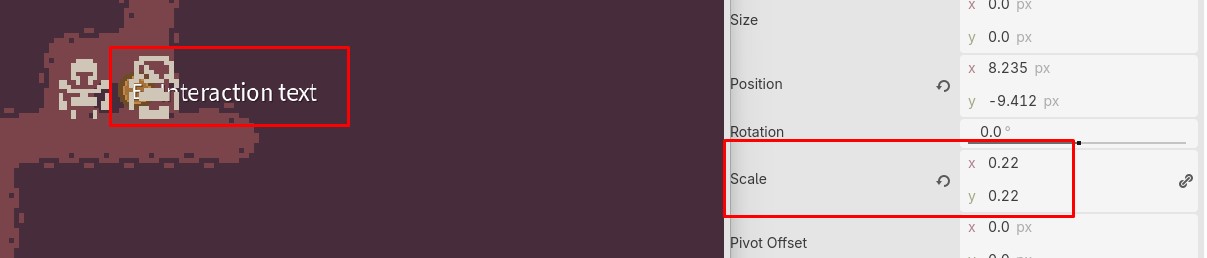
I can solve this by increasing the Z-index, but then the “z-index” war will start, with myself trying to figure out the indexes for this.

The text element will go behind other UI Elements, which is good. But not always.

For that fixing that, we have the node CanvasLayer and I can also “fake the position” so it looks really good:
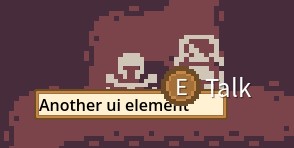
But here is where my problem start to shine.

What if we have a camera limit and/or the entity is not close to the anchor that we setted (for example, center)?

Then the text will keep its position to that anchor, obviously.
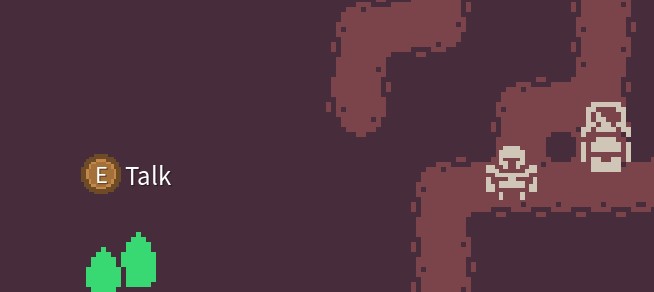
So I thought that maybe I can position the text via script and here is where I bumped into the wall.

I tried to position from the entity script with something like:

interaction_control.set_position(get_global_transform_with_canvas().get_origin().round())

But as you can watch on the video, the text will do a weird effect only when the entity moves vertically and not when moving horizontally.

Futhermore, now the text can leave the screen (also a problem with the first approach)

So now I wonder,

What is the correct way of positioning a UI element in a CanvasLayer relative to an entity of the game world?

How can I prevent it from leaving the screen?

Thank you for your time!

Kinds regards to everyone.

Scaling Control nodes can create visual problems when attached to moving entities. Calculating the screen position dynamically and clamping it within the viewport edges provides better results for HUD elements that need to stay visible and readable.

Yes, this is what I want to achieve.

The scaling only happens in the first cases, when I use the canvas layer there is no need for scaling.

How can you calculate the screen position and clamp it to the view port?

Is the get_global_transform_with_canvas().get_origin() the correct method?

Multiply the world position with canvas_transform gotten from camera’s viewport. This will give you the position in viewport space which you can directly assign to controls on the canvas layer.

The second thing is constraining the label rect to viewport rect. After you’ve positioned the label check how much its rect is extending over viewport rect on each of 4 sides and translate the label for that amount in opposite direction.

Hello, sorry for replying so late.

I tried this as you advised, but the bouncing on the vertical axis still happens.

This is my code, there to_position is the global_position of the entity (the player in this case):

func set_control_position(to_position: Vector2) -> void:
    var viewport := get_viewport()
    var screenPosition := viewport.get_canvas_transform() * to_position
    interaction_control.global_position = screenPosition

The vertical bouncing is so strange.

I changed the Stretch mode in the window’s display property to several values but the problem persists. The only setting that helped a little (some times it flickers) is disable the V-Sync Mode.

For constraining inside the viewport I did something like:

    var labelRect := interaction_control.get_global_rect()

    if labelRect.position.x < 0.0:
        interaction_control.global_position.x -= labelRect.position.x

    if labelRect.end.x > viewportRect.end.x:
        interaction_control.global_position.x -= labelRect.end.x - viewportRect.end.x

    if labelRect.position.y < 0.0:
        interaction_control.global_position.y -= labelRect.position.y

    if labelRect.end.y > viewportRect.end.y:
        interaction_control.global_position.y -= labelRect.end.y - viewportRect.end.y

It is working but I have to take into account the label size to make it work correctly.

Try rounding the position to the nearest integer value.

Hello,

I already did that rounding in my first post and also in the previous one.

I just got tired of trying it with control node, so despite that mixing canvas layer and node2d seems not to be recommend, I tried again by having a parent canvas layer, and instead a control node, a normal Node2D and with this, it’s working properly no problems. I had to scale the node to make the text look good but it’s working fine. Not jittering and position is just an assigment.

I’m trying to make it not go outside the viewport but by doing this change, it’s not working.

I was able to get how much of the label is outside

var screenPosition := viewport.get_canvas_transform() * labelRect.end
if screenPosition.x > viewportRect.end.x:
   var offx = screenPosition.x - viewportRect.end.x
   print("out by ", offx)

but I’m not able to convert this back to the position of the node or the label.
When I tried, but the node keeps “jumping” from one side to the other, horizontally.

Get both rects. If label rect end.x is greater than viewport end.x, move the label by their difference.
Then check the other side as well. If label rect position.x is smaller than viewport position.x move the label by their difference.

You can do the same for the y axis is needed.

Yes, I already tried that by changing position and global_position on the label.

interaction_label.position.x -= offx

But I had 2 problems.
One is this “jumping around”, because when I do the offset difference, it’s not longer outside, so it restores the position, which makes it again outside, so it recalculates the offset, basically looping and moving it all the time.

If I don’t restore it when it’s no longer outside, then the label is permanently offsetted, and it never goes back to the proper position, even when it’s not outside the viewport anymore.

Well move it only if offx is positive i.e. if label end is greater than viewport end.

Yes, indeed, as stated in my previous posts, I always have this condition before actually applying the offset difference.

I don’t get where the problem is. Calculate the wanted position without the constrain, apply the constrain to that and then set the final result to the actual position.

Finally I think I solved it.

The trick was using canvas_transform.affine_inverse() and positioning the canvas in the word position to do the calculations with var canvas_position := canvas_transform * to_position

Then, create a rectangle with the composition of the UI elements (an icon and a text), and combine the canvas_position with both the position and size of this rectangle.

Then execute all the if conditions for the edges and finally apply position = canvas_transform.affine_inverse() * clamped_canvas_position to node2d

Also, I forced the camera only to move when the target applies the movement (so it’s the target who moves the camera), and not in _process, I think that helped with the jittering too.