I want to have 3d characters in a 2d level. To make the level I am using the plugin SmartShape2D.
I was trying to display the level in 3d utilizing a sprite3D with a viewport texture, but the result ends up being low resolution (you can see the pixels without even zooming in that much) and I am also struggling with translating the scale and position in 2d to 3d. Also for now I’m just testing with a few simple shapes, but putting in a whole level in a subviewport would require a really huge viewport, and I’m not sure if it’s bad for performance.
SmartShape2D is really cool. I created a simple CurvedTerrain2D Plugin, but it doesn’t allow you to choose what sides the edges are on, or handle corner textures. Very neat.
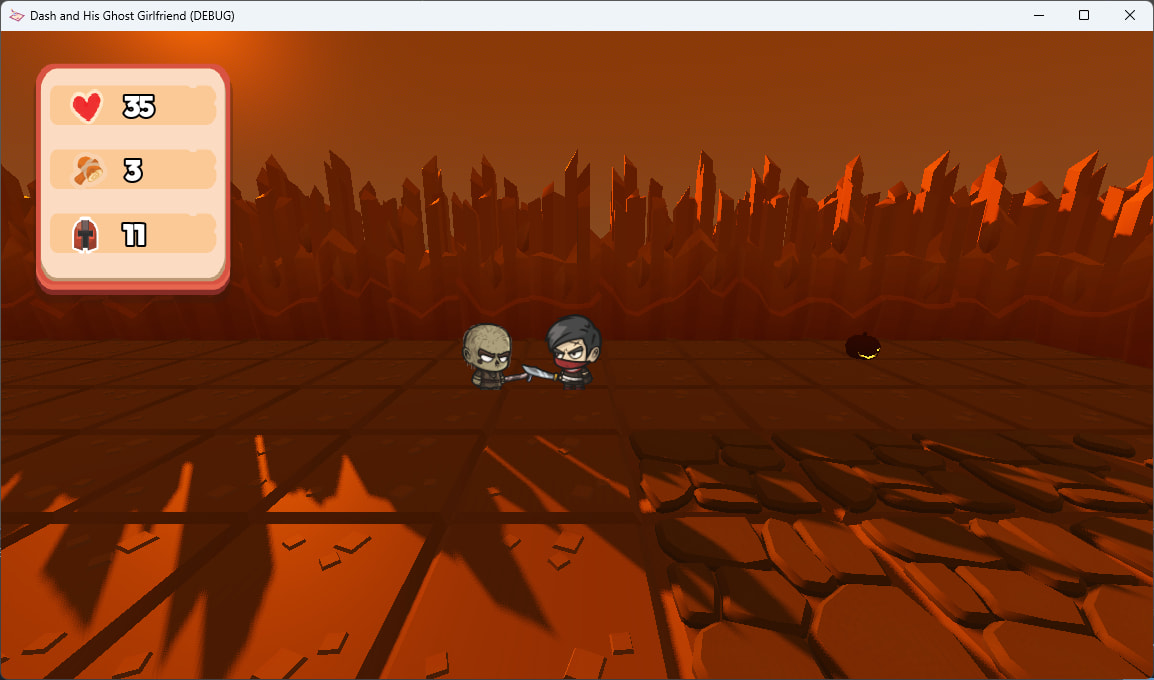
If I may ask, why are you wanting to use 3D characters in a 3D world? Typically a 2.5D game (a game combining 2D and 3D elements) has 2D characters in a 3D world (like my game Dash’s Ghost Girlfriend).
What @trizZzle suggested (which I couldn’t like because I’m out of likes).
Make a fully 3D game and make it a side-scroller. Like my game Skele-Tom, which is a 3D game viewed through a 2D viewport, viewed inside a 3D TV model.
Use an addon like IosXCoder’s that converts a 3D model into a set of 2D sprites and make your game full 2D. (@Demetrius_Dixoncould probably get us a link from his Discord server.) Sadly I have no screenshots of this because when they left the forum I lost all my conversations with them.
But I got back to the question: Why? This is an interesting choice.
Basically I suck at drawing, and while I’m not that good at 3d modeling either I can at least do something. As for the environment being 2D, as far as I have found there’s no 3D equivalent to SmartShape2D, and creating my own alternative is way beyond my skill level, besides I want to do some forced perspective stuff for the enviroment which could be tough in 3D.
Converting 3D models into sprites is definetly something to consider, but it seems like a pain, plus I wouldn’t be able to easily use stuff like blending between two animations so I want to try something else first.
That would probably work. It’s just that I’ve been working in 3D so far, so converting everything to 2D would take a while, but definetly not impossible. The only worry is wether having a subviewport for each 3D model would be bad for performance.
There are lots of tutorials out there, but I get doing what you know. AESprite is a great tool for this.
Godot has built-in CSG boxes you can use for in-game sculpting, but I get what you’re saying. That plugin does make pretty maps.
An orthogonal camera could probably do that.
It’s really not. You give it a model with animations, and it churns out all the animations in every directions as sprites. It’s really cool. It is slow though (hour or two per model), so it’s a preprocessing thing.
You’re going to have to try it.
To be blunt, you have made a design decision you don’t know the full effects of, based on the limitations you currently have and a LOT of uninformed assumptions about what Godot can and cannot do. You have a long road ahead of you. Viewports is not the only problem you’re going to have to solve.
However, you seem like a “see it for yourself” type of person. Keep in mind there’s a Texture3D node. If I were you, I’d see about turning your SmartShape2D environments into textures you can add to Texture3D objects. Then you can keep your 3D characters and game world and don’t need to play with viewports so much.
Well, the issue isn’t really the tools, it’s more like my drawing skill It would take lots of practice to get it to a decent level, besides I’m more interested in practicing 3D.
I already gave CSGPolygons a shot, but I found it hard to get the textures to look fine, also a big benefit to smartshape2D is that you can change the edge texture from edge to edge, which CSGPolygons have no way of doing natively afaik.
As for the forced perspective, what I want is something like Zelda: a link to the past where you can see walls on left, right, top and bottom even tough it makes no sense. Basically that but for floors and ceilings as well as walls. As far as I know orthographic camera just means that it doesn’t take into account the distance from the camera when rendering, so I’m not sure how it could help with that.
As for the rest… you’re probably right. Guess I’ll just have to try and see. Tough I am more of a “take the laziest path” type of person lol
Not sure what the problem is exactly here. If you render a 3d character into a subviewport, and use that as a sprite texture, positioning it in 2d world is exactly the same as doing it with pre-rendered sprite sheets. You position the 2d sprite in both cases. If the resolution is too low - increase the subviewport size.

 It would take lots of practice to get it to a decent level, besides I’m more interested in practicing 3D.