Godot Version
4.4
Question
Hello! I have this scene for an assembly station working well as an independent scene, but when I add it to the rest of my game it stops working? Here’s a video showing what’s going wrong:
I’ve checked all the mouse filters in the entire game scene and they’re all set to ignore. Any help is appreciated, cause I’m really stumped.
In the Debugger panel the “Misc” tab will tell you if your mouse inputs are consumed by a Control node and which node is doing so; does that panel show anything? Do your areas print anything on input?
I didn’t know the debugger had that function, that’s gonna be very helpful in the future.
It only prints when I click a button node, and not my Area2Ds. If I try and click anything else it just doesn’t update
1 Like
Have you tried enabling Visible Collision Shapes in the “Debug” menu at the top? Maybe your Areas have run off, or another one from a nearby panel is overlapping?
Is your game paused? Maybe setting the areas Process mode to “Always” will be a quick test?
I set process to “Always”, it didn’t help unfortunately
All of my collision shapes are in the right places when I turn on visible collision shapes as well
Could you paste the script for picking up these objects? Hard to say, is there any way you can introduce the other “main game” components one by one to find a perpetrator?
I would like to ask for a screenshot of the remote trees in both cases, but the game seems like it’s far a long and may have a lot of differences. Looks fantastic too :^) really hope you find a fix if I can’t find anything
Here’s the script for one of the draggable objects:
extends Sprite2D

var is_dragging = false
var mouse_offset: Vector2
var dropped = false

var item_type = "bun"

@export var squirt: PackedScene

@onready var area: Area2D = $Area2D

func _physics_process(delta):
	if is_dragging:
		global_position = get_global_mouse_position() - mouse_offset


func _unhandled_input(event):
	if dropped:
		return

	if event is InputEventMouseButton and event.button_index == MOUSE_BUTTON_LEFT:

		if event.pressed:
			if get_rect().has_point(to_local(event.position)):
				is_dragging = true
				mouse_offset = get_global_mouse_position() - global_position

		else:
			for drop_spot in get_tree().get_nodes_in_group("drop_spot_group"):
				if drop_spot.has_overlapping_areas() and drop_spot.get_overlapping_areas().has(area):
					is_dragging = false
					dropped = true
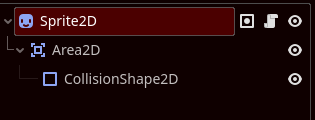
here’s the sprite tree for it:
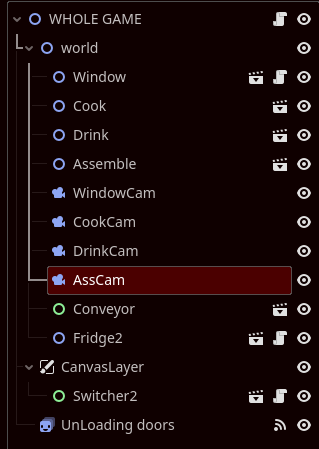
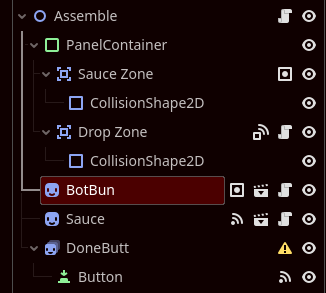
and here’s the sprite trees for the entire game and just the assembly station:
Huh, anything could be handling the input before this sprite runs, inputs propagate up children from the bottom of the tree to the top. You could have some other script using accept_event() or get_viewport().set_input_as_handled() lower in the tree than your areas; or a control could just decide it’s consumed it, but I think it would usually trigger that Misc tab.
Try using the input_event signal from the Area2D instead of overriding _unhandled_input. Alternatively _input will never be consumed.