Editor Console Plugin

Execute simple script from input and watch output.

This is likely the best way to quickly experiment with GDScript, without having to create a new scene, avoid cluttering your project with temporary files.

Just paste the simplest snippet to Console Input gui , and press run (or ctrl+enter).

Please focus on the key point: being able to quickly run user-defined scripts in the editor is valuable in itself. Stop nitpicking.

Now, this plugin supports loading multiple user script files located at res://addons/console_input/userscripts/*snippets.gd.

This plugin will load those scripts and extract qualified methods to the dynamic popup menu.

Some Tools Preset:

  1. Scroll scene tree to top or bottom
  2. Scroll inspector panel to top or bottom
  3. Toggle node disabled or enabled
  4. Batch move selected nodes gui ( a xyz dialog )
  5. You can open snippet source file with one click !
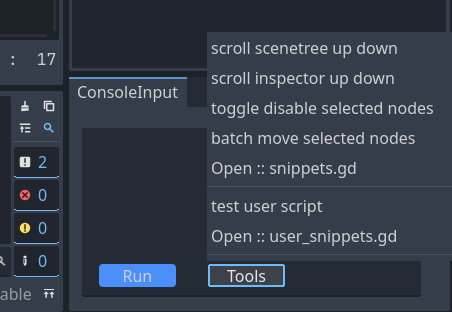
It’s a customizable dynamic menu !

You can run standard gdscript methods now, not just through the simple eval .
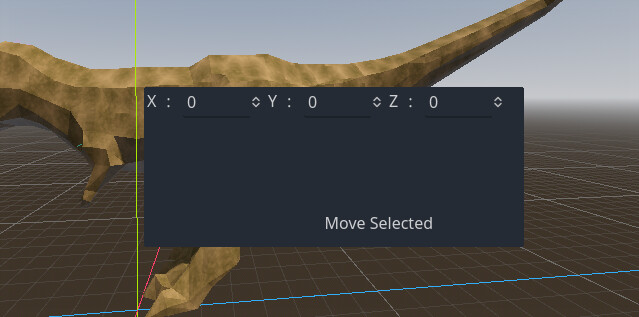
the dialog is just a panel added to editor.get_base_control()

snippets tutorial : Godot-Editor-Console/addons/console_input/userscripts/user_snippets.gd at master · KnIfER/Godot-Editor-Console · GitHub

with those two parameters you can craft your own methods :

  1. editor:EditorInterface
  2. plugin:EditorPlugin

And below is just some of my personal cheatsheet, u don’t have to use :

(toggle) disable selected node :


kn()

batch move selected nodes by 500u along the z axis:

for node in sns():
    node.position.z += 500

print position of selected node:

=sn().position

copy position to clipboard:

FU.setTmpText(sn().position)

put a big arrow in the scene:


	DDD.vvv(Vector3(0, 0, 0), Vector3(0, 1, 0), 1)

The idea is interesting, but this is the most confusing syntax ever, that I couldn’t be bothered to learn, sorry.

Quoting @dragonforge-dev:

Also, you had me hooked until this sentence:

Crazy idea, I know, but bear with me - can we also not use ChatGPT, or is this required for this Plugin?

3 Likes

Yeah as soon as I see just ask AI I have a mini crash out in the head.

3 Likes

I get where this idea is coming from, but it seems like a throwback. You’re creating a live text scripting interface to mock up things you can do in the editor visually. It’s very Ruby/Python

From a testing perspective, this has very little value as most problems raise their heads during gameplay.

This does seem like a tool for helping use LLMs to code though, because LLMs are really bad at helping you used nodes for simple solutions, and always tries to create complex coding solutions instead. This seems like an idea that came from an LLM TBH.

2 Likes

confusing syntax

u mean the method names? dont use it if it makes you uncomfortable. sorry.

not use ChatGPT

u can always use google

Yeah, it’s just a small tool I made while learning Godot. It’s obviously not meant for production use.

That actually was not clear. You posted this in Resources/Plugins. If it’s not intended for production use, a better place would be Showcase.

1 Like

But it is a plugin

not true. for example you can’t batch move nodes for specific units. (Correct me if I’m wrong.)

It for prototyping..

Yes, this syntax:

kn()
sns()
sn()
FU.setTmpText(sn().position)
DDD.vvv(Vector3(0, 0, 0), Vector3(0, 1, 0), 1)

Using abbreviations doesn’t really make you more efficient. Quite the opposite, because you have to keep these abbreviations in mind, or constantly look it up in the documentation. And it makes it that much harder for anyone else to actually use the Plugin.

You could take this as a feedback on how you could improve the Plugin to be more accessible to everyone else. But with this attitude of “If you don’t like it - don’t use it”, it seems like you’re not accepting any critique.

You published it as if it was a final product, never mentioned it’s in a WIP state or that it shouldn’t be used in production.

2 Likes

Using abbreviations doesn’t really make you more efficient

not true. I can easily memorize them, they are non-monsters to me.

They are mini creatures.

If you don’t like it - don’t use it

I mean, there’re simpler demos described in the GitHub link. For example, typing =1+1 will yield 2 in the output panel. Is that still too confusing?

It’s obviously not meant for production use.

Then I restate: this is clearly not for use in your game project, nor for debugging your game product.

Although, I believe I have already stated its purpose in the first sentence: Execute simple script in the editor.

It’s for testing or prototyping GDscript.

You absolutely can. You can select them all and drag them. You can select them all and update the position in the Inspector.

1 Like

You absolutely can … batch move nodes for specific units

not for me:

  1. dragging them can’t specify the distance to move
  2. update the position in the Inspector will collapse all nodes to one position in that axis
1 Like

You can, because you invented this system and it’s obvious to you. It’s not obvious to anyone else, though.

There is a good reason why methods are spelled out fully in Godot, like move_and_slide() instead of mas() or _physics_process() instead of _pp(), etc.

If you published the Plugin here, I would have assumed you want to reach a bigger audience.

It’s not confusing, but it’s not a practical example either. I don’t see why I’d want to use the Plugin for that.

I actually agree with this usecase. It is tricky to move multiple nodes by exactly the same amount, if they are placed in a different starting position. Like you said, if you just type the position in the inspector, it will collapse all nodes to the same position, which is not what you want. Being able to move multiple nodes by a specific Vector would be nice.

As I said before - I find the idea interesting and could even be useful, if done right. I think there’s still some parts you could improve to make it more accessible by others. Until then, I’ll just follow the progress from the sidelines.

1 Like

You can also group them under a Node2D or Node3D and move that node.

That syntax is HORRIFIC. DDD? vvv??? It reads like gibberish.

Also:

You posted on the WRONG forum, pal.

:tractor: :tractor: :tractor:

2 Likes

You might not always want to do that, or even be able to do that. E.g. moving children nodes of 2 separate parent nodes. You can’t always put them under the same parent. It’s a very specific use case, so probably not that common in real life, but still - this Plugin wins for this use case. I feel like there should be a native way to do that though… I wonder if there already is a proposal for that.

Yeah, maybe. Typically, when I want to do something like this, it’s in a TileMapLayer or GridMap, and they have built-in functionality for this, including cut and paste.

Turns out there is, I’ll just leave it here for the future reference:

1 Like

Update :

  1. fix compatibility issue for godot 4.0
  2. Upgrade Edit button to dynamic popup menu, add standard gdscript snippets support