Editor slow down on panel/window focus change

Hi everyone,
I originaly aimed to post this issue on the github, but I think it s not narrow enough to post it there.
I couldn’t find a better name for this issue, but I am sure there is one.

I upgraded my project from 4.6.2 to 4.7.1. On 4.6.2, everything is perfect, the editor is smooth.

On 4.7.1, I experience lag spikes when I change focus between editor panels or windows.

I recorded a video to demonstrate:

  • Red circles appear where I click left
  • I noticed that the visual profiler is going crazy, so I included it
  • Below is a list with video time codes and what was tested

When the project is running:

  • 0:00 - There is a 1-second delay when I click the “Run project” button and when it triggers
  • 0:06 - There is almost a 2-second delay between the time the game is displayed and when the console prints
  • 0:13 - Lag spike when my mouse enters the game screen (I thought the lag occurred when I clicked, but hovering the mouse is enough). I did this multiple times
  • 0:39 - Lag spike when I press previous and next folder in the Filesystem tab
  • 0:53 - Alt-tabbing back from VSCode to the editor is also slow. Alt-tabbing is slow even when the project is not running


I don’t know if it’s related, but this error message pop on one of my projecting running test

  ERROR: core/debugger/remote_debugger_peer.cpp:269 - Remote debugger: Packet too large (1953394499 > 8388612 bytes). Disconnecting.
Godot Engine v4.7.1.stable.official.a13da4feb - https://godotengine.org
Vulkan 1.4.325 - Forward+ - Using Device #0: NVIDIA - NVIDIA GeForce RTX 3070 Ti

  ERROR: core/debugger/remote_debugger_peer.cpp:269 - Remote debugger: Packet too large (1953394499 > 8388612 bytes). Disconnecting.


Also, I don’t know if it’s important, but here the size of the project.
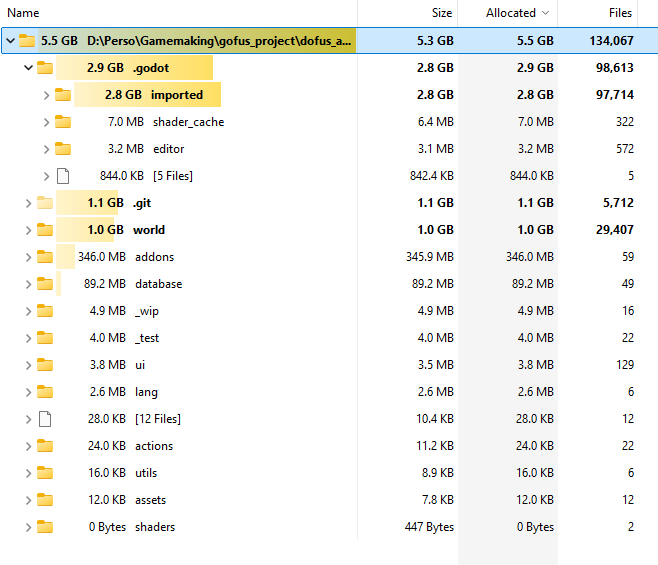

That’s the first issue I post, so don’t hesitate to tell me if some informations are missing,
Thank you !

Do you have one very large file, with a large tilemap perhaps?

Obviously, I find the issue right after posting :upside_down_face:
I deleted the .godot folder and reload. It is now at 740mo instead of 2.9go, and the editor is smooth.

Do someone would know why this folder was so large ?

Obviously, I find the issue right after posting :upside_down_face:
I deleted the .godot folder and reload. It is now at 740mo instead of 2.9go, and the editor is smooth.

Do someone would know why this folder was so large ?


:warning::warning::warning:Hey it’s me again :') It was working the first time and then it started to lag again, if anyone has an idea to diagnose where the issue it would be awesome

Nop, my tiles are all invidual files, I have a lot a of small assets

Since it’s fine now I wouldn’t worry tho

Sadly it doesn’t work finaly :frowning:

Interesting I will try to see.if I can find something

It seems the problem is in the “imported” folder inside of the .Godot folder

The imported folder is where the Godot readable version of you assets are stored, basically it contains all your assets.

It may be due to a large item in that folder so go check for a large item in the imported folder

The larger file 3.7MB, so I’m not sure that’s the issue.
However, Godot still has a hard time to open the folder storing all tile sprites (around 7 000 different pngs), maybe there is a link.

Yes this may be the link but I don’t see why this would impact the entire game running

Are they all loaded at once, for example, are they all in the same tileset? If 7000 files are all loaded at the same time it could definitely cause a problem

I also see you were the person with the upgraded files problem, couldn’t be related?

Nop I load them on the fly (using load).

Mmmmh, I don’t remember having any issue with upgraded files and I can’t find the post, could you link it ?

Are all of the 7000 tiles in the same TileSets?