Godot Version
Godot version 4.6
Question
After watching tutorial on first person movement and camera movement. I added a staticbody3d and collisionshape3d for platform and charcterbody3d (character). I have attempted thickness of platform, change physics fps from 60 to 120 and looked over 3 different tutorials on this and showed the exact same steps that i followed any help would be much appreciated. I used just template script for basic movement.
Link for problem - https://youtu.be/AZoSQ26N_NE
extends CharacterBody3D
const SPEED = 5.0
const JUMP_VELOCITY = 4.5
var gravity = ProjectSettings.get_setting(“physics/3d/default_gravity”)
func _physics_process(delta: float) → void:
Add the gravity.
if not is_on_floor():
velocity += get_gravity() * delta
# Handle jump.
if Input.is_action_just_pressed("ui_accept") and is_on_floor():
	velocity.y = JUMP_VELOCITY

# Get the input direction and handle the movement/deceleration.
# As good practice, you should replace UI actions with custom gameplay actions.
var input_dir := Input.get_vector("ui_left", "ui_right", "ui_up", "ui_down")
var direction := (transform.basis * Vector3(input_dir.x, 0, input_dir.y)).normalized()
if direction:
	velocity.x = direction.x * SPEED
	velocity.z = direction.z * SPEED
else:
	velocity.x = move_toward(velocity.x, 0, SPEED)
	velocity.z = move_toward(velocity.z, 0, SPEED)

move_and_slide()

# accumulators
var rot_x = 0
var rot_y = 0
func _input(event):
if event is InputEventMouseMotion and event.button_mask & 1:
modify accumulated mouse rotation
rot_x += event.relative.x * 0.5
rot_y += event.relative.y * 0.5
transform.basis = Basis() # reset rotation
rotate_object_local(Vector3(0, 1, 0), rot_x) # first rotate in Y
rotate_object_local(Vector3(1, 0, 0), rot_y) # then rotate in X
Your character’s collision shape seems odd, are you using a primitive shape such as CapsuleShape3D or did you generate one based on the mesh? The latter will produce much slower and worse collisions.
I was using primitive shape CapsuleShape3D, I just attempted generate one based on the mesh and there were no changes.
Sounds like your floor and the player are not on the same physics layer.
I just looked over my game and all assets are on the same layer - https://youtu.be/YCxriAz1Lj8
In the CSGBox, “use collision” is disabled, so with that in mind, it means that the CSGBox will not collide with anything.
I just changed the value to on and off and there is no change (i was going to be so annoyed if it was that easy) - https://youtu.be/4Fei7CbZFWw
What are the MeshInstance3D and StaticBody3D along with the CollisionShape3D attached to the CSGBox3D for here?
The StaticBody3D and MeshInstance3D are child nodes of the CSGBox3D while the collisionshape3d is child node of the StaticBody3D - https://youtu.be/FYiNk3wXZDw
Yes, but, I would like to know why they’re here, if you have a CSGBox there already, what is the mesh instance and static body there for? I was under the impression that the whole floor plane there was the CSGBox, is that not correct?
Ahhhh ok well to be honest I was just following a tutorial which called for them to be added to help prevent this issue. I have removed them but there is no change.
You should either use one or the other, there isn’t realistically any reason to use both at once, how does it look like if you enable collision on the CSGBox after removing them, still the same?
Yes, sadly no difference. (also thank you for your help.)
Honestly, not sure then, I can’t seem to spot anything that would be wrong otherwise.
Only thing I can currently suggest is perhaps trying again from scratch, try being methodical and go step by step, you could try following the basic 3D setup from the Godot docs or some other guide. Perhaps a fresh project, maybe it’s related to something in project settings?
Either that or someone smarter and more observant than me could spot something else wrong 
I’ve looked through all the videos, this one’s really stumping me. It looks like everything (CSGbox, characterbody, and static body) is set to collision layer 1, and collision is enabled, yet nothing collides?
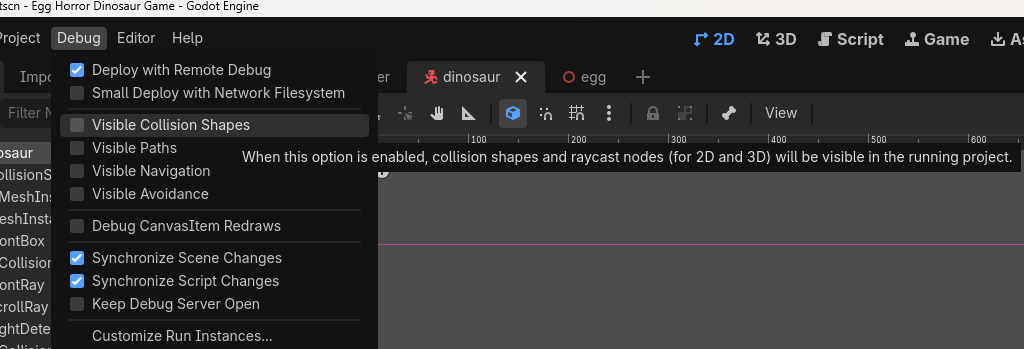
Have you tried toggling on visible collision meshes in the debug settings? I’ve noticed a wireframe in your game footage which could be a collision mesh, but there’s no corresponding one for the floor. (despite that being visible in the editor when you select it in your video.)
Edit: you can find that setting here, for reference:
This will not fix your issue, just help with debugging.
Thanks so much for your help, I ended up just starting a new project and following a different tutorial. (I’ve always wanted to start to make a game and this was really discouraging me from continuing) - https://youtu.be/Ao3iJW_8NyM
Yeah thanks I turned it on to see if the collision mesh was even there, and potentially that was the reason it wasn’t working just never actually removed it.
Glad you figured it out, perhaps we missed something in the previous one, guess it doesn’t matter now, but good luck with your project!
Again thanks, again my first project so probably forgot something.
Yeah, sounds like it was just gone for some reason. I do not have a fix for that lol, sounds like you lucked out and ran into an engine-level bug or something on your first project.
Hope your next one goes better <3