No, that’s precisely the point. That’s what OP asked.
It’s not trivial even with a C++ extension as you’ll probably need to circumvent Godot’s rendering device abstraction and go directly to system specific APIs.
No, that’s precisely the point. That’s what OP asked.
It’s not trivial even with a C++ extension as you’ll probably need to circumvent Godot’s rendering device abstraction and go directly to system specific APIs.
In actual fact you could by simply doing a resource load of an 8K texture till it fails and then get the memory usage at that point. Not very elegant, but it would work.
Can a resource load gracefully fail due to allocation? Can script code know that?
If you’re running with OpenGL, allocation will not fail if you break the vram bound. It’ll just start swapping to system ram.
Using ImageTexture should load it into GPU memory, and not fall over to system memory as its a texture. So once that fails, you have hit you GPU memory limit.
ImageTexture — Godot Engine (stable) documentation in English
Vulkan lets you query memory banks directly, including their intended purpose; you kind of need the information for when you’re setting up things like swap chains. If you’re running a box that has vulkaninfo on it you can see the results in the printout.
Okay soo,seems like it’s very odd to do these.I have an idea and maybe the solution.The solution is to use a batch file and write the vram into a .txt or .json file and then run it from Godot and read it.
The batch file I made using chatgpt is this :
@echo off
REM Get GPU names and VRAM safely using PowerShell

echo Checking GPU VRAM...

powershell -Command "Get-CimInstance Win32_VideoController | ForEach-Object { '{0} VRAM: {1} MB' -f $_.Name, [math]::Round($_.AdapterRAM/1MB) }" > VRAM.txt

echo VRAM info saved to VRAM.txt
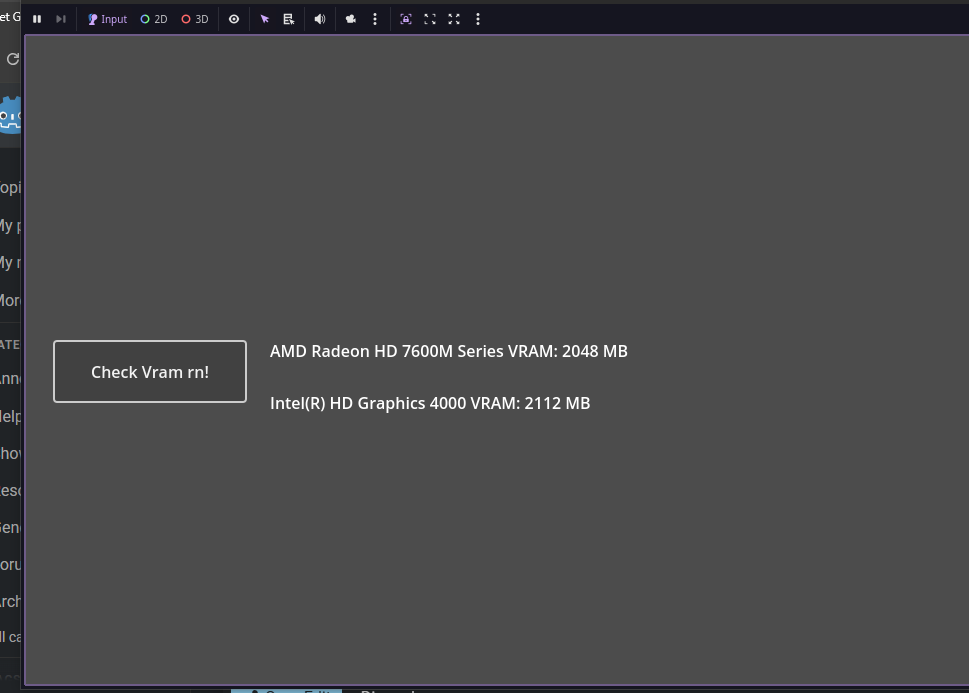
And the output I got is
#Vram.txt
AMD Radeon HD 7600M Series VRAM: 2048 MB
Intel(R) HD Graphics 4000 VRAM: 2112 MB
###I know,it’s the closest thing to a potato bruh
and by power of OS.execute() we are good!
and bingo!
And I am soo sorry I posted Bruh cuz my whole post glitched and just posted the batch code….
you can try this and @tibaverus method to get that Vram amount!
How do you determine it failed?
Besides, this is too high level. If you’re running with OpenGL renderer there’s no “hitting the GPU memory limit”. OpenGL abstracts the memory away by design. It’ll do transparent swapping between gpu and cpu address space under the hood when needed, to maintain the illusion of “endless” memory. The only thing you may notice is performance loss.
Vulkan or Godot’s Vulkan wrapping code may throw an exception though but Godot’s ImageTexture and possibly even RenderingServer likely won’t hear anything about it.
This is windows specific and afaik getting it via wmi won’t properly report anything larger than 4 gigs.
Although there are recipes on stack overflow how to pluck the information from the registry.
That’s just a prototype,you can use c++ to make a program that checks it.
or getting the vram by name is one of the easy and cross-platform way.
The ultimate solution to every problem 
yep,I used it to make a paste.exe cuz I was making my own kao emoji program and godot can’t paste things(which is expected lol) ,worked like a charm
Not very reliable. There’s 16Gb VRAM here.
NVIDIA Quadro RTX 5000 VRAM: 4095 MB
xD lol,now we need to use c++ to make a program just like that batch file
There are complications here too. My GPU can use the main RAM — how will that be displayed? 256+16 Gb??
u got 256 gigs of ram? u run godot or the whole godot db xD
sorry ,Yeah I also tried a batch file that shows I got 4 gb vram while I have 2gb dedicated and 2gb shared.
I dunno how to do this…tomcat can u try this
@echo off
setlocal

echo Fetching VRAM info...

powershell -NoProfile -Command ^
  "$g = Get-CimInstance Win32_VideoController | Select-Object Name,AdapterRAM,SharedSystemMemory;" ^
  "foreach ($gpu in $g) {" ^
  "  '{0}' -f $gpu.Name;" ^
  "  'Dedicated_MB={0}' -f ([math]::Round($gpu.AdapterRAM / 1MB));" ^
  "  'Shared_MB={0}' -f ([math]::Round($gpu.SharedSystemMemory / 1MB));" ^
  "}"

> VRAM.txt (
  powershell -NoProfile -Command ^
    "$g = Get-CimInstance Win32_VideoController | Select-Object Name,AdapterRAM,SharedSystemMemory;" ^
    "foreach ($gpu in $g) {" ^
    "  '{0}' -f $gpu.Name;" ^
    "  'Dedicated_MB={0}' -f ([math]::Round($gpu.AdapterRAM / 1MB));" ^
    "  'Shared_MB={0}' -f ([math]::Round($gpu.SharedSystemMemory / 1MB));" ^
    "}"
)

echo Done! VRAM saved to VRAM.txt
pause
Yeah.
I have a very large project and may need server functions.
NVIDIA Quadro RTX 5000
Dedicated_MB=4095
Shared_MB=0
NVIDIA System Information
Available graphics memory:    146272 MB
Dedicated video memory:    15360 MB GDDR6
System video memory:    0 MB
Shared system memory:    130912 MB
hmm,seems like I have to try the real final boss ,the C++
will try to make it work tomorrow.
why u add a thing that can’t do anything after 4 gigs Bill? why?
4Gb ought to be enough for anybody
If the image loaded is null then it failed. I dont disagree btw this is spit-balling at the highest level.
Well then it’s easier to just call RenderingDevice.texture_buffer_create() until it returns zero RID.
But this will also count in slow shared memory with Vulkan and who knows what else with OpenGL, possibly even virtual memory on the hard disk.