Godot Version
4.7
Question
I made a simple visual shader, I have exp on unity shader graph, feel quite good, however in godot, I cant make the texture rolls whatever I did, and even for simple cases, the result is very counter-intuitive. for example, I just output a constant color, however, godot would still use the texture and multiply the color with the texture, however I never connect any texture nodes.
shader_type canvas_item;
render_mode blend_mix;


void vertex() {
// ColorConstant:10
	vec4 n_out10p0 = vec4(1.000000, 1.000000, 0.000000, 0.992157);


// Output:0
	COLOR.rgb = vec3(n_out10p0.xyz);


}
This is the generated code, as you see, just set a color.
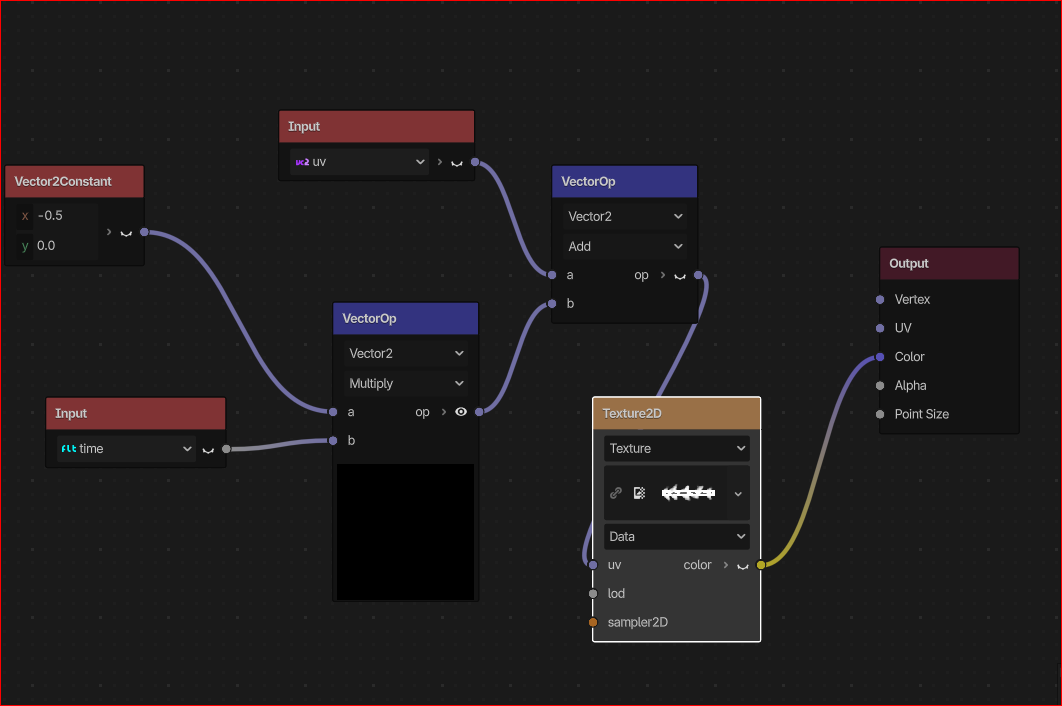
And if I use a time to change the uv, it never works, I see demos and youtube, I cant see any issue with my shader.
Here is another example, this is the generated code of the visual shader. Obviously I have changed the uv, however nothing works.
this is the shader I am using, it is a canvas_item, I expected the texture to move as time goes by, but nothing happens. I also tried TextureParameters, the same, nothing works.shader_type canvas_item;
render_mode blend_mix;uniform sampler2D tex_vtx_9;
void vertex() {
// Input:3
vec2 n_out3p0 = UV;// Vector2Constant:6
vec2 n_out6p0 = vec2(-0.500000, 0.000000);// Input:4
float n_out4p0 = TIME;// VectorOp:8
vec2 n_out8p0 = n_out6p0 * vec2(n_out4p0);// VectorOp:7
vec2 n_out7p0 = n_out3p0 + n_out8p0;// Texture2D:9
vec4 n_out9p0 = texture(tex_vtx_9, n_out7p0);// Output:0
COLOR.rgb = vec3(n_out9p0.xyz);}