Godot Version
4.5.1 stable
Question
`How should I decide the level of granularity when creating game assets? For example, I’m modeling a bus stop — right now it’s a single object and I’m unwrapping the UVs. I was thinking: if I split each part into separate objects and unwrap and texture them individually, wouldn’t the UV unwrapping become easier, and the objects could even be reused later?
But then I realized, if each object has its own 1K texture set (normal, roughness, base color, etc.), that’s already around 5MB-ish per object. If I break it up into multiple objects, each would need its own texture set. Wouldn’t that make my project size blow up? How do you usually handle this when creating game assets?
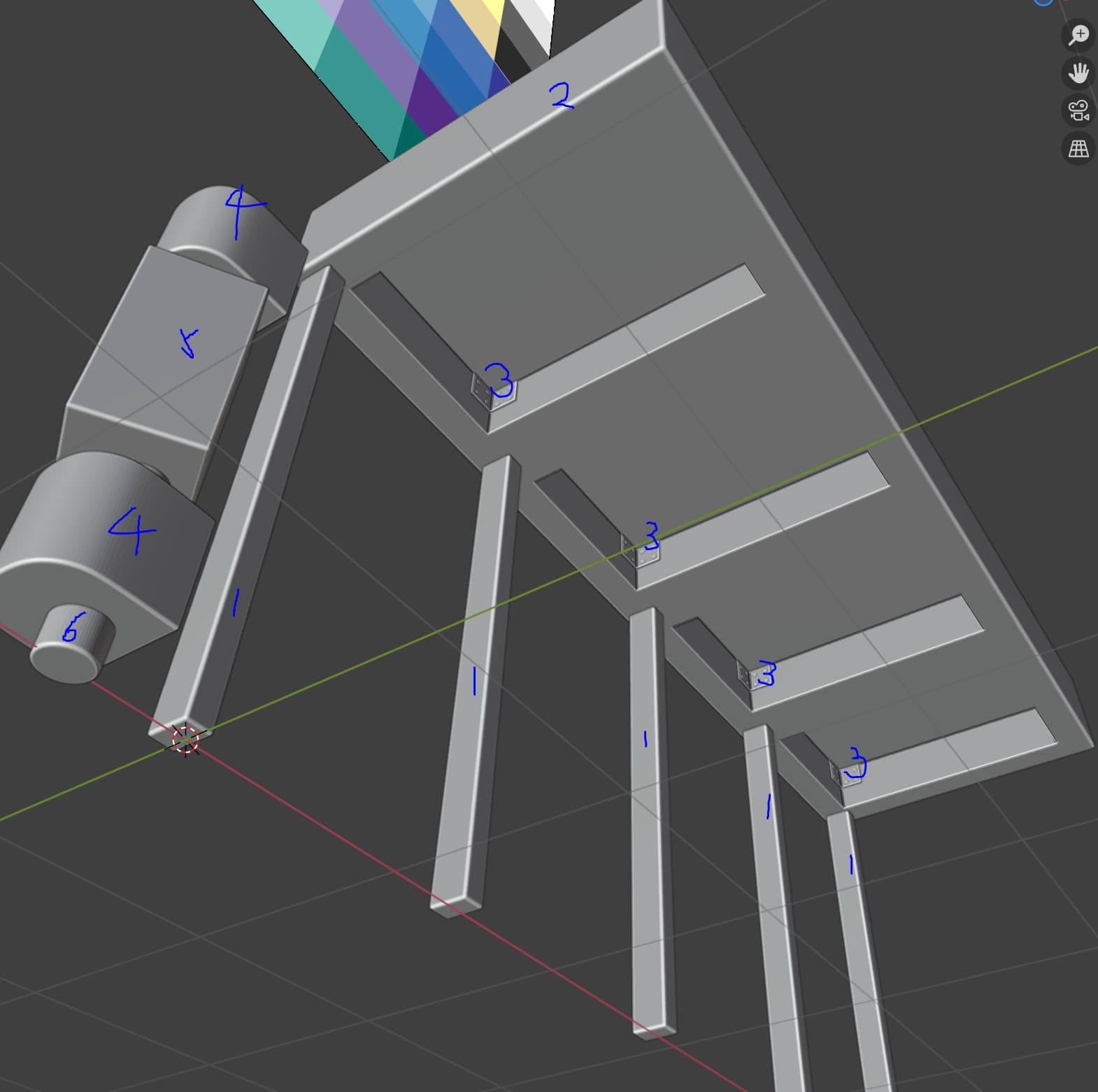
The granularity I have in mind:
`
I think it all depends on the target platform. You could map each seperate object, and thats not so bad if the textures are used many times in the scene. I usually aim for a texel density of 512 or 1k per meter.
The other way is to bake textures … i am not sure what works best, i think it varies from scene to scene.
1 Like
I’m not sure if I’m thinking about optimization too early. But if I follow the granularity I’m imagining, it would be like making one texture that contains, say 10 different types of columns. That texture would basically exist only for various columns. Similarly, I suppose I could make another texture that contains all the different types of hinges used in the game world.
What I can foresee is that I would end up assembling larger objects out of smaller objects in Godot — for example, a bus stop built from modular pieces, and a door assembled from another set of modular pieces, shifting the workload from Blender to Godot.
Right now I’m unsure whether this approach, which seems to make UV unwrapping easier, will actually cause more work later. Also, the asset creation tutorials I’m following don’t do this — they usually combine all the related mesh pieces into a single object (separate meshes or a single joined one) and always create one dedicated texture set for it.
Games are about good enough illusions. The granularity would depend on minimal possible viewing distance within the game… and somewhat on semantic/storytelling importance of the asset.
2 Likes
And by the way, you can model and unwrap each part as a separate object. When you’re done, join them into a single mesh and just scale/layout their uv islands in the common uv space.
1 Like
If you are using Blender you need to use the Cycles renderer for texture baking – eevee doesnt support baking.
For example, if you had a 3d scene containing a wooden table with some plates and cutlery, then you might have a wood material, a ceramic material and a metal material. First you just use “ctrl + j” and join them together, then you tab to edit mode, select all, go to the UV list in the object properties and add another UV channel, then select the second channel, make it active, then unwrap with ‘smart UV project’. Tab back to object mode, reactivate the first UV channel but select the second. Then activate the shader view, add an image texture, leave it disconnected, add a new texture and give it a name, click the shield to make a fake user, head on over to the cycles render tab and scroll to the samples settings - they can be much much lower, you might want to try a couple of tests. Navigate down further in the cycles tab to the bake settings. I usually start with diffuse and color only. Activate the lit material view in the viewport to make sure it all looks ok, then navigate to the shader viewport and make sure the new texture node is selected, and the second texture channel is selected but not active in object properties, then switch back to the cycles view and hit bake… you should see the texture appear in the texture preview pane.
Once you bake the texture you should save it to disk.
1 Like
The rationale behind texture baking is that small objects like cutlery and plates dont really need as many texels - as much texture space - as the table. They take up far less screen space. So its efficient to bake them all into one texture. This is especially the case for unique materials.
1 Like
From my understanding you shouldn’t really split small objects into multiple ones unless you specifically plan for them to be reusable in multiple environments, but it all depends on size and importance of the asset. Usually you want small background props to have lower resolution texture sets, or even better, put a few of those objects into one texture set together. So a bigger, more important object, can be split into multiple objects with their own texture sets to improve it’s visual quality, but smaller props would benefit from being merged together and having one texture set.
1 Like
You can also bake them without merging the objects. Or merge, bake, then un-merge. I wouldnt put all pillars in one texture - the sets are grouped by scene, not by object type.
You can also write simple RGB colors onto the texture and then lookup a material in the shader …
if( color.r > color.b && color.r > color.g ) {
// select texture 1
2 Likes