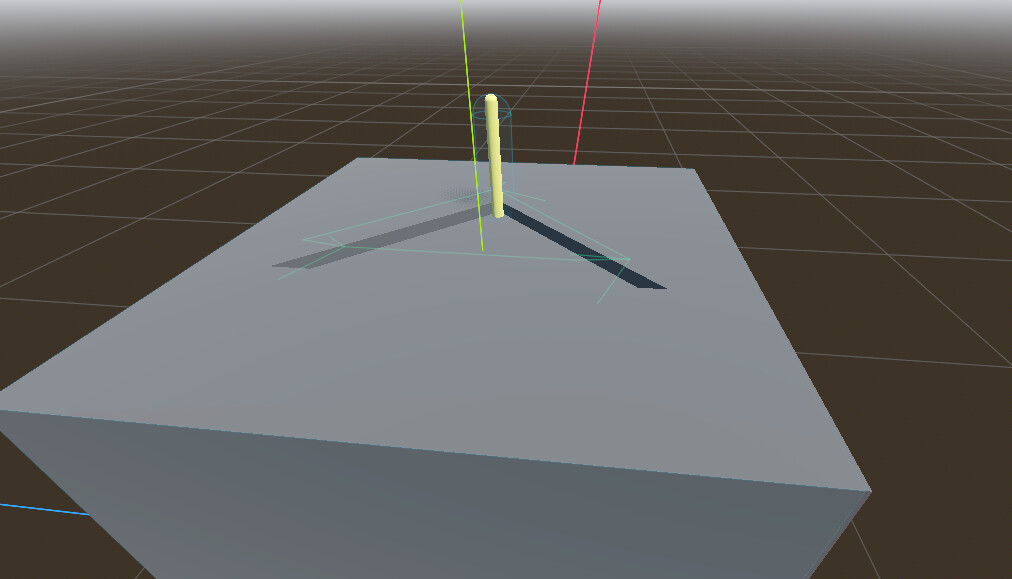
Hi guys. I’m relatively new to Godot and I could really use some help when it comes to this component I am trying to create. Basically, in 3D, I would want to make a lever with a draggable lever handle and I would just like some help since I want it to only be draggable in a particular direction. I’ve been stuck on this for a while so any help is appreciated. Below is a picture with a nice explanation.
As you can see in the photograph, there is a yellow cylinder erecting from the rectangle and there is a triangle carved out. I would want it to be draggable such that it only moves along the edge of the triangle until it reaches a corner. This is a first-person game where the mouse is locked in the center of the screen.
Also I would be super thankful if you could also give a nice explanation as to how a possible solution may work since I would like to know how.
Thank you a lot for your time and I hope you have magical days in the future.
Hoi guys.
In case you were wondering, I was able to reach out to a friend and we were able to work things out with this code:
extends StaticBody3D

class_name LeverStick

@onready var position_one: Marker3D = $"../MarkerPositions/PositionOne"
@onready var position_two: Marker3D = $"../MarkerPositions/PositionTwo"
@onready var position_three: Marker3D = $"../MarkerPositions/PositionThree"

const LEVER_SPEED = 0.1

var is_dragging: bool = false
var selected = false
var player: Object
var camera
var currentPosition: Vector3
var targetPosition: Vector3
var firstPosition: Vector3
var secondPosition: Vector3
var thirdPosition: Vector3
var placeHolderPosition: Vector3
var margin: float = 0.01
var isMoving: bool = false
var moveToPosition: Vector3

func _input(event: InputEvent) -> void:
	if event is InputEventMouseButton and selected == true:
		is_dragging = true
	if event is InputEventMouseButton and event.is_pressed() == false:
		is_dragging = false
	if event is InputEventMouseMotion and is_dragging == true:
		var lever_screen_pos = camera.unproject_position(currentPosition)
		var position_one_pos = camera.unproject_position(firstPosition)
		var position_two_pos = camera.unproject_position(secondPosition)
		var position_three_pos = camera.unproject_position(thirdPosition)
		var mouse_delta = event.relative.normalized()

		if currentPosition == firstPosition:
			if (mouse_delta).normalized().distance_to((position_two_pos - lever_screen_pos).normalized()) < margin:
				targetPosition = secondPosition
				isMoving = true
			if (mouse_delta).normalized().distance_to((position_three_pos - lever_screen_pos).normalized()) < margin:
				targetPosition = thirdPosition
				isMoving = true
		elif currentPosition == secondPosition:
			if (mouse_delta).normalized().distance_to((position_one_pos - lever_screen_pos).normalized()) < margin:
				targetPosition = firstPosition
				isMoving = true
			if (mouse_delta).normalized().distance_to((position_three_pos - lever_screen_pos).normalized()) < margin:
				targetPosition = thirdPosition
				isMoving = true
		elif currentPosition == thirdPosition:
			if (mouse_delta).normalized().distance_to((position_one_pos - lever_screen_pos).normalized()) < margin:
				targetPosition = firstPosition
				isMoving = true
			if (mouse_delta).normalized().distance_to((position_two_pos - lever_screen_pos).normalized()) < margin:
				targetPosition = secondPosition
				isMoving = true

func _physics_process(delta: float) -> void:
	if isMoving == true:
		global_position = global_position.move_toward(targetPosition, LEVER_SPEED * delta)

	if global_position.distance_to(targetPosition) < 0.002:
		global_position = targetPosition
		currentPosition = targetPosition
		isMoving = false
		targetPosition = Vector3.ZERO

func _ready() -> void:
	camera = get_viewport().get_camera_3d()
	firstPosition = position_one.global_position
	secondPosition = position_two.global_position
	thirdPosition = position_three.global_position
	currentPosition = firstPosition

	player = get_tree().get_first_node_in_group("player").get_node("CarrierBehaviour")
	player.interact_object.connect(set_selected)

func set_selected(object: Object) -> void:
	if object == self:
		selected = true
	else:
		selected = false
Feel free to leave your thoughts if you have any and I will just leave this here in case it helps anyone. Perhaps there are many ways to shorten it though, but I believe this code is relatively easy to understand and that’s something that is very nice to people like me who are beginners.
Thank you and have a merry hawk tuah.