Godot Version
4.5.1
Question
I am working on a “retro-style” 2D game and I’m having a lot of trouble getting fonts to render without being blurry. I have found some pixel fonts that aren’t blurry, but only at specific font sizes. I’d like to be able to use a vector font and set the size to whatever makes sense in the context.
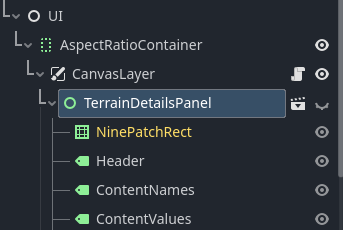
My game is set to 1600x900px resolution, and my UI hierarchy looks like this:
I’m fairly certain my project settings aren’t the culprit (though I’m open to suggestions).
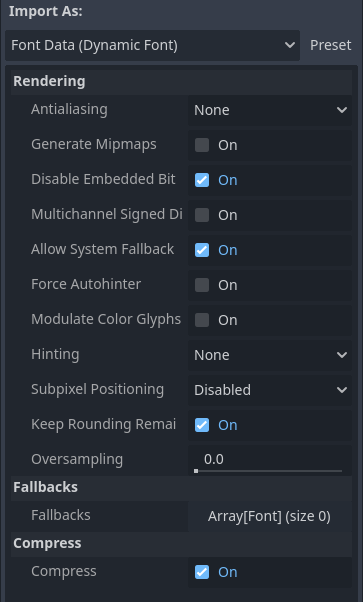
Yeah, I’ve tried that. And I think I’m using the right import settings for my font, but I’d take advice:
How does your font look right now?
Well I’m using m5x7 right now, a pixel font, but I’d rather use a vector font (I THINK), so that I’m not locked into certain font sizes. I can switch back to a vector font and share screenshots once I have a moment…
1 Like
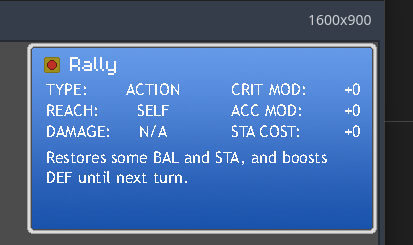
This is Trebuchet at 16px font size. I probably misspoke by saying vector fonts look blurry, but it sure does look awful. Maybe bumpy is a better word? Like it tried to squish but the pixels didn’t know where to go.
Ignore the header (“Rally”) - that’s a pixel font.
A high-res font can’t look good in 16px.
1 Like
Hmm. And maybe it’s as simple as that. So do I “need” to use a pixel font then, or are there any workarounds, such as high font-size but low scale?
You should look for 16x or 24x pixels font ,they look good enough : )
Thanks for the suggestion.
1 Like