ok so where would I put these codes? in the player script or item script?
The sample is an alteration of these lines
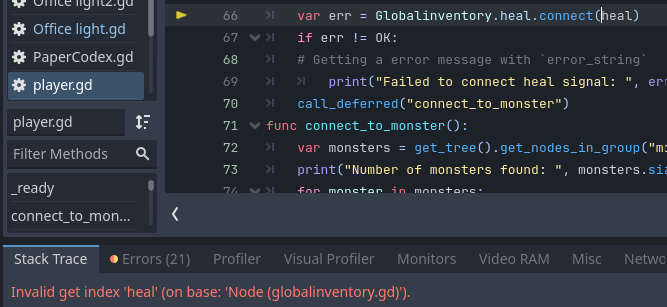
Super! this tells us vital information, your global inventory script does not have a “heal” signal, is this correct? Have you checked the “Errors (21)” tab before? Might they say the same from the old 3.x emit_signal functions too?
my apologies, I have been on the system for 12 hours and didnt notice this…, the globalinventory does NOT have anything to do with the healing or anything in this matter. that script is mostly for the inventory update.
I should have put HpMofatesh which have the function heal.
var err = HpMofatesh.heal.connect(heal)
which is getting another error
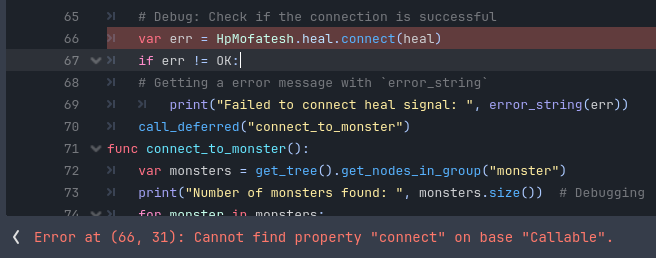
Right, but HpMofatesh has a heal function not a heal signal, it does have health_changed but that brings us back to the infinite loop problem.
Maybe you do not want a heal signal connected either! Could you call the global HpMofatesh.heal from the item script directly?
func use_item(item):
	if item["name"] == "beef":
		print("Emitting heal signal for beef")

		# No longer using a signal
		HpMofatesh.heal(10)

		item["quantity"] -= 1
		if item["quantity"] <= 0:
			Globalinventory.inventory.erase(item)
Globalinventory.inventory_updates.emit()I did that before, but if I do that directly, I can not call the flash green function
Then let’s try making a new function specifically for checking the player health changes, which should work for more than just the item.
func _ready():
	Globalinventory.set_player_ref(self)

	# Connect checking function using 4.x style
	HpMofatesh.health_changed.connect(check_health_change)

	call_deferred("connect_to_monster")

# store the last recorded health
var last_health: float = 100.0
func check_health_change(new_health: float) -> void:
	var difference: float = new_health - last_health
	# record new health
	last_health = new_health

	if difference > 0:
		# Positive change results in flash_green
		flash_green()
	elif difference < 0:
		# Negative changes flash red (assuming it exists)
		flash_red()
THANK YOU… you are the boss dude