Godot Version
4.5
Question
Gadot newbie here. I have made a working system whereby I can select a button from one side of the screen and instance it when it is dropped into a selected area. The instance can then be dragged around itself, and if no longer desired, can be dragged out of the selected area and will delete. The goal here is to have a system where I can have multiple objects on one side of the screen that the player can add to decorate the other side, picking as many of one object as they want. I’m happy with my progress so far, but I suspect that there are better things I can be doing.
Here is a demonstration of it in action:
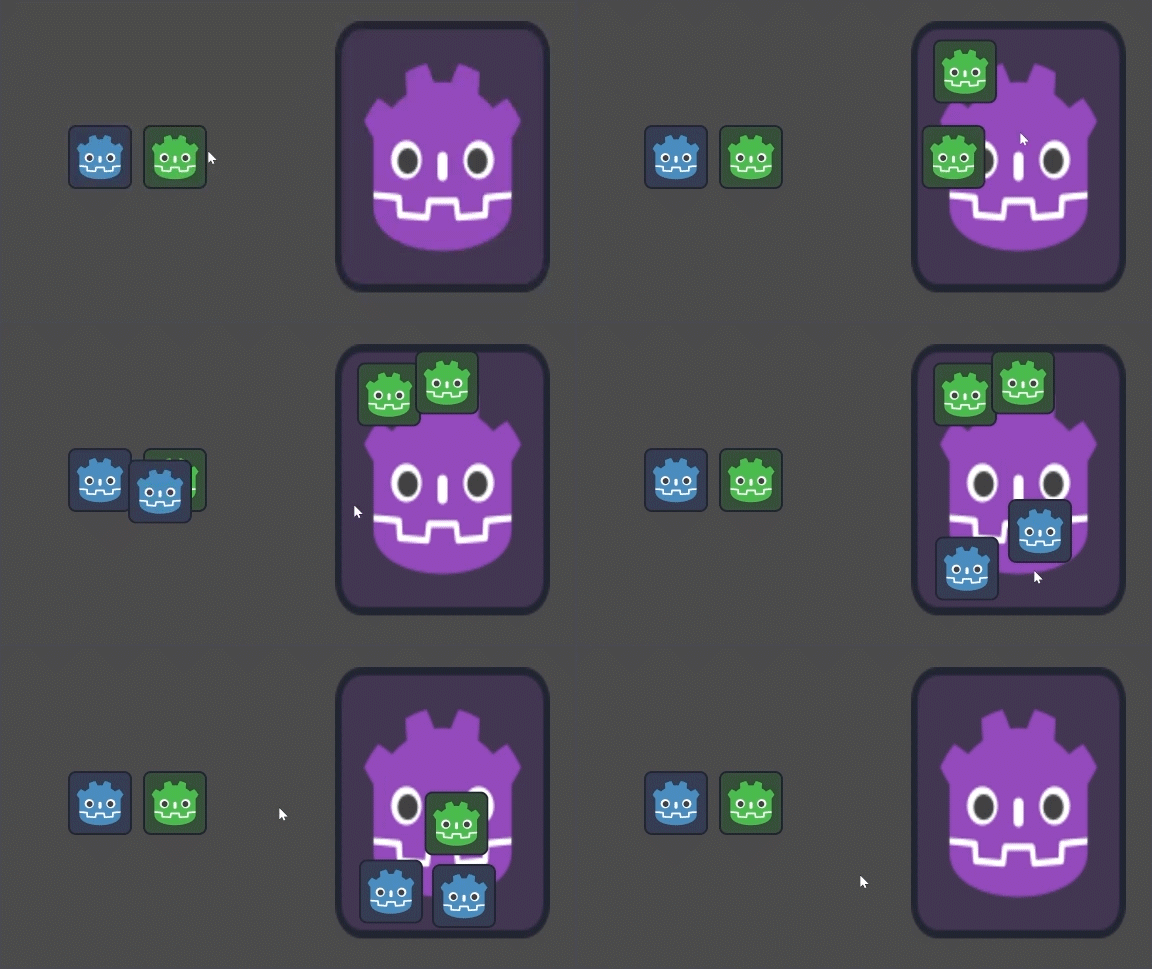
Here is my main scene tree:

And here is one of the item scene trees which gets instantiated when the buttons are dropped into the scene:
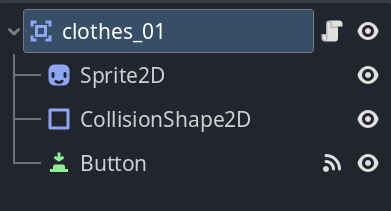
Here is my code.
Attached to the root node inside my item scenes, is a simple drag and drop script:
extends Area2D

var dragging = false
var os = Vector2(0,0)

func _process(delta: float) -> void:
	if dragging:
		position = get_global_mouse_position() - os


func _on_button_button_down() -> void:
	dragging = true
	os = get_global_mouse_position() - global_position


func _on_button_button_up() -> void:
	dragging = false
And the Main scene script attached to TectureRect node “background”:
extends TextureRect

#Info
const CLOTHES_BLUE = preload("uid://dlel27egt84p3")
const CLOTHES_GREEN = preload("uid://chksw0pvnklj7")
@onready var button_blue: Area2D = %button_blue
@onready var button_green: Area2D = $"../button_green"

#Variables
var dragging = false
var os = Vector2(0,0)
var in_zone = false
var blue = false
var green = false

#Functions
func _process(delta: float) -> void:
	if dragging:
		if blue:
			button_blue.position = get_global_mouse_position() - os
		if green:
			button_green.position = get_global_mouse_position() - os
	else:
		button_blue.position = Vector2(200, 315)
		button_green.position = Vector2(350, 315)

func inst(x, pos):
	var instance = x.instantiate()
	instance.position = pos
	instance.add_to_group("clothes")
	instance.z_index = 1
	add_child(instance)

##Blue Button
func _on_blue_button_button_down() -> void:
	dragging = true
	blue = true
	os = get_global_mouse_position() - button_blue.position

func _on_blue_button_button_up() -> void:
	if in_zone:
		inst(CLOTHES_BLUE, get_global_mouse_position() - os)
	dragging = false
	blue = false

func _on_button_blue_area_entered(area: Area2D) -> void:
	if area.name == "Zone":
		in_zone = true

func _on_button_blue_area_exited(area: Area2D) -> void:
	if area.name == "Zone":
		in_zone = false

##Green Button
func _on_green_button_button_down() -> void:
	dragging = true
	green = true
	os = get_global_mouse_position() - button_green.position

func _on_green_button_button_up() -> void:
	if in_zone:
		inst(CLOTHES_GREEN, get_global_mouse_position() - os)
	dragging = false
	green = false

func _on_button_green_area_entered(area: Area2D) -> void:
	if area.name == "Zone":
		in_zone = true

func _on_button_green_area_exited(area: Area2D) -> void:
	if area.name == "Zone":
		in_zone = false

##Zone
func _on_zone_area_exited(area: Area2D) -> void:
	if area.is_in_group("clothes"):
		area.queue_free()
As you can see, I utilize buttons and groups along with a script to drag my objects. The instantiated items get added to the group “clothes” when they are added, and are checked by the collision2D when they leave the “zone”.
Now that I have explained everything, here’s what I want to improve.
I would like to add the buttons to a new node to make a menu interface that can be turned on and off. However, whenever I drag the buttons to be children of a new node (I have tried a 2D node and another TextureRect), I get an error telling me that I cannot set the position of both the blue and green buttons.
Invalid assignment of property or key 'position' with value of type 'Vector2' on a base object of type 'null instance'.
This is something I would like to fix.
Secondly, this will become very unruly very quickly, as I would like there to be 20-50 draggable assets. I’m not sure if there’s a way to use Classes to help streamline this process, but with the script listening out for button down and up signals, and wanting to add the instantiated children to the main scene tree, I have not been able to figure out a way to package the scenes effectively.
That’s all I can think of for the time being on how this project is going. If you’re able to help me do this in a more efficient way, please can you explain a little bit of the how as well as the answer so I can learn a bit more about Gadot and GD Script in the process. If you need any more info, please let me know.
 That in many ways. But most importantly, instead of writing one script governing all the pieces in the specific combination, you ought to think in terms of what pieces themselves do and automate them.
 So I’ll see what I can do and be back if I get stuck.