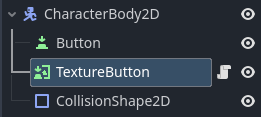
I’m making a simple 2d farm game. I just started making custom buttons (A character body 2d with a button, texture button, and a collision shape 2d as children). I’m planning to use these for a settings button or a map button. The buttons themselves have worked out wonderfully, but now I’m trying to place them in my main “game” scene. I currently have my camera as a child of my player, so if I simply place the buttons down in the world, they move when the player moves, as if they are a part of the tilemap or an interactable object in my scene. I would like for them to just be stuck in one of the corners of the screen, but I can’t find any good tutorials on how to do this. Any advice?
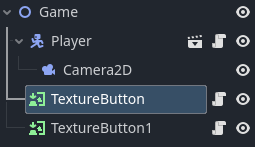
At first, I added it just so I could have something to put the Button and TextureButton nodes into. I tried using a regular 2d node, but when I added it to my game scene, I coudn’t manage to move it around. I’ve been playing around with it, and I figured out that I only really need the TextureButton node to make it how I want it. I currently have my game scene set up like this (two buttons in my game scene) →
The solution is CanvasLayer node. If you add the buttons as children of the canvas layer, they won’t be affected by the camera. Check out this page in the documentation for more details: Canvas layers — Godot Engine (stable) documentation in English
When I make the button a child of the CanvasLayer, it looks fine, but when I play the scene the button completely disappears. I don’t have anything that the button might be behind, so I’m very confused. Is there a solution to this?
Edit 2: The button (TextureButton node that is a child of CanvasLayer) does not disappear when I check “Follow Viewport: Enabled” in the CanvasLayer tab. However, it still doesn’t work how I want it to.
The buttons are outside of the screen, because you positioned them based on the camera rectangle. You should use the other rectangle, which becomes visible, if you zoom out or scroll to the right and down a little. And you can also use the same canvas layer for both buttons.