I have a custom resource class MyRes : Resource.
It will load data from an ini/json file lazily. That is, It load the file right before data is accessed from other scripts.
But when the ini/json file changes, the data in MyRes remains old, and I have no idea how to check the file change performantly.
How fast do you need to refresh the data? You could use a timer to check the file’s last modification time ( FileAccess — Godot Engine (stable) documentation in English ) and reload the content if necessary. I wouldn’t do this, if you need to check for new data in every frame. But this is not going to be a performance problem if you do this, let’s say, once every 10 seconds.
If you need a data source, which is externally modified and you need to see the changes immediately, the answer is an SQLite database.
It’s some basic configurations, like turret ROF and target detecting range. It will be accessed > 100 times each frame.
Checking file modification time is the fastest option?
If so I’d make it check once for 0.1s~0.5s, maybe on another thread…
What if I only need this in godot editor? No callbacks or signals?
I didn’t use SQLite, it is a real database software which is too heavy IMO. It’s really concerning about its latency, and maybe much harder to read & write compare to text files…
So you need to reload data from file only during development? Then I would just manually order the reloading, e.g. after making changes to the json file, pressing R in the game would reload the json file. Do not make too complicated stuff for development features, like using a thread.
Measure how long the json reloading takes. If it takes less than, say 5 ms, just reload the json file every 5 seconds.
This is false. SQLite is specifically created to be a local db with incredibly high performance. It’s essentially just a file which you read and write to, and in most cases it’s much faster than reading and writing text files.
2 Likes
Is there a reason signals won’t work for you?
Also, why is it important for your files to be the source of truth instead of your Resources?
To add to what @tibaverus was saying: SQLite will never be your bottleneck, as it is very low resource and very fast, especially if you have an in-memory database.
Your whole setup just sounds weird. Why do you need to check 100 times per second if a file has changed? Also checking a file, opening it, reading it and parsing its content takes time as well, you know.
2 Likes
Is there any signal that mentions a file have got updated? For text file, it’s much more easier to edit compare to custom Resource in editor; it also has more convenience in C#, since I can store data in pure C# structures by deserializing json rather than nested resources, without coding the data transformation and resource class definition file.
Well, than I definately will have a try.
There is if you create one whenever you update a file.
I disagree. A Resource with @export variables can be edited in the Inspector. It is much easier to use Resources than text files in Godot once you understand how to use them. They serialize and de-serialize themselves to and from disk.
This statement tells me you do not understand how Resources work. You can do all of that with Resources. They can serialize and de-serialize using ResourceSaver and ResourceLoader. But you can also just run them through JSON serialization/deserialization that comes with Godot.
The added benefit of a Resource is that if data changes in a Resource you can create a signal to fire off whenever a value you care about changes - getting rid of all your need for polling. That alone will solve all the problems you’re experiencing, plus a number you haven’t run into yet.
It seems like you have made a number of false assumptions about Godot that programmers with experience, especially C# experience, have when they come to Godot:
- That C# code in Godot executes faster than GDScript. This is not the case for many operations, including most operations where bottlenecks typically occur - which is with graphics.
- That you can write low-level functionality in C# that will be more performant than GDScript. GDScript is highly optimized to do the things that video games need to do. C# is a generalist language.
- That somehow Node and Resource objects are not performant.
If challenges for the sake of challenges appeal to you, then by all means keep going down this road. Just understand that you are fighting against the Godot engine and are going to run into many more self-created problems that the engine would handle for you if you would let it.
Let’s talk about it more clearly.
Pretty sure I know how to use them in the Inspector. However even a simple structure like
class BuildCost : Resource { ... }
class BuildOption : Resource { [Export] BuildCost[] Costs; }
Requires two soruce files. Also it’s unavailable to make BuildCost a struct.
Also it requires a lot of foldouts and clicking in the inspector. To add an entry I have to Click add elements button, click the small arrow on the added element, click create in the popup, finally edit the values. At least for me, in json, I can locate, edit (including copy-paste) and inspect all data much faster than inspector.
Ok so… I did it wrong? Resource is not used like that?
Also I can see that json files are imported as Resource. And I can see the signals; but it does not let me to bind anywhere.. If I use code to bind, then what’s the difference to simply have a Resource?
Had done some profiling.
Yes you are right. I’m currently simply using Resources since there is always chance to do further decisions and trade-offs. I’ll appriciate if people could have more idea that makes my life easier.
1 Like
As opposed to what? Even if you use a struct, you have to put it in a source file.
What’s your obsession with making it a struct? C# structs are passed by value. Resources are passed by reference. This means that every time you use a struct, pass it in a function, or use it in a Resource, additional memory has to be allocated for a new version of the same thing. Whereas with a Resource the only thing passed is a memory address. This means your memory will bloat linearly with every recipe ingredient, and recipe you add. It also means that it will take longer to process anything that contains a recipe ingredient, and that processing time will increase for each ingredient you are passing in an Array or Dictionary.
Sure. Of course, if you’re saving all those source files, you can just double-click on them and edit them in the inspector directly like this:
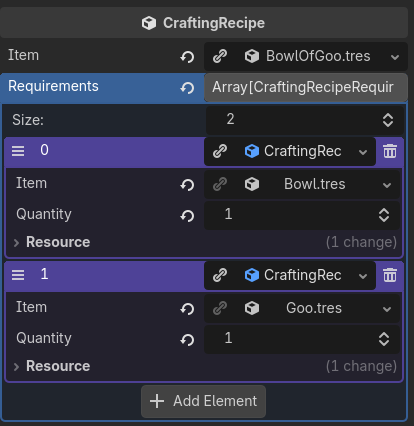
And the code is very simple, like this:
class_name  CraftingRecipe extends Resource

@export var item: Item
@export var requirements: Array[CraftingRecipeRequirement]
class_name CraftingRecipeRequirement extends Resource

@export var item: Item
@export var quantity: int
You can also right-click on an empty folder and create a new Resource. Then fill out the data, then load it. If you’re having trouble seeing everything, you can expand the Inspector window by dragging it to the left (like in my screen shot). Finally, if you already have the recipe components created, you can literally drag and drop them from FileSystem directly into the CraftingRecipe in the Inspector and don’t ever have to click and Add button.
Again, I think that’s just a case of you not knowing how to use Godot’s search functionality. But if you’re spending a lot of time auditing your data, you could easily code something to dump all data into JSON or a csv for review. Or, like I said, you can use JSON and suck that into a Resource for initial loading.
I do not understand this question. Bind to what?
Using what? What did you profile? How do you know that the changes you see are significant at all to the actual running of a game? Did you do this profiling with an entire game running with graphics, or just some low-level functionality?
How do you know you correctly leveraged GDScript? What was your comparison code? Hearing this without details is like hearing someone say that a 5-speed manual racecar drove slower than the minivan. I just have to assume the person didn’t know how to shift gears.
I recommend just playing around with Resources. You can also use custom icons for resources. This can be really helpful for immediately recognizing things in the Inspector and FileSystem.
Ah, I often use this:
public class BuildOption
{
    public struct Cost
    {
        ...
    }
    public Cost[] costs;   // Json libs take care of this perfectly.
}
No it’s not allocating. Struct will be in thread stack or even CPU registers. They are much faster than accessing data through pointers.
Maybe you could go deeper, see how memory layout and pointer chasing affect performance. Because of that, Node, Resource and gdscripts are actually slower.
At least in my case, 200 turrets with 300 targets searching & aiming, C# and manual brute-force query uses half the time compare to gdscript + Area2D, reducing ~10ms per tick (AI does not run per frame). Not to mention that I didn’t implement multithread optimization and spatial hash.
However, you are generally trapping me. This post is not about optimization, neither proving that I have some knowledge. It’s me who take responsibilities for my game, and for my decisions.
So let’s end up here, as I read all your text, I think I have correctly understood how Resource are expceted to work, and the rest part should be some personal taste (I mean, I still disagree that inspector is easier to use).
1 Like
If your combat logic is calculated with C# code, maybe the config data (i.e. json files) would be better read in C# to some C# structures? The less you move data between GDScript and C# the better.