How can I "step" through an animation's keys with AnimationPlayer?

Godot Version

4.3.stable

Question

Basically, something I have in my game is an NPC that changes text over time (Both name and dialougue) and even the sprite of a portrait.

Because this NPC is meant to represent two characters having a conversation between each other (As if the player is overhearing their conversation).

In my first game, I already had this “NPC Convo” scene where the player would play this animation that changes character texts to simulate a conversation then hear from other characters.

But it was an animation that changed stuff over time and you weren’t able to press a button to change to the next line.

But in my current game, I wanted to allow the player to press something to get the next line, instead of waiting for the line to change (Specially if some lines seemingly last a bit too long, or the opposite problem where they may not last long enough for players that aren’t quick readers).

And I also wanted to make sure that what I get from that is a format that could be used in different conversations, if I kept using the same script for duplicated scenes of this NPC type.

(And of course, the player also being able to “replay” the conversation so they can see it anytime they want).

Basically, think of any game with NPC’s where you see their text box and press a button to see the next lines until the text box closes (And with the context of “2 characters having a talk and the player overhears their conversation”, also changing the name boxes and face portraits).

This scene and its script are related to what I mean:

Also to specify:

I want to skip to the next key in general and not a specific key.

Because I want to make sure the code still works in different scenes that have bigger or smaller animations (As in, more or less the amount of keys).

And the animation would “end” once I hit the final key, regardless of the lenght.

While also always starting at 0.

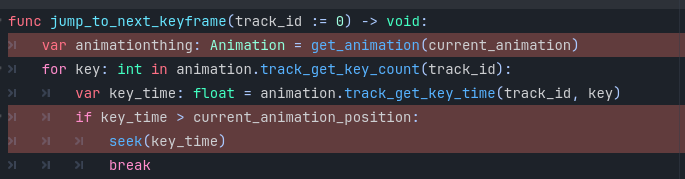
Get the current animation and current time from the animation player. Iterate through animation keys and find the first one whose time is greater than the current time. Change player’s time to key’s time using seek()

How can I do that?

Also just to mention again, I don’t want to specify key frames in the code (Besides maybe 0), because I plan on duplicating the scene with similar scenes using the same script.

So ideally, the code I want to work on animations that would have a different number of key frames, as long as the code allows to simply move from one keyframe to the next.

Exactly as I wrote. Look at the references for AnimationPlayer/AnimationMixer, AnimationLibrary and Animation classes. All needed funtionality is there.

I still haven’t found a way to set it right.

extends AnimationPlayer

func jump_to_next_keyframe(track_id := 0) -> void:
	var animation: Animation = get_animation(current_animation)
	for key: int in animation.track_get_key_count(track_id):
		var key_time: float = animation.track_get_key_time(track_id, key)
		if key_time > current_animation_position:
			seek(key_time)
			break

The “extends AnimationPlayer” implies I’m making a scene out of an AnimationPlayer when ideally, that is a node of a scene that’s an Area2D.

I should also mention that the two links on my post are for the scene and script of the relevant scene I’m editing.

So in a way, you can at least indicate how exactly I should integrate that code you suggest in the one I’m trying to edit.

You can integrate any way you see fit. It’s reasonable to keep it with animation player as it de facto extends its functionality. But you can put it anywhere, just prefix all animation player api calls and properties with a reference to the animation player node.

I just really haven’t found a way to make it work, which is why I was wondering if there’s an actual reference of code where it can work.

I’m going to recommend you check out the Dialog Manager and Dialogic 2 plugins.

A little time learning how to use either of them will save you a lot of time later. It will also be MUCH easier to edit the conversation later.

extends SupercaliFragilisticExpialidocious

func jump_to_next_keyframe(animation_player: AnimationPlayer, track_id := 0) -> void:
	var animation: Animation = animation_player.get_animation(animation_player.current_animation)
	for key: int in animation.track_get_key_count(track_id):
		var key_time: float = animation.track_get_key_time(track_id, key)
		if key_time > animation_player.current_animation_position:
			animation_player.seek(key_time)
			break

Are you vibe coding it?

No I don’t trust AI shit.

I just suck at code in general.

But I meant if someone were to look at the script from my scene and found a better way to make it work.

Like how would I edit the script and what it already has, to make the solution work.

Also wanted to try and work on the game as far as possible without plugins.

The function in my previous post is completely generalized. You can put it anywhere and it’ll work as long as you pass it a valid reference to the animation player node.

The reference to AnimationPlayer is “@onready var animation = $AnimationPlayer”

So I wonder about these elements that are also called “animation” or “Animation”.

red text 2

Use the last one I posted and change the name of your animation player reference to something other than animation

I changed the name of how AnimationPlayer is referenced.

But I’m not sure if I’m using the suggested code right:

Ok, sounds like you want to learn. So this post is a great example of the XY Problem. You want to display a conversation, and your solution was to use an AnimationPlayer. You then had problems with that, and asked for help to solve the problems you are seeing with using an AnimationPlayer.

Your actual problem is you are using an AnimationPlayer for this solution to begin with. If you want to roll your own system, I recommend you take a step back and design it. Because otherwise, your AnimationPlayer solution is going to cause more problems the longer you use it.

  • Conversations will get harder to edit.
  • You won’t be able to branch them.
  • You have to update multiple things in an AnimationPlayer for each new line of dialog which will slow you down and frustrate you.
  • Inserting new lines of dialog in the middle of an existing animation will be even more frustrating.
  • Organization will become a nightmare.

I recommend you rethink how you display dialog. This is a really good tutorial on how to do that and it’s less than 15 minutes long.

1 Like

Does it do what you want it to?

The code (At least how I implement it) is either seen as wrong by Godot so the game doesn’t run or the conversation is still stuck in the first frame.
Unless the issue here really is using AnimationPlayer.

Part of why I went with AnimationPlayer was because:

  • The “conversation” NPC is based on a concept I tried in my first game (But in that game, it was just an animation changing texts, so you had no player input outside of starting the animation in general; So the text change was technically automatic)
  • I saw stuff about setting the node to “manual” and functions like “seek” or “advance” that I could thought help
  • And stuff like character portraits and names/dialogues would’ve been set by the animation and not the code

Whenever I see tutorials of NPC dialogue text boxes, they always add the dialogue in the code when I wanted to see if I could find a format that wouldn’t specify dialogue in the code, so I could have it set by the AnimationPlayer.
(And even going far as the code not having to specify the number of keys, meaning it’d be that flexible in the ideal scenario).
(Or at least the code specifies like 25 keys, but some conversations would still be short, so the remaining keys would just be the portraits and texts being invisible to give the idea of the conversation ending sooner and then the player would just come back to the NPC’s to restart the conversation)

And one can mention export var but I also had a situation with another scene where some text (That is part of the localization file, therefore meant to be translatable to the languages in the game) didn’t work.

So I apologize for the wasted time here.
Either way, I might still go with the lazy/cheap methods I already know in the worst case scenario.
Meaning I’d just do the older way I already did before.
But I also have few things to put in my game anyway, such as levels, sprites and some other things, that might be outside of this area.
(In general, this game will be smaller and shorter than my previous)

This is technically my second “hobby” game.
Once I finish it, it’s the third where I’ll try to take things more seriously (As in, actually paying someone else to figure out some stuff for me).

You can make it work with AnimationPlayer but all the caveats mentioned by @dragonforge-dev are valid.

There shouldn’t be any direct “issues” with the animation player. Post the code and the errors you get. By default, the function I posted presumes the keys you want to skip are in the first track in the currently playing animation. If they are in some other track, you need to pass that track’s id as an argument.

1 Like