Godot Version
4.7.2 stable, Compatibility renderer
Question
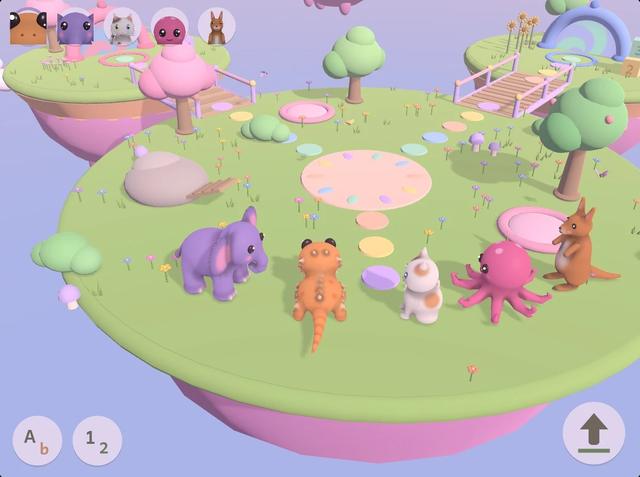
I’m making a gentle learning game for young kids in Godot 4.7. Image 1 is the mockup I made with an AI image tool; image 2 is the game today. The player picks one of the five baby animals, walks it around the island and goes through portals.
Right now the animals are built from code: soft blobs (signed distance fields) turned into meshes, plain vertex colours, one sun and a little ambient light, Compatibility renderer because it has to run on a tablet. Next to the mockup they look cheap: lumpy shapes, flat colours, hard shadows, no soft bounce light.
What would you do to get as close as possible to image 1 while keeping the animals animated and controllable?
- Models: proper sculpted and textured models, AI image-to-3D from my character sheets (Tripo, Meshy, Hunyuan3D), or something else? Any experience auto-rigging a lizard, an octopus and a kangaroo?
- Lighting: is a baked lightmap for the island plus SSAO, AgX tonemapping and a soft custom character shader the right direction in Compatibility, or should I move to the Mobile renderer?
- What makes the biggest difference first?
Thanks!
Image 1, the mockup (the goal):
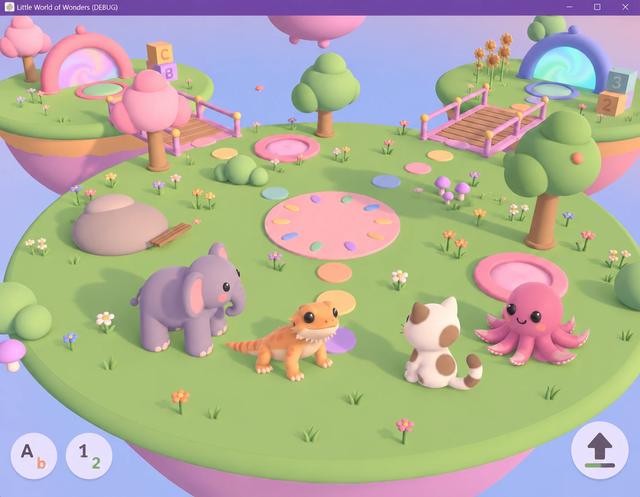
Image 2, the game today: