Godot Version
4.5.1
Question
I’m using the following script to pause my game while it plays animations. I’m trying to set up an anime style scream reaction animation. This requires animating on 2’s and hiding/showing some meshes with pngs. On the right of the image is the animation player for the model, as you can see the model is animated to move every 2 frames at a 24fps.
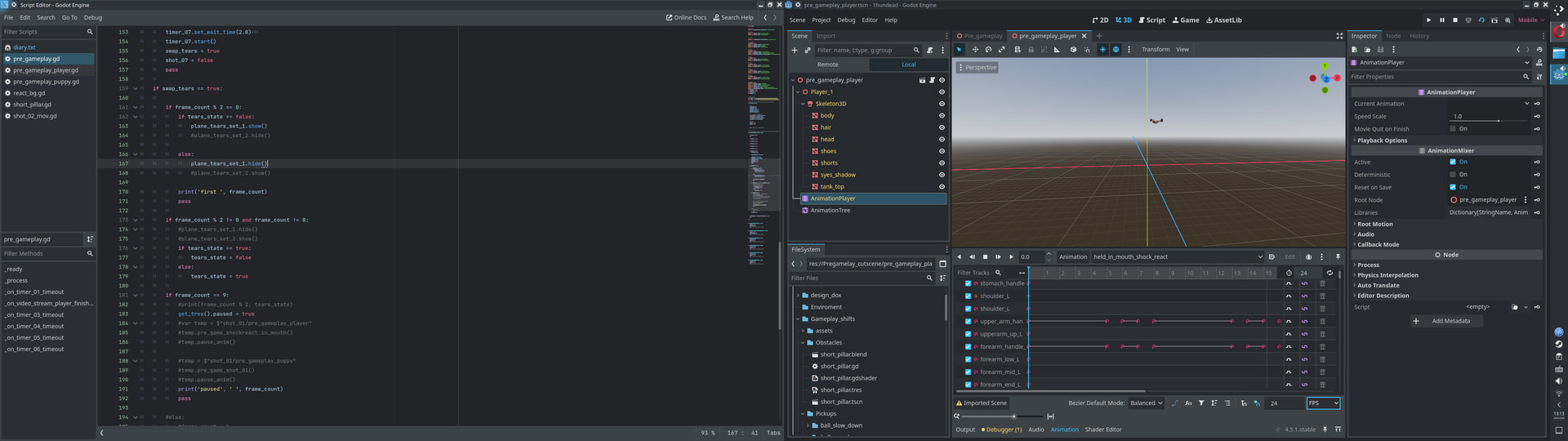
When I run this set up my main scene is rendering in a way I don’t understand (see next image). The head should move on frame 2 from its starting position on frame 0. The script I’m using to pause the animation is in the _process(). I’ve noticed the render gets to around frame 9 before it finally moves to the next key frame. I’m trying to understand why this happens as the set of tears meshes that I have need to be sync’d to the position of the head.
From my understanding process() aims to run at 30hz, if that were the case I would expect to see the change occur around frames 3 or 4. (Based off of 1/24 * 3 = 0.125 seconds, 0.125 / (1/30) = 3.75 frames). Doing a quick sum of the delta for the process() over this time also doesn’t make sense to me if 0.256 seconds have passed from the start of the animation we are well beyond frame 2.
The animation of the model is being controlled through the root nodes script and an animation tree by adding together two animation nodes. The background is a plane with a script controlling the position of the textures, moving them every other frame.
Script for animations:
# root tree node script for activating animations and camera
func _process(_delta):
    .....

    if shot_07 == true:
        # parent node of the meshs and camera, unhide
		shockreact.show()

        # activate bg planes true/false loop to move bg texture every other _process frame
		shock_react_bg.react_shader()

        # tell character model to play anim
		var temp = $"shot_01/pre_gameplay_player"

        # this is a func with one line 'state_machine.travel('shockreact_in_mouth')'
		temp.pre_game_shockreact_in_mouth()

        # activate camera and start timer to control shot length
		camera_07.make_current()
		timer_07.set_wait_time(2.0)
		timer_07.start()

        # swap tears true, see first image, controls loop in _process to hide   and unhide set of tears
		swap_tears = true

        # dont run loop again, set false
		shot_07 = false
		pass

    .....
If I don’t pause the ruining at all and just let it run, the whole thing looks somewhat okay, I can tell somethings wrong and things arn’t timed up right.
Any advice would be much appreciated!