How to comfortably store nested Dictionaries in a Resource?

Godot Version

v4.6.stable.official [89cea1439]

Question

My CharacterBody2D objects each contain a number of Bodypart objects that inherit from Node2D. The Bodypart contains its Sprite2D. Some Bodypart belong to other Bodyparts, so that they inherit behaviours and positions :

        |- CharacterBody2D
                |- Bodypart
                        |- Sprite2D
                |- Bodypart
                        |- Sprite2D
                        |- Bodypart
                                |- Sprite2D
                        |- Bodypart
                                |- Sprite2D
                                |- Bodypart
                                        |- Sprite2D

Each Bodypart is associated with a region in the spritesheet AtlasTexture.atlas, and also needs its default position relative to its parents, so the head sits atop the torso and the hand at the end of the arm.

Each Bodypart also carries an int related to its health, and another int related to hit localization.

Now, the trick is that everything spawns at runtime, from the code. Nothing is set in the Editor, and it’s the way I prefer to work.

The way that I go about this business so far is a Dictionary like so :

  • a “spritesheet” key with the resource path to its .png image as value
  • a “bodyparts” key with a Dictionary of all bodyparts-String as keys and their parent as values
  • a key for each bodypart-String with a Rect2 telling the region in the .png image they are drawn from
  • a key for each bodypart-String+”_position” telling their default position
  • and so forth
D_spriteSheet[“spritesheet”] = ResourceLoader.load(“res://assets/sprites/image.png”,“image”,ResourceLoader.CACHE_MODE_REPLACE)
D_spriteSheet[“bodyparts”] = {“leg_right”:“root”,“leg_left”:“root”,“torso”:“root”,“head”:“torso”,“arm_right”:“torso”,“arm_left”:“torso”,“hand_right”:“arm_right”,“hand_left”:“arm_left”}

D_spriteSheet[“head”] = Rect2(32,16,4,6)
D_spriteSheet[“torso”] = Rect2(16,16,8,11)
D_spriteSheet[“leg_right”] = Rect2(48,16,6,10)
D_spriteSheet[“leg_left”] = Rect2(16,32,6,10)
D_spriteSheet[“arm_right”] = Rect2(32,32,4,8)
D_spriteSheet[“arm_left”] = Rect2(48,32,5,6)
D_spriteSheet[“hand_right”] = Rect2(16,48,3,3)
D_spriteSheet[“hand_left”] = Rect2(32,48,3,3)

D_spriteSheet["torso_position"] = Vector2(0,0)
D_spriteSheet["head_position"] = Vector2(0,-9)
D_spriteSheet["leg_right_position"] = Vector2(-2,9)
D_spriteSheet["leg_left_position"] = Vector2(2,9)
D_spriteSheet["arm_right_position"] = Vector2(-6,0)
D_spriteSheet["arm_left_position"] = Vector2(7,-1)
D_spriteSheet["hand_right_position"] = Vector2(-1,4)
D_spriteSheet["hand_left_position"] = Vector2(2,4)
[...]

This Dictionary is passed to the CharacterBody _ready() to create its child-Bodyparts:

var D_bodyparts : Dictionary = D_spriteSheet[“bodyparts”]

for bodypartString in D_bodyparts.keys() :
	atlas = AtlasTexture.new()
	atlas.atlas = D_spriteSheet["spritesheet"]
	atlas.region = D_spriteSheet[bodypartString]
	texture = atlas
	var parent : Node2D = find_child(D_bodyparts[bodypartString],true,false)
	if D_bodyparts[bodypartString] == "root":
		parent = bodyCanvas
	parent.add_child(bodypart)
[...]

This allows me to switch spritesheets, positions, health… for any Bodypart in a CharacterBody2D quite easily, by editing the D_spritesheet Dictionary without changing the CharacterBody2D code.

Nowadays, the D_spritesheet Dictionary is entirely written in a spawner method, and I move this spawner code around as I go along and think of better places to put it in (in the main Node, in a map Node, in an container Node wrapping the CharacterBody2D…).

My problem :

I would like to store this D_spritesheet Dictionary in an inert Resource that I could access from anywhere.

The D_spritesheets are a finite number, and many CharacterBody2D reuse them, so it seemed like a good idea to create them through a custom Resource… Plus, the setup code in the CharacterBody2D would fit nicely in the Resource script _ready().

But I can’t seem to see how to do it, since

  • I don’t have a fixed number of Bodyparts (a CharacterBody2D could have four hands, another two heads…). I would have to create a Resource script for each, then create one Resourcefrom this script, all to get the same as now… seems overly complicated.
  • The number of keys in the Dictionary depends on the number of Bodyparts.
  • as for the nested Dictionary D_spriteSheet[“bodyparts”] : to be able to create such a Resource in the Editor, I would have to be able to select a bodypart-String in a field then select another bodypart-String from the same Resource to set as its parent. Which, AFAIK, isn’t possible
  • the sheer number of entries I would have to edit through fields if I created Resourcesthat only allow for 1-key-1-value associations would be huge. My Dictionary already has at most 50 one-to-one associations in it, and it’s set to grow even bigger (as I create models with more Bodyparts in the spritesheet, with RemoteTransform2D and whatnot). I wouldn’t even know how to put Rect2 coordinates in there

I tried to look into .res (as opposed to .tres), but I can’t seem to see where they’re going. I have checked a number of videos about the subject, but all I can get from them is the same tired pictures of Resource with two int attributes and a simple _ready(). I believe I’m missing something that could turn Resources in what I’m looking for.

The alternative is JSON files. But at this rate, I’d rather keep it all in GDscript.

I don’t know the volume of the data you are managing but may be you should think in using indexes instead of instances. So you will have a collection of let say gear and the body will only contain the index to that collection and will be instanced only when needed and even you could pool it.

I can’t quite get what you mean, I’m afraid.

Searches in the doc for “index” and “collection” don’t point me to Objects I could use.

You mean the CharacterBody2D would reference indexes from an pre-populated collection=Array of Bodyparts ?

I think this is a problem in how you want to set up the data layout for your resource.
As far as I can see, currently, you are using a dictionary with multiple entries, including another nested dictionary.

You could e.g. put the dictionary inside of a Resource as-is, and you would probably have the same layout as in a JSON file, I think.

But there is some potential to restructure this.

First, you have some keys in the dictionary that look like they belong to each other:

D_spriteSheet[“torso”] = Rect2(32,16,4,6)
D_spriteSheet["torso_position"] = Vector2(0,-9)

Why not use a custom class that keeps this information? You could create e.g. an inner class that holds a Rect2 and a Vector2, and just use one key in your dictionary to point to the combined data.

Then, we could go a step further: why not just make that as a ResourceBodyPart, and keep an array of references to other BodyParts recursively? This way you replicate the tree-like structure and can get rid of the nested dictionary instead.

This way you’d only need a root BodyPartresource (which would be the head in your example) instead of a dictionary. This root node would need a reference to the spritesheet, a Rect2 and a Postition, and an Array of other nested BodyParts resources.

This is one way of doing this - I’m not sure if this completely fits your needs, but maybe this points you to the right direction.

Then, we could go a step further: why not just make that as a ResourceBodyPart, and keep an array of references to other BodyParts recursively? This way you replicate the tree-like structure and can get rid of the nested dictionary instead.

Thanks for having looked into my problem and taken the time to submit your solution.

I tried it, by creating a BodypartRes.gd Resource script with this bit :

class_name BodypartRes extends Resource

@export var name : String
@export var region : Rect2
@export var position : Vector2
@export var children : Array[Resource]
@export var spritesheet : CompressedTexture2D

I created a Resource torso.tres (the root node is actually the torso, not the head, but same same), and populated all fields in the Editor, with children being, in this case, the Resources head.tres, arm_right.tres, arm_left.tres, leg_right.tres, leg_left.tres.

Then writing the spawner code like so :

@export var torso_resource : Resource

var torso = Node2D.new()
torso.name = torso_resource.name
torso.position = torso_resource.position
var atlasTexture = AtlasTexture.new()
atlasTexture.atlas = torso_resource.spritesheet
atlasTexture.region = torso_resource.region
var sprite = Sprite2D.new()
sprite.texture = atlasTexture
sprite.texture_filter = CanvasItem.TEXTURE_FILTER_NEAREST
sprite.centered = false

add_child(torso)
torso.add_child(sprite)

for child in torso_resource.children:
	var childNode2D = Node2D.new()
	childNode2D.resource = child

I hope I understood your plan and transcribed it somewhat well.

The last bit with the loop doesn’t work : Node2D doesn’t have a resource property, but I wrote it to show the spirit of it. I could very well work further and add recursiveness by creating a Bodypart class from Node2D that has a resource property and the recursive children-spawning bit.

But

I realized the whole idea means creating a torso Resource for this spreadsheet, and a head Resource, a left, a right leg, right-left arms and hands. 8 Resources. Then I have the village elder’s spreadsheet, with different Rect2 and positions for all of these. 8 more Resources. Then the two gladiators, the lanista, the dog, the…

I’m looking at 8 times the characters worth of Resources.

And soon, I’ll need to add feet to all these, to be able to wear boots independently of pants. 10 Resources per. Arms and forearms, to be able to animate them cutout-style ? 12 Resources per. I dread having to create a medusa with 50 individual snakes-Sprites for hair…

Maybe I didn’t understand your plan after all…

What I ended up doing (for now) is a BodypartRes.gd Resource that literally explodes the Dictionary into lines for each Bodypart. It’s many lines, but it keeps one Resource per spreadsheet.

class_name BodyRes extends Resource

@export var spritesheet : CompressedTexture2D
@export var name : String
@export_group(“torso”)
@export var torso_name : String = “torso”
@export var torso_region : Rect2
@export var torso_position : Vector2
@export var torso_children : Array[String] = [“head”,“leg_right”,“leg_left”,“arm_right”,“arm_left”]
@export_group(“head”)
@export var head_name : String = “head”
@export var head_region : Rect2
@export var head_position : Vector2
@export var head_children : Array[String] = []
@export_group(“leg_right”)
@export var leg_right_name : String = “leg_right”
@export var leg_right_region : Rect2
@export var leg_right_position : Vector2
@export var leg_right_children : Array[String] = []
[...]

The Bodyparts are set up recursively in the CharacterBody2D quite like it was, except the Dictionary parameter is now a Resource.

I guess it’s what you called “the same layout as in a JSON file”, which is my feeling and why I’m not satisfied with it, but at least the all the variables to unpack one spritesheet are stored in one inert file on disk. And it’s somewhat easy to edit, and extend from if I want to add in feet and forearms (and medusa snake-hair).

I’m reluctant to mark that as a solution though.

PS : does someone know how to disable to autocompletion for smileys on this forum ? I’m losing my mind here. Each time I type “ : “, the autocompletion grabs the focus and I have to leave it or hit Space before hitting Return. Which I don’t always do. Which enters a smiley. Which I don’t want. Which I hate.

A side note in terms of typing:

class_name BodypartRes extends Resource

#...
@export var children : Array[Resource]

Try to be as specific as you can when providing type hints. Unless you want to allow all types of resources as children, you can just use BodyPartRes here:
@export var children : Array[BodyPartRes]

This applies to the loop part as well that did not work for you - if you specifically use the type of the class that has the torso_resource, you should be able to access it as well.

I hope I understood your plan and transcribed it somewhat well.

Yes, I think you kind of understood the idea. I didn’t realize you needed many different layouts, though. For this, splitting the resource into multiple nested resources is indeed overkill imho.

Doing this in a less Resource-hungry way is possible as well, although a bit limited by the gdscript typing support (as long as you want to use export variables, that is). If you would try to export a custom class instead of a resource, you would get Parse Error: Export type can only be built-in, a resource, a node, or an enum.
The solution is to use Dictionaries or Arrays in these cases. It’s neither nice to edit nor does it improve a lot from what you did initially, but this is a way to do this as well:

class_name BodyResNew extends Resource

@export var name : String@export var region : Rect2
@export var position : Vector2
@export var children : Dictionary[String, Dictionary] = {}
@export var spritesheet : CompressedTexture2D

func example_resource_setup() → BodyResNew:
	var example_body: BodyResNew = BodyResNew.new()
	example_body.name = “torso”
	example_body.position = Vector2(0,0)
	example_body.region = Rect2(16,16,8,11)

	var children_dict: Dictionary[String, Dictionary]

	children_dict["arm_right"] = {
		"position": Vector2(-6,0),
		"region": Rect2(32,32,4,8),
		"children": { 
			#... 
		} 
	}
	example_body.children = children_dict	
	return example_body

(you could also use Dictionary[String, Array] or even Array[Array] if you don’t need the names, but this is more verbose and easier to debug)

1 Like

Why is that a problem? If you have a hierarchical structure with recurring components, having many resource files is not a problem whatsoever.

If you don’t want/need reusable components, pack the description of the whole hierarchy into a json or xml file.

2 Likes

Just to be clear, you are using a Godot anti=pattern, and the reason you are having so much trouble with this is typically a godot game stores all of this complicated information in a Node or Scene. Then it loads the data from the resource.

You’re also running into the issue of being able to fully communicate your problem. The initial solution given didn’t solve your problem because you didn’t provide enough information about your architecture. It might be helpful to give us an example of two actual Dictionary objects.

This problem indicates that you are not using inheritance and are hard-coding each Dictionary in the code. The first step then, is to solve this problem. Create a generic Character class that handles bipedal characters. Then inherit it for dogs, medusae, etc and change it. Doing so will give you a starting place for a generic Resource and any specific ones you need.

Inheritance will solve most of this problem. But Dictionary objects are not arrays. They are Maps - a data structure that doesn’t care how many entries are in it. I think it would be more appropriate to say that your code depends on a certain number of Dictionary keys, and errors out if they do not exist. So that’s the problem that should be solved.

Sure it is. You just need a new type of key.

D_spriteSheet[“leg_left_parent”] = "torso"

Yes. We go back to my initial comment. You have created a Godot anti-pattern, and the farther you go down this route, the more problems you are going to have. Data entry is one of them.

However the whole point of a Resource is you don’t have to store everything as a Dictionary.

Use this to store a part. You can use the filename to sort out what part it is.

class_name BodyPart extends Resource
@export var spritesheet : CompressedTexture2D
@export var region: Rect2
@export var position: Vector2
@export var parent: String

Use this to store all the parts for a character. The dictionary key is the name of the part.

class_name BodyParts extends Resource
@export var body_parts: Dictionary[String, BodyPart]

func get_body_part(part_name: String) -> BodyPart:
	return body_parts[part_name]

Use this to create all the parts. You don’t need to hard-code anything per part. It iterates through all the parts, whether there’s 1 or 100, and creates them. It then searches for the parent of each part that has a parent assigned, finds the node recursively and parents it to the appropriate place. It supports any number of uniquely-named nodes, and any depth of structure.

@export var body_parts: BodyParts

for part_name: String in body_parts:
	var body_part = Node2D.new()
	body_part.name = part_name
	torso.position = body_parts[part_name].position
	add_child(body_part)

	var atlas_texture = AtlasTexture.new()
	atlas_texture.atlas = body_parts[part_name].spritesheet
	atlas_texture.region = body_parts[part_name].region
	var sprite = Sprite2D.new()
	sprite.texture = atlas_texture
	sprite.texture_filter = CanvasItem.TEXTURE_FILTER_NEAREST
	sprite.centered = false
	body_part.add_child(sprite)

for part_name: String in body_parts:
	if body_parts[part_name].parent
		var body_part = find_child(part_name)
		var parent = find_child(body_parts[part_name].parent)
		body_part.reparent(parent)

.tres files are used when you’re editing your game. They are Text Resources so that they are easily editable. .res files are Binary Resources. They are created when you export your game. Other than how they store and retrieve data, they are exactly the same.

Conclusion

I still think you’re making this way harder on yourself than needed. I would recommend you change Node that shows these to a @tool script so at least you can see them in the editor.

1 Like

Why is that a problem? If you have a hierarchical structure with recurring components, having many resource files is not a problem whatsoever.

The main trouble I have with having more than ten Resources to manage one spreadsheet, is that I feel, and others here have led me towards it, that I don’t need to have more than ten Resources to manage one spreadsheet. But they do the job alright. Nothing wrong with having tens of Resources.

If you don’t want/need reusable components, pack the description of the whole hierarchy into a json or xml file.

Well, as I said, I didn’t want to go into JSON territory, or any external format for that matter, to keep it tight into Godot. Which I found I could do with a mix of Resources and Dictionarys, so all is well, really.

As I said previously, it just works as is. Always has. My question was aimed at using Resources, specifically, because I couldn’t wrap my head around how to implement them in my ecosystem.

An interesting answer to be sure ! Thank you for having taken the time, didn’t expect so much.

Just to be clear, you are using a Godot anti=pattern, and the reason you are having so much trouble with this is typically a godot game stores all of this complicated information in a Node or Scene. Then it loads the data from the resource.

I don’t think I do, and I don’t think it is.

The reason I’m having so much trouble with this is that I couldn’t apprehend, even when aware of the fact from the videos I watched, that Resources are not objects, as in, instances, they’re configuration files. Attribute-values repositories. So you actually have to instantiate something and have the attributes ready before using the Resource to get values from them. You can’t call Resource.new() natively, that’s the gist of it.

But the code worked as it was. The problem I have are only about Resources. Not about making it work. You actually provided means to do the trick with Resources in a way, I understand, you wouldn’t call anti-Godot.

Besides, everything I do is Nodes and Scenes, I couldn’t do without them. I just don’t spawn them graphically, but programmatically. Just another way of looking at it, really. I often make it work in the Editor, Nodes and Scenes and clickity-clicks and all, before translating it into code, to do the same thing. I said the spawning comes from the code, meaning my Node2D are empty at first and usually create their own children at runtime. It’s generative, if you will. It’s not really different from the Godot I’ve watched and read.

This problem indicates that you are not using inheritance and are hard-coding each Dictionary in the code. The first step then, is to solve this problem. Create a generic Character class that handles bipedal characters. Then inherit it for dogs, medusae, etc and change it. Doing so will give you a starting place for a generic Resource and any specific ones you need.

I did exactly that. But I’m working step by step, and the Dictionary was in the Character Node2D code because I hadn’t taken that step yet. Hence my question. And I haven’t even scratched the issue of quadrupeds and snake-haired things yet – I’ll be sure to ask around here when I come to that :grin: . I’m using inheritance quite well, if I do say so myself. And I’ve been quite happy with my understanding and using of composition (in lieu of inheritance, when adequate), which is new to me, coming from Python.
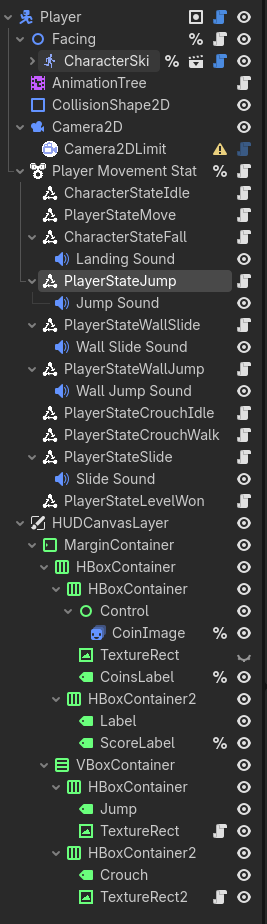
Inheritance will solve most of this problem. But Dictionary objects are not arrays. They are Maps - a data structure that doesn’t care how many entries are in it. I think it would be more appropriate to say that your code depends on a certain number of Dictionary keys, and errors out if they do not exist. So that’s the problem that should be solved.

It actually would not. Or not enough :

see, my hunch was that I had to transfer

D_spriteSheet[“bodyparts”] = {“leg_right”:“root”,“leg_left”:“root”,“torso”:“root”,“head”:“torso”,“arm_right”:“torso”,“arm_left”:“torso”,“hand_right”:“arm_right”,“hand_left”:“arm_left”}

directly into a field on a Resource in the Editor, which seems unwieldy if not impossible (the solution being instead to create a “parent” or “children” field for each bodypart, instead of cramming everything in a nested Dictionary, as we’ve seen). That’s why I said “The number of keys in the [nested] Dictionary [the value to D_spriteSheet[“bodyparts”]] depends on the number of Bodyparts”, because the number of fields I had to put up for @export in the Resource would vary between, say, spritesheets that have forearms and spritesheets that don’t. I could have used inheritance to have a forearm-bearing Resource extending from the main Resource, but that would defeat the purpose of creating an all-compassing Resource script managing all spritesheet-related Resources.

Sure it is. You just need a new type of key.

Yup. Saw it above, did it here :

I created a Resource torso.tres (the root node is actually the torso, not the head, but same same), and populated all fields in the Editor, with children being, in this case, the Resources head.tres, arm_right.tres, arm_left.tres, leg_right.tres, leg_left.tres.

Solved.

Use this to store a part

(…)

for part_name: String in body_parts:
	if body_parts[part_name].parent
		var body_part = find_child(part_name)
		var parent = find_child(body_parts[part_name].parent)
		body_part.reparent(parent)

Yup. Exactly what I did here :

for bodypartString in D_bodyparts.keys() :
	atlas = AtlasTexture.new()
	atlas.atlas = D_spriteSheet["spritesheet"]
	atlas.region = D_spriteSheet[bodypartString]
	texture = atlas
	var parent : Node2D = find_child(D_bodyparts[bodypartString],true,false)
	if D_bodyparts[bodypartString] == "root":
		parent = bodyCanvas
	parent.add_child(bodypart)

and here :

The Bodyparts are set up recursively in the CharacterBody2D quite like it was, except the Dictionary parameter is now a Resource.

except for the part where I don’t create one Resource by Bodypart, as per my explanation above on the number of Resources. I feel it would be even more Godotic to assign the parent with a Resource and not a String, but as you saw, after having tried, eventually I went for the String as you did.

I believe this answer is largely useless, because we converge on the same points. But I wanted to take the time to answer because you made the effort.

2 Likes

You totally can. Resources are regular objects. They just implement a mechanism that allows for easy serialization to disk.

2 Likes

What I meant is this won’t work :

var resource = load("res://torso.tres")
var torso = resource.new()

because that’s not how they work, because that’s not what they are.

Sorry if we didn’t get on your idea. As far as I know, in Godot is not like Unity where you can create Resources on the editor. Or you create them from code and save them or you create them on the editor as part of a Resource Script and then you save them. For the initial creation, maybe is not a bad idea use the definition on JSON. You can create them and later reuse them.

1 Like

I do agree that programmatic generation of nodes is not anti-Godot. What should have said is that your approach seemed like an anti-pattern based on what you posted. Specifically, I have seen a number of people experienced with another language trying to leverage programming experience without understanding how Godot works. (It’s what I did when I started.)

I am a fan of complex nodes as a single script when it makes sense. My Curved Terrain Plugin and Chibi Animated sprite plugin are examples of this. Now that I understand you are using inheritance and using this to display all your nodes, it sounds like you are not using an anti-pattern. Instead you are leveraging the power of custom nodes.

I still recommend making them a @tool script so you can see them in the editor. It’s a lot faster to debug that way. The curved terrain plugin is an example of that.

Here’s something from my game Katamari Mech Spacey that I think might be useful for you. I made two Nodes, CollisionSprite2D and CollisionSpritePolygon2D. I wanted to automatically create CollisionPolygon2D nodes that matched my sprite so I could have custom ships that handles their own complex collision shapes. When the game starts, they create themselves and reparent to the first CollisionBody2D object up the chain they can find. If any sprite object is removed or added while the game is running, the attendant collision shapes are removed or added.

CollisionSprite2D
@icon("res://assets/textures/icons/collision_sprite_2d.svg")
class_name CollisionSprite2D extends Sprite2D
## A Sprite2D that creates collision shapes that match the outline of the
## texture, ignoring pixels with their alpha set to 0.
# Modified from https://shaggydev.com/2022/04/13/sprite-collision-polygons/

## Rectangle describing the size of the texture in pixels.
var size: Vector2i
## Stores all the CollisionSpritePolygon2D nodes created.
var collision_polygons: Array[CollisionSpritePolygon2D]
## Tracks whether the polygons in collision_polygons are diabled
var is_collision_disabled: bool = false


func _ready() -> void:
	create_collision_polygon_2d()


## Creates a CollisionSpritePolygon2D and parents it to the first
## CollisionObject2D it find up the node tree.
func create_collision_polygon_2d() -> void:
	if collision_polygons: #Delete all existing polygons if they exist.
		for polygon: CollisionSpritePolygon2D in collision_polygons:
			polygon.queue_free()
	var bitmap := BitMap.new()
	bitmap.create_from_image_alpha(texture.get_image())
	size = bitmap.get_size()

	var polys: Array[PackedVector2Array] = bitmap.opaque_to_polygons(Rect2(Vector2.ZERO, texture.get_size()))
	for poly: PackedVector2Array in polys:
		var collision_polygon := CollisionSpritePolygon2D.new(self)
		collision_polygons.append(collision_polygon)
		collision_polygon.polygon = poly
		add_child(collision_polygon) # Add this here first so that the starting rotation and position will match this node's.
		collision_polygon.reparent.call_deferred(find_collision_2d_object(self)) # Then move it to the CollisionObject2D


## Returns the first CollisionObject2D found up the node tree.
func find_collision_2d_object(node: Node) -> CollisionObject2D:
	var object: Node = node.get_parent()
	if object is CollisionObject2D:
		return object
	if object is MapLevel2D:
		return null
	else:
		return find_collision_2d_object(object)


## Disable all polygons created by this node. Pass in false to enable them.
func disable_polygons(disabled: bool = true) -> void:
	if collision_polygons:
		for polygon: CollisionSpritePolygon2D in collision_polygons:
			polygon.set_deferred("disabled", disabled)
	is_collision_disabled = disabled
CollisionSpritePolygon2D
class_name CollisionSpritePolygon2D extends CollisionPolygon2D

var creator: CollisionSprite2D


func _init(collision_sprite_2d: CollisionSprite2D) -> void:
	creator = collision_sprite_2d


func _ready() -> void:
	# Handle Visibility
	creator.visibility_changed.connect(_on_visibility_changed)
	visible = creator.visible
	
	# Generated polygon will not take into account the half-width and half-height offset
	# of the image when "centered" is on. So move it backwards by this amount so it lines up.
	if creator.centered:
		position -= Vector2(creator.size) / 2
	if creator.flip_h:
		scale.x *= -1
		position.x += creator.size.x
	if creator.flip_v:
		scale.y *= -1
		position.y += creator.size.y

func _on_visibility_changed() -> void:
	visible = creator.visible
1 Like

Niiiice ! Motherlode.
I’m going to check your snippets.

I still recommend making them a @tool script so you can see them in the editor. It’s a lot faster to debug that way.

I’m going to do that.

1 Like

What would be the purpose of doing this? load() news the object under the hood for you, deserializes the disk file and returns the object populated with deserialized data.

If you, for some reason, want to deserialize what’s on disk into an already created object, you can use Resource::take_over_path()

Resources work like any other object, nothing special about them except the ability to serialize and some GDScript syntactic sugar over that.

2 Likes

I stand corrected : Resources are Objects. They’re no objects, though, in the sense they’re not part of the Node line of descent. add_child(resource) doesn’t do anything. The purpose of doing this is actually building a body, with Bodypart Node2Ds, or any object that can fit the bill of having an 2D existence and the methods I wrote inBodypart, such as :

func get_hit(damage: int) -> void :
	for item in worn:
		damage -= item.condition
		item.get_hit(damage)
	if damage > 0:
		if damage >= conditionLevels :
			get_crit()
		condition -= damage
		hit_flash()
		got_hit.emit(self,condition)

A Resource could fit such a method (even the signal, I read), but I fail to imagine a way to make Resource.load() Objects exist in the tree, except by creating a Node2D to carry their properties and methods (and in that returning to what I’m doing now), or rewriting in the Resource all the Node2D methods I’d need. In my mind, a torso exists, it can be parented and have children, bear Sprites and Shaders, have other Nodes worn. A Resource does not.

That’s why I said Resources are attribute-values repositories (I guess “property-values repositories” is a better description, and it doesn’t account for functions in the Resource). That’s what is shown in this video : they instantiate an Enemy Scene, an object in the tree, and gives its properties the Resource values. It’s even written in the doc : “Resource is the base class for all Godot-specific resource types, serving primarily as data containers.” (source)

“Nodes give you functionality: they draw sprites, 3D models, simulate physics, arrange user interfaces, etc. Resources are data containers. They don’t do anything on their own: instead, nodes use the data contained in resources.” (source)

Am I looking at this wrong ?

Interesting discussion though, that’s why I’m pushing on. I want to convert some of my Nodes to RefCounteds already, that only store methods. But it goes against what I learned from composition (“put Nodes everywhere, for everything, always. even in you sleep”), so I guess I’ll have to revisit this as well.

There are a few recommendations / best practises for Godot, but they are not absolute truths. Especially this one is rather misleading. If you don’t need a node, you don’t have to use one. Personally, I only use nodes if I they bring something of value to the table.
E.g. some people use nodes to define different states for a state machine (used for ai behavior) - which is valid, but useless for me because it creates unnecessary clutter. If you want to do optimization, having nodes where you could easily use e.g. RefCounteds is not a good idea.
For beginners, it’s probably a good advice to encourage them to use nodes where they can, though.

The same applies to “Composition over Inheritance”, btw. Yes, you should try to use composition if you can, but sometimes using inheritance is just less tedious (and the engine is obviously making use of inheritance as well).

I think you’ve got most things right.

Just an overview what you can do with resources:

  • useMyResource.new() if you want to create a resource from code.
    • you can also have your own _init(x: int) -> void: #... method defined in the resource, if you want to initially pass an argument: MyResource.new(42)
  • use @export my_resource: MyResource in a node, if you only want to set them initially in the editor
  • use load(“path/to/my/resource”) if you want to load them dynamically
  • you can change the properties of them via code, but they won’t automatically save
  • Resources can have methods, I would use these for e.g. setting properties in a specific way, validation, things that belong to how to handle them etc

Because they are no nodes, you usually don’t have access to lifecycle methods (such as _ready or process) or the tree.

1 Like

Yes and No. Resource inherits from RefCounted, which inherits from Object. So both Resource and RefCounted are Objects.

They are also lowercase objects because an object is any specific created version of a class at runtime.

How you view them is irrelevant in a discussion with others. The way I would phrase it is a Resource is not a Node. Then everything you were saying would make sense and there’d be no semantic argument.

This opinion is understandable, but based on the thinking that one needs to optimize their code to that degree. Node objects are incredibly lightweight. When people come here with optimization problems, the answer is never that they have too many Node objects. The answer is instead they have too many objects on the screen at the same time, or are processing too many objects offscreen. And by too many, I mean 10s of thousands.

It’s actually experienced programmers that more often need to be encouraged to use nodes. The reason being that they tend to overcomplicate their code because they future-proof. They are used to optimizing, and they think about it while architecting.

What they don’t understand is that GDScript, unlike C# for Godot, Unity, and C++ for Unreal, is optimized for running games. You do not need to do nearly as much optimizing because the GDScript interpreter handles that under the hood better than any developer can - if you use Godot the way it is intended.

You see the same thing in someone using C++ who doesn’t understand 32-bit and 64-bit architecture. They’ll declare short ints everywhere when they don’t need 32 bits in an int to optimize. And this was a good thing in the 80s. But with the advent of 32-bit and 64-bit processors, it actually slows down processing. Because modern processors handle 32-bit and 64-bit integers faster than they do smaller ones. However, if you’ve been around long enough (like me), it’s an optimization habit that is better unlearnt.


A Story About Singletons

A perfect example of this over-optimization by experienced programmers is the singleton. As developers coming into Godot we (and I mean to say I did this and have seen many others do this on here) start by creating a singleton the way we know how. We create an Object because even a RefCounted is wasteful with a singleton pattern. We declare every variable and function as static. Then we give it a class name, and we can call it from anywhere. MyClass.my_function()

Then, we want to add a signal to it. This requires some hoops, where you have to declare a private non-static signal and call it when the static public signal is called.

This leads to us learning that an Autoload doesn’t have this signal problem. So we take our my_class.gd file, remove the class name, and make it an Autoload called MyClass. It’s weird, but now we can use signals.

Then we get used to @export variables, which are really useful in the editor. We want to tweak something for testing, or more likely - we want to make something configurable so we can use it in multiple projects. Problem is, we need a Scene for that, and for that, we need a Node object.

At this point we learn that we can create a Scene with just one Node in it and attach our script to it, extending Node instead of Object. Now we can use signals and @export variables.

That whole journey took me, personally, a few months. I relied on my knowledge of programming and architecture and refused to use Autoloads for a long time, because at some point I’d read another experienced programmer talk about how they didn’t like Autoloads. And they made a lot of sense coming from where I was coming from, but I learned they didn’t understand GDScript and the Godot Engine.

For people who don’t come with a development background, they ask how to do something that would allow multiple unrelated objects see data, and we give them a link and tell them “Make an Autoload.” They say, “ok”, do it and move on. They don’t go through the days, weeks, or months-long process of unlearning singletons and learning Autoloads.

Autoload is the Godot implementation of the singleton pattern that handles a bunch of things for us - including making everything static.

Using Nodes for State Machines

I see new people to Godot tell people all the time that they don’t need to use Nodes for state machines. And that’s true. You can use an Enum and a single script. You can use Object, RefCounted or Resource objects instead. And it feels more optimized.

It’s not, really. The amount of additional memory and processing power needed for a Node-based state machine is negligible - even if they’re all over your game. (I use them for my main loop, every enemy, player, NPC, and various other things.)

But there are also a number of benefits that people who again, have experience in other languages, do not see.

  • When I open up a scene, I immediately know if it uses a StateMachine, and what States it has. It saves me a lot of time digging through code.
  • It keeps my code atomic, because each Node is logically separated out into its own file.
  • It allows me to see at a glance if I changed the default code for the StateMachine or a State based on the color or the attached script.
  • I can add a StateMachine, and its States like any other Node, which is faster than copy-pasting code. It literally takes me seconds in a new project to create a StateMachine and default States for characters. Then I can start working on new custom States.
  • I can add additional Node objects that only the state cares about to the State. For example an AudioStreamPlayer for a PlayerJumpState, or an Area2D/3D for an EnemyShootState to detect the player. As a character object gets more complex, this organization helps a lot.

Composition and Inheritance

I agree it makes sense to use both. I disagree that you should try to use composition over inheritance. They both have their places.

A favorite example is having a Health component, which is really applying an ECS pattern to an OOP project. It works, and seems neat, but for many games, it just creates loosely coupled code with no real benefit. Still, most simple examples of using composition in Godot use the idea of a Health component node. While I think it’s overkill, I describe how to do it and a lot of other thoughts on how to use composition in Godot in this post: Am I doing Components/composition right? - #3 by dragonforge-dev

1 Like

That’s not entirely true. It raises a type mismatch runtime error if you don’t use static typing, and an equivalent compile time error if you do :smiley:

1 Like