Hi, I’m building a user placement system which I’m very new to and I’m trying to build a system to delete tiles. Right now when I click anywhere on the screen, the last node that was placed gets deleted but I want to delete a specific node where my mouse position is.
Code
elif(currentBuildMode == buildingModes[2]):
 get_global_mouse_position()
 for node in get_tree().get_nodes_in_group("Crops"):
  if node.is_in_group("Crops"):
   node.queue_free()
   break
The section above is the deletion part of the user placement system.
I’ve tried adding another if statement such as if node.position == get_global_mouse_position()but that just breaks the deletion system and nothing happens. My theory is get_all_nodes_in_group just gets every single node in that group and it doesn’t run since not all nodes are under your mouse position I may be wrong on that.
Below is a screen recording showing what happens
For mouse interaction you’d typically use Area2D nodes along the visual representation. Those nodes can detect mouse clicks inside their shapes. So each of your sprites should have a corresponding area node.
You can also do it without areas by calculating each sprite’s global bounding rectangle and then checking if the mouse click position is within.
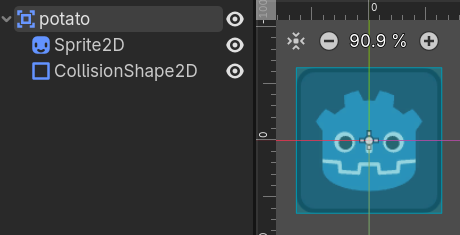
I changed the node (The root node in the scene I want to instantiate) type from a node2D to a Area2D and gave it a shape.
I’m looking into using the _on_mouse_entered()signal and connecting it to the script that defines the user placement system. However, the node won’t be in the scene hierarchy until I instantiate the node and start placing it so connecting the signal through the UI doesn’t seem a possibility.
How would I connect a signal through code? I came across node.connect()but requires two perameters. The first is I guess the signal I want to connect and the second is a callable which I have no idea what a callable is.
Summary
What I wanted to try is:
- Change root node within the tile scene to Area2D
- Add a
CollisionShape2Dto that root node to define its shape
- Connect that root node to
user_placementscript through a mouse_entered()signal
But because the tile isn’t in the main scene until I instantiate it, connecting a signal through the standard UI doesn’t work.
You should indeed use connect() but better to use Signal::connect() instead of Node::connect(). Both will work but the former is a legacy apparoach.
Callable is a reference to a function. You can just use the function name without parentheses.
Connect from code right after instantiation. instantiate() returns a reference to the top node in the scene. In your case that will be the Area2D that sends the signal. So all you need to do is:
var scene_top_node = your_packed_scene.instantiate()
scene_top_node.signal_name.connect(signal_handlng_function_name)
_on_mouse_enteredisn’t declared in the current scope is what that gives me. Did you put that in the node that will be instantiated? The script defining all that logic is in the root node in the main scene. Probably getting the error because the engine isn’t recognizing the function I’m trying to call so I’m either putting it in the wrong place or I need to somehow reference the signal first before trying to connect it.
potato = preload("path_to_scene")
var selectedCrop
var cropInstance

func _on_potato_button_pressed():
 selectedCrop = potato

func userPlacement():
 cropInstance = selectedCrop.instantiate()
 $game.add_child(cropInstance)

func _input(event):
 if event is InputEventMouseButton:
  if event.button_index == MOUSE_BUTTON_LEFT and event.pressed:
   for node in get_tree().get_nodes_in_group("Crops"):
    if node_is_in_group("Crops"):
     # potato.mouse_entered.connect(_on_mouse_entered)
     node.queue_free()
     break

#########################################################################

## Also tried moving these two lines here, but error remains the same

# on_ready() -> void:
#  cropInstance = selectedCrop.instantiate()
#  potato.mouse_entered.connect(_on_mouse_entered)

##########################################################################
You should call connect() when instantiating.
The function you connect to needs to exist either in the same script or it a different script. In the latter case you need to use the dot syntax with a node reference to specify the callable i.e.: node_reference.function_name
That worked, I have the function in a script that’s attached to the Area2Dthen used the .notation like you suggested which doesn’t give any errors. I’ll try to reformat my deletion system to make it work on Friday. Thank you for your help.
What I ended up doing was making my user placement system a global script in the project settings so that I can call currentBuildModeand buildingModeswhich are both variables.
In result I can now do two things:
- Node gets deleted when I press the left mouse button (Shown in the code and video)
- If I move the logic into
_on_mouse_entered()the node will get deleted if I hover over it
I’m close to my goal, but now I’m just not sure how to make that node delete if the mouse hovers over it. I’ve tried creating a lambda in _on_mouse_entered()and putting the logic within that which didn’t work. But if I include the line if UserPlacement.currentBuildMode == UserPlacement.buildingModes[2]it all stops working and
nothing happens.
potato.gd (attached to tile that is being instantiated)
func _on_mouse_entered(event) -> void:
	_input(event) # This line has no effect, put it in to test something earlier

func _input(event):
	if event is InputEventMouseButton:
		if event.button_index == MOUSE_BUTTON_LEFT and event.pressed:
			$".".queue_free()
I do have the feeling I shouldn’t use $”.”.queue_free() and should use UserPlacement.potato.queue_free() instead but not too sure.
You want to place on click and delete on hover?
In my user placement System I will have multiple building modes. “Deletion” is the one I’m working on right now and is the one that’s relevant to this topic.
In that specific video I click on the image in the menu to get the tile placed, then I press the “delete” button which in the code puts me in delete mode. Once I click the delete button I want to be able to delete tiles that have already been placed.
On click, delete the tile that the mouse is hovering over.
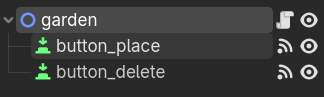
garden.tscn:
potato.tscn:
garden.gd:
extends Node2D

var tool = &"place"

func _on_button_place_pressed():
	tool = &"place"

func _on_button_delete_pressed():
	tool = &"delete"

func _unhandled_input(event):
	if event is InputEventMouseButton and event.is_pressed() and tool == &"place":
		var potato_instance = load("res://potato.tscn").instantiate()
		potato_instance.input_event.connect(_on_potato_clicked.bind(potato_instance))
		add_child(potato_instance)
		potato_instance.global_position = event.global_position

func _on_potato_clicked(viewport, event, shape_idx, which_potato):
	if event is InputEventMouseButton and event.is_pressed() and tool == &"delete":
		which_potato.queue_free()
Took me 15 minutes to figure out why your scene worked but mine didn’t, but it does and I really appreciate your help.