just trying to display vertex colors from blender to godot.
in blender when I create a simple cube with no materials assigned and paint vertex color on top, export glb to godot, vertex colors appear and i can also add material, check vertex color as albedo and they also show correctly on top of a material with textures.
issue is, if the cube already has materials assigned in blender, then godot refuses to display vertex colors even if I add replacing materials in all the mesh slots in godot like material overlay or surface overide etc.
is this a bug or intended? what is the appropiate method to do this simple thing? I also feel it’s quite like a hidden info about the mesh. like in blender you have this color attributes that you can toggle and edit individually like layers but in godot there is no way to see that, at least visually.
4.4 stable btw
Enable vertex_color_use_as_albedo in standard material or read COLOR in shaders.
ty, but as mentioned in the post this does nothing
Check that the vertex colors are properly exported from Blender.
As a simple test that things are working on Godot side, use a single mesh exported as OBJ (with vertex color option enabled in the exporter).
Made a complete new blender and godot files. It works with obj, but It doesn’t with glb, just like before. Just found out more about the problem, it actually works when having an empty material slot assigned to at least one face in blender, only then you can display vertex colors. If all faces have actual materials assigned it doesn’t display anything. This happens with glb, not obj. Is this inteded? Should I report this issue on github? Checked and it also happnes with godot and blender latest versions
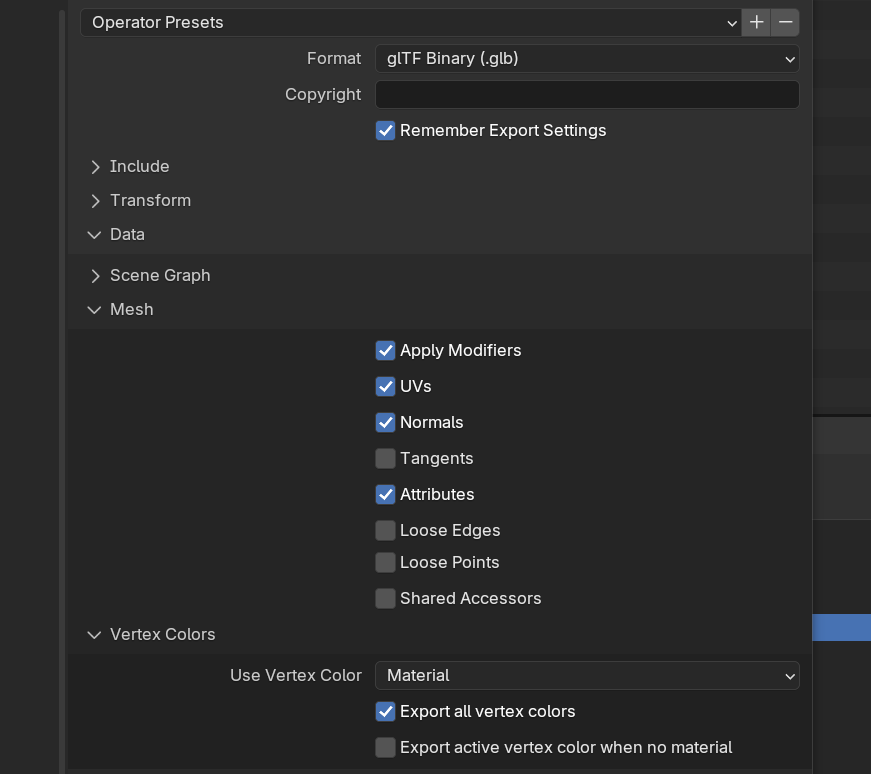
What are your glb vertex color export settings?
checking export “active vertex color when no material” doesn’t seam to do anything… anyways it’s fixed bc just adding some random non visible ingame face on the emsh and assigning an empty material slot makes it work… but looks like a bug right? not sure if from godot or from blender
Perhaps enable that other checkbox.
wich one? the “active vertex color when no material”
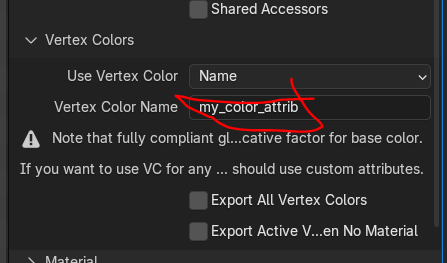
Yes. You can also export a named attribute. That wouldn’t require it to be used by a material.
as I said before this doesn’t seam to do anything. how would I go about exporting a named attribute? ty for the help btw
Do you have a named attribute?
Yes, it’s a color attribute called color.
Isn’t that the default attibute?
You can create a custom vertex color attribute and paint that.
Then specify its name in gltf export options.