How to have a Horizontally scaled Camera not stretch the screen

Godot Version

Godot Version 4.1

Hey so this is just a sort of simple question that I’m asking because I can’t really find any good sources that explain it simply and clearly, but how do you make it so an uneven zoom value (such as the one in the picture) doesn’t stretch out the screen? I want the camera to be specifically scaled to show a portion of the room but If it set it so the zoom values are uneven the scene ends up looking stretched on runtime. If anyone with basic knowledge on this stuff could give me some advice I’d appreciate it.
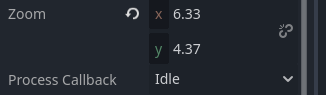
Screenshot_20260803_232442


Edit: (Diagram to show what I mean for better clarity)

Make the zoom even.

Why do you want it to be non-uniform and also not stretched?

I’d assume you would have to change the Viewport Width/Height but changing the window resolution like that is really weird for a game.

I want it to fit within a room in a way where it can show the entire room on the camera, and that room is more tall than wide (I may have mixed up the terms horizontal and vertical so if I’m wrong on calling it horizontal let me know) and if I were to make the camera any larger to fit it all uniformly it would clip and go out of bounds due to the limits I have around the room.

Can you add black bars or a fog-of-war effect over the area you do not want to show?

I feel like that would be a bit impractical as its a rather small area. For more clarity this is the setup I have, I want the Camera to specifically see this area in front of it, however from what I’m aware the Zoom property for the base camera doesn’t work like that, and leaves the camera stretched.

Do you want to move the camera up? Is there any way you could mock up what you would like to happen? I don’t see many other options based on your description.

I just want the Camera to see specific parts of the area based on the Zoom, Like if I want the camera to see slightly forward, I would edit the zoom property so it is expanded upwards. The problem with me using a uniform Camera zoom is that by doing so it expands the veiw on all sides. I just want to expand it upward, while still keeping the other parts in frame.

I think my only problem is with how the zoom works it moreso magnifies the current area than just shows different parts of the screen, and if i have an uneven zoom value it tries to magnify the screen unevenly. I just want it so the camera has a normal zoom but can also show more than just a rectangular area on screen.

Do you want the user’s window to extend? If your game supports fullscreen that’s not really possible.

The only way to show non-rectangular areas on a rectangular screen will require some form of reprojection, currently that is in the form of stretching/squashing. Other forms of reprojection are going to be much worse.


I don’t think what your asking for is physically or logically possible.

Since this seems really hard to explain in just words I made a quick diagram in Krita to show what I mean

Uneven Camera2D.zoom will always stretch the picture. There’s no way around that on a normal rectangular screen.

What your diagram shows is aspect ratio keep + side bars:

Project Settings → Display → Window → Stretch

  • Mode: canvas_items or viewport
  • Aspect: keep
    –That should stop the squash/stretch.

For the tall room: keep zoom uniform, fit the side that matters, and use camera limits (and/or bars) so you don’t see outside. Don’t use (1, 1.5) zoom to “open only upward”; that just warps everything.

Useful to read:

Thanks for the advice, my only issue is that with how the room is structured, if I were to scale it so the area I want to be on Camera was visible, then there would be a part of the Camera that goes outside of the limits, which I don’t want. Would there be any other way to get it so the Camera can fit in that area without going outside the limits Horizontally or do I just have to cut my losses and change the limits and add the black bars myself?

Also kind of unrelated to the problem but something I’ve been wondering related to this topic, if the zoom always looks bad when the X and Y values don’t match, then why even give the option to give them non-matching values in the first place? Seems really unintuitive to me.

That’s the actual tradeoff. A rectangular screen has one aspect ratio. If you zoom uniform until the tall bit fits, the view gets wider too, so it wants to peek past your horizontal limits. Uneven zoom doesn’t “open only up”; it just squishes.

So, you’ve got options:

1- Fit the width (uniform zoom so left/right limits fill the screen). You won’t see the full height at once. scroll/move the camera vertically, or live with cropping top/bottom.

2- Fit the height and widen/soften the limits, or cover the overflow with bars / fog / UI (what @gertkeno meant). That’s the “what I want” side of your diagram – bars, not stretch.

3- Match aspects: make the stretch / window aspect closer to that pink rect so one uniform zoom fits both axes. Still bars on some displays.

4- Offset, not uneven zoom: if you only need “more above the player,” keep zoom.x == zoom.y and shove offset / position so the frame sits lower. Left/right still grow together; limits still clamp.

  • If the allowed rect is taller than the screen aspect, you cannot show full height and never see past the side limits with a normal Camera2D. Cut losses = change limits and/or add bars. That’s the honest fix.

  • Why uneven zoom exists: it’s a Vector2 on purpose for intentional warp (hitstun squash, drunk wobble, special effects). Docs even say X/Y should match unless you want stretch.

–Allowed != recommended for framing a room.

Thanks for the advice, I’ll mark this as the solution as it gives a pretty satisfying explanation of what to do, my only question now is if you could maybe elaborate on what matching aspects entails as I don’t really know how exactly to implement that.

It’s a shame that Godot doesn’t have any option to have the camera keep it’s zoom while allowing different screen aspect ratios to be easily produced for different shots (as I plan for this type of Camera restriction to apply to only some rooms), as that would be pretty useful, though at the same time I’m not a github contributor who knows the inner workings of Godot like the back of my hand, so I don’t really know how easy it would be to implement that. All in all though thanks for the options

“Match aspects” just means: make the game’s view shape close to that pink room rect, so one uniform zoom can cover height and width without peeking past the side limits.“Match aspects” = make the game’s view roughly the same shape as that pink room, so one uniform zoom fits both axes.

Easiest: Project Settings → Display → Window → set viewport width/height to that room’s ratio, stretch aspect keep. Bars show up on other screens; zoom stays even.

For only some rooms: don’t fight project stretch per door. On enter, set limits to the room and pick one zoom from viewport size / room size (same value on X and Y). If the room is taller than the screen, you’ll still need bars or a softer limit - same tradeoff, just per room.

Okay, Thanks!