How to make resource with complex data structure.

Godot Version

v4.6.2.stable.mono.official [71f334935]

Question

For an automation game, I need a Resource (Scriptable Object) to create recipes. Amongst other things, it needs to associate a list of input items and their count to a list of output items and their count (i.e. 1 coal + 4 iron ore makes 2 iron bars), however I cannot find a clean way of doing this. I have found a couple solutions, but none of them seem the best. Please help, thanks.

Solution 1) Dictionary (or array[ItemData, int])
This seems to be the most ideal, but the inspector does not like these more complex data types. An actual solution would ideally be as close to this as possible

public partial class RecipeData : Resource
{
	[Export] public Godot.Collections.Dictionary<ItemData, int> ingredients;
	[Export] public Godot.Collections.Dictionary<ItemData, int> results;

	public RecipeData() { }
}

Solution 2) Separate Arrays

This solutions works the best, but feels like bad design, having the items and quantities only implicitly linked.

public partial class RecipeData : Resource
{
	[Export] public ItemData[] ingredients;
	[Export] public int[] ingredientQuantities;
	[Export] public ItemData[] results;
	[Export] public int[] resultQuantities;

	public RecipeData() { }
}

Solution 3) Custom Struct

This solutions feels the most intended, but it is bad to work with. To create a new recipe, I need to create a new itemstack resource for each ingredient and result, so I will end up with just a bunch of files that have {iron ore, 2} {iron ore, 4} etc. which just seems silly and annoying and a lot of extra stuff for something so trivial.

[GlobalClass]
[Tool]
public partial class ItemStack : Resource
{
    public ItemData Item;
    public int Amount = 1;

    public ItemStack() { }
}

[GlobalClass]
[Tool]
public partial class RecipeData : Resource
{
	[Export] public ItemStack[] ingredients;
	[Export] public ItemStack[] results;

	public RecipeData() { }
}
I like this approach:

class_name Item extends Resource

@export var display_name : String
@export var icon : Texture2D
@export var max_stack_size : int = 12
@export var world_item_scene : PackedScene
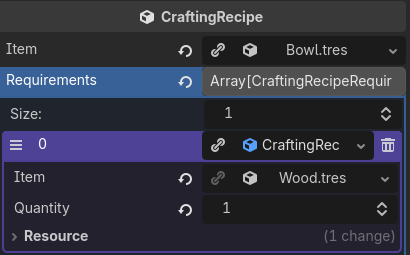
class_name CraftingRecipeRequirement extends Resource

@export var item: Item
@export var quantity: int
class_name  CraftingRecipe extends Resource

@export var item: Item
@export var requirements: Array[CraftingRecipeRequirement]

Looks like this in the inspector:

2 Likes

Yeah this works thanks.

1 Like

If that’s the solution you used, please mark the previous post as the solution for others coming later.

2 Likes

Sorry if this comes across as dumb but I was just looking to do this and wanted to know if all those resources you mention ¿¿are contained in one single file or each one has its own file??

also ¿where do those items get stored and how do you make them? if this is not the place to ask pls don’t hesitate to redirect me somewhere else. Thanks in advance

With this setup you have created 3 classes, Item, CraftingRecipeRequirement, CraftingRecipe.
This you will save in 3 separate script files (*.gd)

Then in the editor files section you can right click, create new resource and type in your name of the class.
At the end every item, every RecipeRequirement and CraftingRecipe has its own *.tres file.

See official documentation or here i found something more tutorial like:

2 Likes

@poesero I think @andi_godot answered your question pretty well. But for future reference, typically if you have a question, just make a new post. If you want to reference another post, like this one, just link to it. In this case, your question was inline with the original post, so it’s fine to post it here.

1 Like

It can be either way. When you create a sub-resource in the inspector it will by default be embedded in the parent resource. The parent resource itself can as well be embedded in the scene file or can be in a separate file that the scene file references. It’s a cascade.

Scene

  • resource
    – sub resource
    – sub resource
    – sub resource

So you can embed all sub resources into the resource and then embed resource into scene and you will have no additional files other than the scene file.
Conversely, each of those can be in its separate *.tres file. Any combination of embedded and external resources is possible.

In the inspector, you can embed a file based resource by doing “make unique” on it, and de-embed it by doing “save as”.

2 Likes

Thanks a lot for your time guys, it was really helpful. I couldn’t get around doing the embed way but I will eventually.

I will! thanks for your help @dragonforge-dev

1 Like

thanks for your help, I’ll be looking into that document, great community <3