How to make successful signals from instantiated scenes?

Godot Version

4.5

Question

I am making a card based racing game. I want to be instantiating cards (buttons) from a deck, that the player can then click on to move the character. The code works on the button that is coded into the scene, but it doesnt work on the spawned buttons. Whats going on?

button code:
signal straightpressed
func _on_pressed() → void:
straightpressed.emit()
print(“pressed”)
queue_free()

player relevant code:
func playcard():
straightbutton.pressed.connect(_on_straightbutton_pressed) # Connect the signal
func _on_straightbutton_pressed() → void:
print(“straight”)
target += straight

Maybe you meant to connect straightpressed instead?

1 Like
# button.gd

signal straightpressed()

func _onpressed() -> void:
    straightpressed.emit()
    print("pressed")
    queue_free()
# player.gd

func playcard():
    straightbutton.pressed.connect(_on_straightbutton_pressed)

func _on_straightbutton_pressed() → void:
    target += straight
    print("straight")

This is the code, correct? Because if so:

You have to connect the button’s own pressed signal to your custom function that emits your own custom signal:

# button.gd

func _ready() -> void:
    pressed.connect(_onpressed)

And also connect to the correct signal in the other script, which is not the default pressed but your own custom straightpressed:

# player.gd

func playcard(): # You probably don't want to connect the signal here
    button.straightpressed.connect(_on_straightbutton_pressed)

Thank you- it is giving the error Cannot find member “straightpressed” in base “Button”. Ive double checked for any spelling errors.

Sigh…

I would recommend getting more familiar with programming concepts in general. That will enable you to ask better questions.
There is too much that could be going wrong here based on what you’ve said. I don’t know if you are generating said buttons dynamically, I don’t know if you know what a button instance is, let alone how to actually make a custom one. I don’t know if you actually have a button script or scene with that code you’ve posted.

Anyhow, you can copy-paste this into any node and it should work as a proof of concept:

extends Node

func _ready() -> void:
	# Can ignore. Simply for display purposes.
	var vbox: VBoxContainer = VBoxContainer.new()
	vbox.child_order_changed.connect(vbox.set_anchors_and_offsets_preset.bind(Control.PRESET_CENTER))
	add_child(vbox)
	
	 # Add 5 buttons to the middle of the screen.
	for i: int in range(5):
		var button: StraightButton = StraightButton.new()
		button.text = "Button number %d" % i
		button.straight_pressed.connect(_on_straightbutton_pressed.bind(button.text))
		vbox.add_child(button)

func _on_straightbutton_pressed(button_text: String) -> void:
	print("Pressed button: %s" % button_text)


# This creates a custom button class. Not to be confused with GayButton.
class StraightButton extends Button:
	signal straight_pressed()
	
	func _ready() -> void:
		pressed.connect(_on_pressed)

	func _on_pressed() -> void:
		straight_pressed.emit()
		print_rich("[color=gold][i]Custom signal 'straight_pressed' emitted from the custom button.")

There is no reason to even do this in this case, as you can simply check the built-in pressed signal. No need to create a custom one. Although there might be situations in which you’d want to.

It would be helpful if you added the full code of both scripts. Surround them with ``` on the top and bottom to format them like this:

```gdscript
# Put your code here
```

Then it will show up like this:

# Put your code here

What is missing from your code is how the variable straightbutton is being declared and connected to the player.

A screenshot of your editor showing the scene tree that contains the player and straightbutton objects would also be helpful.

I’m sorry for not being clear enough. I’ve changed the ‘move forward’ signal back to the built in signals, as i’d love to use them if possible. They are lot more straight forward. I left the ‘hover’ signals as custom ones to compare for now.

Currently, BOTH ways are working as intended on the buttons that are in the scene tree to start, but do not work on instantiated buttons. This is the issue.

I’ve attached all the relevant code, in a much prettier way, thank you dragonforge-dev!

The racehorse code:

class_name racehorse
extends CharacterBody2D


var speed = 100

#moves
var nomove := Vector2(0.0,0.0)
var straight := Vector2(0.0,  -speed)
var hardleft := Vector2( -0.5*speed,  -0.5*speed)
var hardright := Vector2(+0.5*speed, -0.5*speed)
var bigstraight := Vector2(0.0,  -1.5*speed)
var smallleft  := Vector2(- 0.25*speed, -speed)
var smallright  := Vector2(+.25*speed, -speed)


var target = position


func _ready() -> void:
	target = nomove
	$targetlocation.visible=false


# Called every frame. 'delta' is the elapsed time since the previous frame.
@warning_ignore("unused_parameter")
func _process(delta: float) -> void:
	pass
	
@warning_ignore("unused_parameter")


func _physics_process(delta):
	velocity = position.direction_to(target) * speed
	$racehorsesprite.pause()
	
	if position.distance_to(target) > 10:
		move_and_slide()
		$racehorsesprite.play()
		$targetlocation.visible=false

	
func _on_button_2_pressed() -> void:
	target += hardleft
	
	
#func playcard():
	#var emitting_node = get_node("../straightbutton")
	#emitting_node.straightpressed.connect(_on_straightbutton_straightpressed) # Connect the signal
#func _on_straightbutton_straightpressed() -> void:
	#print("straight")
	#target += straight
	
func hover():
	var emitting_node = get_node("../straightbutton")
	emitting_node.straighthover.connect(_on_straightbutton_straighthover)
	emitting_node.straightexit.connect(_on_straightbutton_straightexit)
func _on_straightbutton_straighthover() -> void:
	$targetlocation.position = straight
	$targetlocation.play()
	$targetlocation.visible=true
func _on_straightbutton_straightexit() -> void:
	$targetlocation.visible=false


func _on_button_2_mouse_entered() -> void:
	$targetlocation.position = hardleft
	$targetlocation.visible=true

func _on_button_2_mouse_exited() -> void:
	$targetlocation.visible=false


func _on_straightbutton_mouse_entered() -> void:
	$targetlocation.position = straight
	$targetlocation.play()
	$targetlocation.visible=true


	pass # Replace with function body.


func _on_straightbutton_pressed() -> void:
	print("straightx")
	target += straight

here is the code for the straight button:

class_name straightbutton
extends Button


# Called when the node enters the scene tree for the first time.
func _ready() -> void:
	pass
#	pressed.connect(_on_straightpressed)


# Called every frame. 'delta' is the elapsed time since the previous frame.
func _process(delta: float) -> void:
	pass


#signal straightpressed()
#func _on_straightpressed() -> void:
#	straightpressed.emit()
#	print("pressed")
#	queue_free()

signal straighthover()
signal straightexit()

func _on_mouse_entered() -> void:
	straighthover.emit()
func _on_mouse_exited() -> void:
	straightexit.emit()

here is the code for instantiating the buttons:

extends Node2D


# Called when the node enters the scene tree for the first time.

var straightbutton = preload("res://straightbutton.tscn")
var leftbutton = preload("res://leftbutton.tscn")
var rightbutton = preload("res://rightbutton.tscn")

# Called every frame. 'delta' is the elapsed time since the previous frame.
func _process(delta: float) -> void:
	pass
	
var deck = [$straightbutton, $straightbutton, $straightbutton, $straightbutton, $straightbutton,  $leftbutton, $leftbutton, $leftbutton, $rightbutton, $rightbutton, $rightbutton]
var hand = []
var discardpile = []

func _ready() -> void:
	deck.shuffle()
	if hand.size() < 5:
		hand.append(deck[-1])
		deck.pop_back()
		
	else:
		print(hand.size)
	hand_show()
		
		
func hand_show():
	var straightbuttonload = straightbutton.instantiate()
	var leftbuttonload = leftbutton.instantiate()
	var rightbuttonload = rightbutton.instantiate()
	for straightbutton in hand:
		$CanvasLayer/Control/MarginContainer/VBoxContainer/HBoxContainer.add_child(straightbuttonload)
	for leftbutton in hand:
		$CanvasLayer/Control/MarginContainer/VBoxContainer/HBoxContainer.add_child(leftbuttonload)
	for rightbutton in hand:
		$CanvasLayer/Control/MarginContainer/VBoxContainer/HBoxContainer.add_child(rightbuttonload)

func drawcard():
	if deck.is_empty():
		deck.shuffle()
	if hand.size() < 5:
		hand.append(deck[-1])
		deck.pop_back()
	hand_show()
	

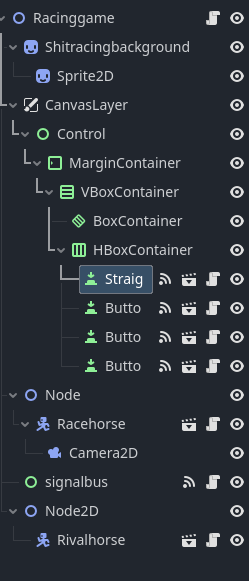
lastly a screenshot of the nodetree:


I was trying out a signalbus to see if that would work but i don’t think its needed.

Thank you all for your suggestions and help so far !!!
You don’t need to add @warning_ignore. Godot will automatically ignore an unused parameter if it is prefixed with an underscore.

func _process(_delta: float) -> void:
	pass

You seem to be adding children to the tree, but not having anyone listen to them. Something like this:

straightbuttonload.straightexit.connect(on_straightbutton_straightexit)

The buttons in the scene tree show you hooked them up through the editor. It needs to be done for every instance you create.

With respect, I would like to point out how many times you used the name straightbutton:

var straightbutton = preload("res://straightbutton.tscn")
var deck = [$straightbutton, $straightbutton, $straightbutton,
for straightbutton in hand:

While this might be acceptable to the compiler, it can lead to variable shadowing - which means that when the code runs it could work on a different variable than you think it should.

Plus it is harder for us humans to read, as we have to ask ourselves which version of the variable should be applied.

For instance, your for loop. Are you intending to use that name as a variable, or are you looking for instances of straightbutton in the hand?

I suspect the latter, but that is not the behavior you are actually getting.

1 Like

Try this code. I cleaned up a bunch of things for you - and yes you should use a SignalBus autoload because it’s way easier than trying to connect and disconnect each card. But that node should not be a part of your scene tree. (It will be autoloaded into the tree on its own.)

I also handled the variable name shadowing issues @that_duck mentioned by changing variable names to the standard GDScript naming conventions. Which included making your preload scripts into constants. Class names should be PascalCase. Variable names should be snake_case. Constant names are ALL_CAPS.

While I was at it, I removed all the node paths from your code. Those should always be referenced through @onready variables so that if the path changes, you only have to change one line of code to fix the problem.

#SignalBus
#Make SignalBus an autoload script and do not add it to the tree.
extends Node

signal straight_button_hovered
signal straight_button_exited
signal straight_button_pressed

class_name StraightButton extends Button


func _ready() -> void:
	mouse_entered.connect(func(): SignalBus.straight_button_hovered.emit())
	mouse_exited.connect(func(): SignalBus.straight_button_exited.emit())
	pressed.connect(_on_button_pressed)


func _on_button_pressed() -> void:
	SignalBus.straight_button_pressed.emit()
	queue_free()
extends Node2D

const STRAIGHT_BUTTON = preload("res://straightbutton.tscn")
const LEFT_BUTTON = preload("res://leftbutton.tscn")
const RIGHT_BUTTON = preload("res://rightbutton.tscn")

var deck = [$straightbutton, $straightbutton, $straightbutton, $straightbutton, $straightbutton,  $leftbutton, $leftbutton, $leftbutton, $rightbutton, $rightbutton, $rightbutton]
var hand = []
var discardpile = []

@onready var hand_container = $CanvasLayer/Control/MarginContainer/VBoxContainer/HBoxContainer


func _ready() -> void:
	deck.shuffle()
	if hand.size() < 5:
		hand.append(deck[-1])
		deck.pop_back()
	else:
		print(hand.size)
	hand_show()
		
		
func hand_show() -> void:
	var straight_button_load = STRAIGHT_BUTTON.instantiate()
	var left_button_load = LEFT_BUTTON.instantiate()
	var right_button_load = RIGHT_BUTTON.instantiate()
	for straightbutton in hand:
		hand_container.add_child(straightbuttonload)
	for leftbutton in hand:
		hand_container.add_child(leftbuttonload)
	for rightbutton in hand:
		hand_container.add_child(rightbuttonload)

func drawcard() -> void:
	if deck.is_empty():
		deck.shuffle()
	if hand.size() < 5:
		hand.append(deck[-1])
		deck.pop_back()
	hand_show()
class_name Racehorse extends CharacterBody2D

var speed = 100

#moves
var nomove := Vector2(0.0,0.0)
var straight := Vector2(0.0,  -speed)
var hardleft := Vector2( -0.5*speed,  -0.5*speed)
var hardright := Vector2(+0.5*speed, -0.5*speed)
var bigstraight := Vector2(0.0,  -1.5*speed)
var smallleft  := Vector2(- 0.25*speed, -speed)
var smallright  := Vector2(+.25*speed, -speed)

var target = position

@onready var race_horse_sprite = $racehorsesprite
@onready var target_location = $targetlocation


func _ready() -> void:
	target = nomove
	target_location.hide()
	SignalBus.straight_button_hovered.connect(_on_straight_button_hover)
	SignalBus.straight_button_exited.connect(_on_straight_button_exit)
	SignalBus.straight_button_pressed.connect(_on_straight_button_pressed)


func _physics_process(_delta: float) -> void:
	velocity = position.direction_to(target) * speed
	race_horse_sprite.pause()
	
	if position.distance_to(target) > 10:
		move_and_slide()
		race_horse_sprite.play()
		target_location.visible=false

	
func _on_straight_button_hover() -> void:
	target_location.position = straight
	target_location.play()
	target_location.visible=true


func _on_straight_button_exit() -> void:
	target_location.visible=false


func _on_straight_button_pressed() -> void:
	print("straightx")
	target += straight


func _on_button_2_pressed() -> void:
	target += hardleft


func _on_button_2_mouse_entered() -> void:
	$targetlocation.position = hardleft
	$targetlocation.visible=true


func _on_button_2_mouse_exited() -> void:
	$targetlocation.visible=false

If your code was working before, this should all continue to work. If you have a lot of cards though, consider just having the cards get a reference to the racehorse and modify target_location and target via functions. All your signals go away, and your RaceHorse class becomes much simpler.

1 Like

Thank you so so much, that is really generous of you. I will update when I am able to input the code, but I am planning on having a few different types of cards, so I’m definitly gonna look into the method you suggest at the end. If you are so inclined would you expand on that a bit? No worries if not though, you’ve already done so much! Thanks again!

1 Like

Something like this. I removed all references to the other cards so you could see how much simpler it would be. As you can see, the number of lines of code drops dramatically. Your hand code shouldn’t have to change at all from the previous example. The SignalBus singleton is replaced with a Game singleton. (Though the name of the singleton doesn’t really matter.)

#Game autoload
#game.gd

var racehorse: Racehorse
class_name Racehorse extends CharacterBody2D

var speed = 100

var target = position

@onready var race_horse_sprite = $racehorsesprite
@onready var target_location = $targetlocation


func _ready() -> void:
	Game.racehorse = self #Assumes there is only one. If the NPC horse(s) are the same class, you'll need to assign this another way.
	target = nomove
	target_location.hide()


func _physics_process(_delta: float) -> void:
	velocity = position.direction_to(target) * speed
	race_horse_sprite.pause()
	
	if position.distance_to(target) > 10:
		move_and_slide()
		race_horse_sprite.play()
		target_location.visible=false


func show_target_location(movement: Vector2) -> void:
	target_location.position = movement * speed
	target_location.play()
	target_location.show()


func hide_target_location() -> void:
	target_location.hide()


func play_movement_card(movement: Vector2) -> void
	target += movement * speed
class_name MovementCard extends Button

# We replace -speed from the Racehorse code with -1.0 then when
# speed is multiplied by this Vector in the racehorse code, we get
# Vector2(0.0, -speed)
@export var movement := Vector2(0.0, -1.0)


func _ready() -> void:
	mouse_entered.connect(func(): Game.racehorse.show_target_location(movement))
	mouse_exited.connect(func(): Game.racehorse.hide_target_location())
	pressed.connect(_on_button_pressed)


func _on_button_pressed() -> void:
	print("straightx")
	Game.racehorse.play_movement_card(movement)
	queue_free()

When you add a new card, you can use the same code, you just change the exported variable containing the movement you want.

Wow, this is wonderful, thank you so much!!

1 Like