Godot Version
4.5.1
Question
Hi everyone,
Real newbie on Godot, I’m trying to move from camera to camera in my game. Indeed, my game is a bit special, as the main scene doesn’t have a character. Basically, you can have two situations :
A sort of “static” mode, where the game takes place on a static location, let’s say you’re facing a computer as shown in the stock image below:

First the camera would comprise the whole screen, but as random moments, there would be a transition that would move to a second camera, that would comprise just the screen. Better yet, the screen would change during this transition as to display a level.
Here’s what I’ve tried:
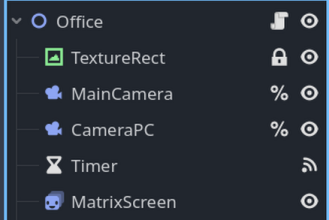
And here’s my code:
extends Node2D

@onready var main_camera = $MainCamera
@onready var zoom_target = $CameraPC

var default_position: Vector2
var default_zoom: Vector2
var is_zoomed = false

func _ready() → void:

default_position = main_camera.position
default_zoom = main_camera.zoom

func _move_camera() → void:
var tween = create_tween().set_parallel(true)
# Pour un mouvement plus naturel (ease in/out)
tween.set_trans(Tween.TRANS_CUBIC).set_ease(Tween.EASE_IN_OUT)
const DURATION = 0.5
if is_zoomed:

tween.tween_property(main_camera, “position”, default_position,DURATION)
tween.tween_property(main_camera, “zoom”, default_zoom,DURATION)
else:

tween.tween_property(main_camera, “position”, zoom_target.position, DURATION)
tween.tween_property(main_camera, “zoom”, zoom_target.zoom, DURATION)

is_zoomed = not is_zoomed

func _on_timer_timeout() → void:
_move_camera()
The issue I have right now is that my tween animation is working but my TextureRect is getting stretched during the zoom, and the zoom displayed is not the one displayed on my 2D dev screen.
I’m sure it’s fairly easy but I’m struggling a bit to understand how to do that.
Thank you for the help!