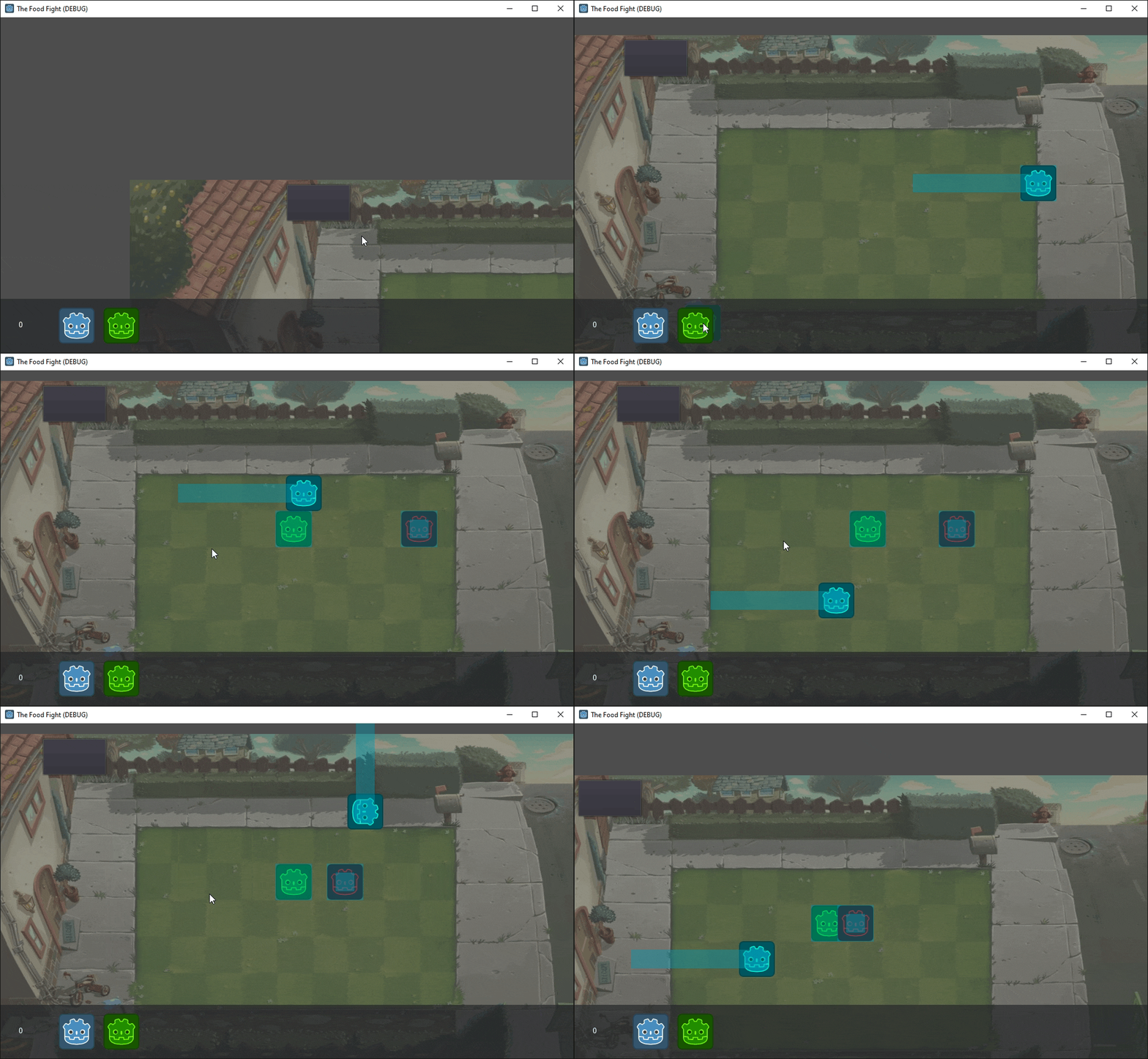
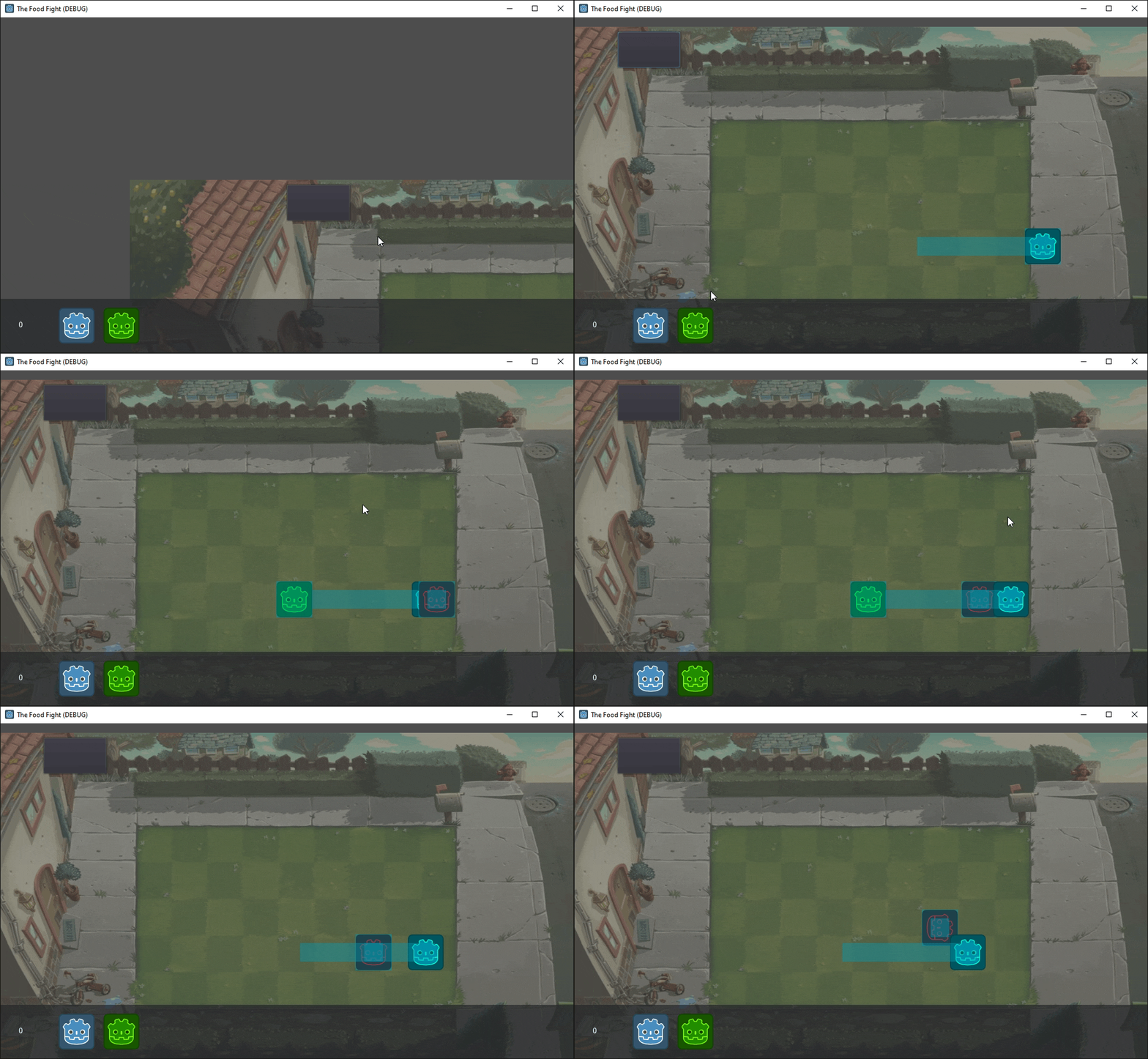
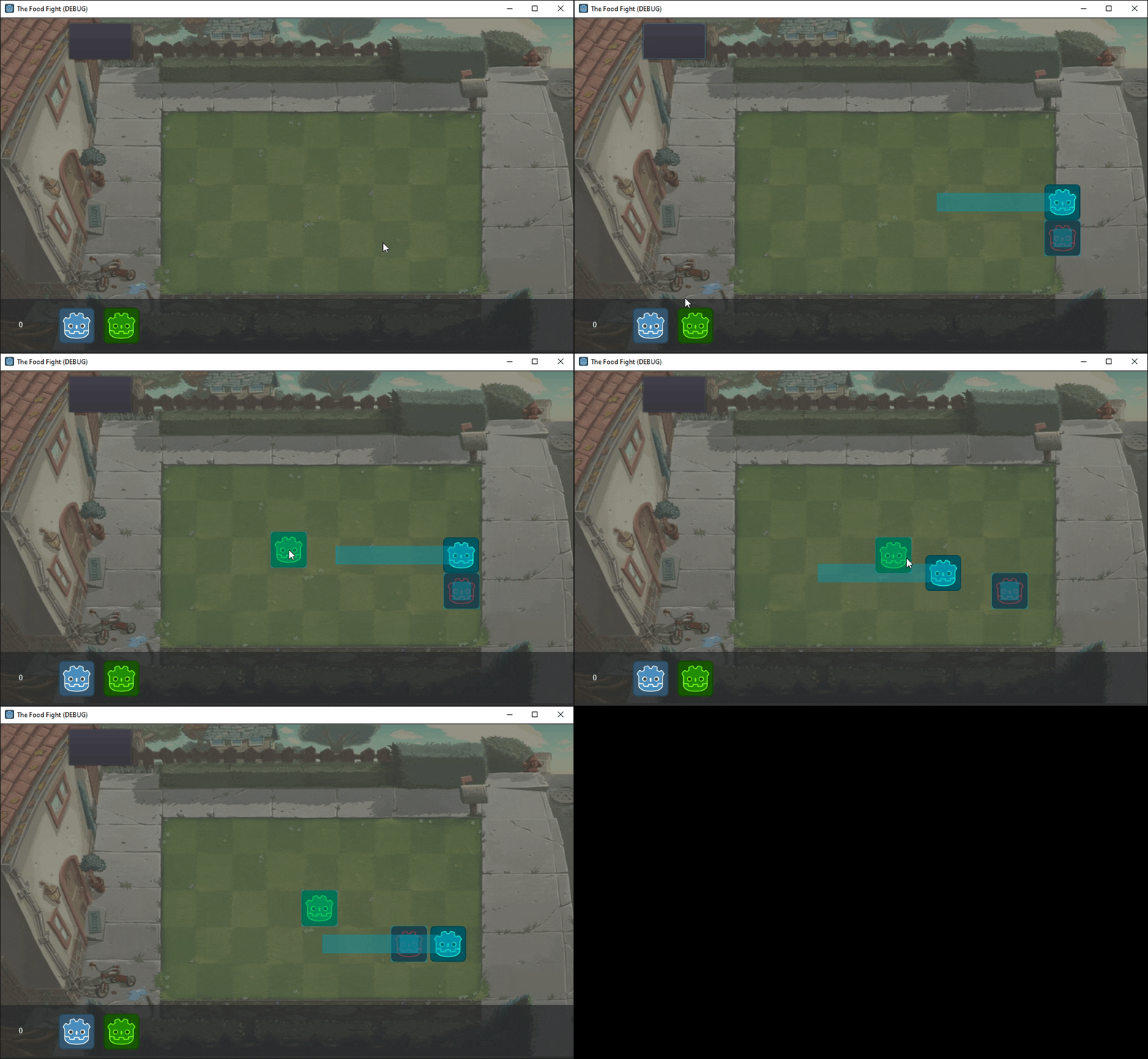
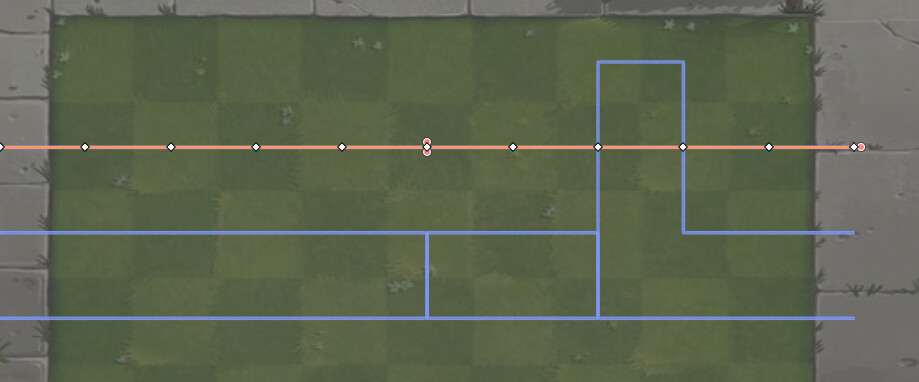
I’m attempting to parent the parent of this scripts node, which is a PathFollow2D, from current_parent to new_parent, AND set current_parent to the nearest offset of new_parent, which is a Path2D. I keep fiddling around, and either it does parent but does not follow the offset accurately at all, or does not parent to the Path2D at all.
I have a hard time figuring out how the Path2D stuff works, so if the issue is in front of me I apologize
func _timeout():
	var lanes = get_tree().current_scene.get_node("Lanes").get_children()
	var nearest_bakedpoint = lanes[0]

	for lane in lanes:
		if lane.curve.get_closest_point(self.global_position) < nearest_bakedpoint.curve.get_closest_point(self.global_position):
			print(lane.curve.get_closest_point(self.global_position),lane.curve.get_closest_offset(self.global_position))

			var current_parent = get_parent()
			var new_parent = lane

			current_parent.get_parent().remove_child(current_parent)
			lane.add_child(current_parent)

			current_parent.global_position = new_parent.curve.get_closest_offset(current_parent.global_position)
			current_parent.offset = new_parent.curve.get_closest_offset(current_parent.global_position)
	...
From the code you got it looks like get_closest_offset returns a float (a distance along the curve), not a position, so assigning it to global_position won’t work. And both get_closest_offset and get_closest_point expect a point in the Path2D’s local space, not global.
So after reparenting, just set the offset and let the PathFollow2D position itself:
I agree with @Baz that you shouldn’t be setting the PathFollow2D’s position to anything; setting the offset sets the position. This is the whole point of the PathFollow2D node.
What do you mean when you say “tried making the PathFollow2D move instead”?
In order to help you, some more information would be nice. For example:
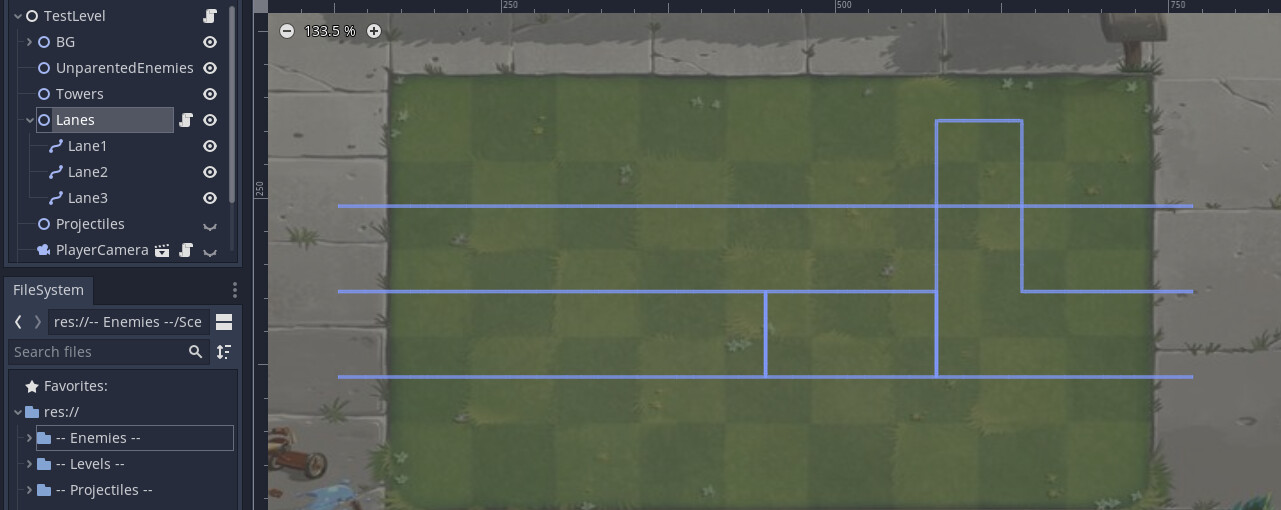
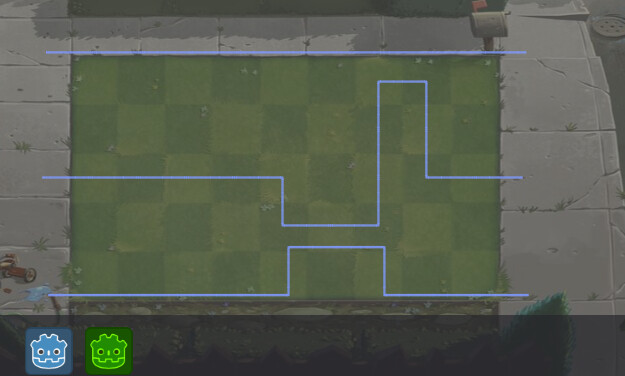
What does the curves you are switching between look like?
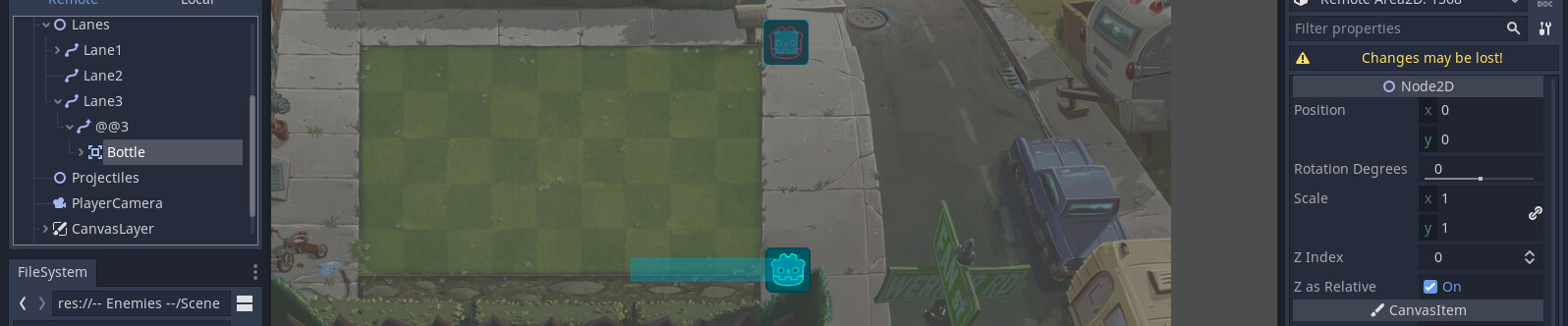
What does the node tree for your moving object, and the overall scene, look like?
Which part of your code is incrementing (i.e. moving) the offset of the PathFollow2D?
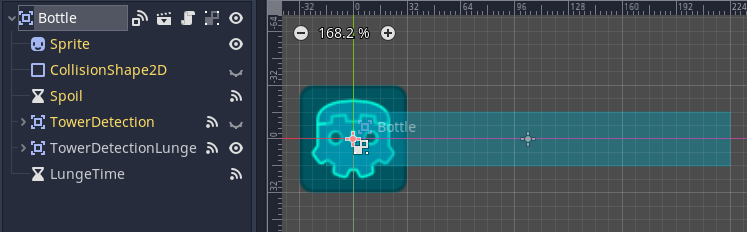
Can you confirm that the child of the PathFollow2D is at its origin
(i.e. position is [0,0,0]?)
The position snapping back is expected, a PathFollow2D’s position is driven by its offset every frame, so any manual position change gets overwritten on the next update. Same reason Sweatix and I both said to only set offset.
The wide turns come from the Area2D sitting away from the PathFollow2D’s origin. The PathFollow2D rotates to follow the curve, so a child that isn’t at 0,0 sweeps an arc around it on every bend. Put the Area2D back at 0,0 and if you need it shifted off the line, use the PathFollow2D’s H Offset and V Offset instead, those are applied along the curve rather than spun around it. Or if the object shouldn’t rotate at all, uncheck Rotate on the PathFollow2D.
For the bottom lane snapping, I think it’s the lane picking loop from your first post. Three things going on in it. get_closest_point returns a Vector2, so the < comparison isn’t comparing distances. nearest_bakedpoint never gets updated inside the loop. And the reparent happens inside the loop, so it can run for several lanes in one timeout and whichever lane passes last wins, which is likely why it always lands on the bottom one. Try restructuring it like this:
func _timeout():
	var lanes = get_tree().current_scene.get_node("Lanes").get_children()
	var follow = get_parent()
	var nearest_lane = null
	var nearest_dist = INF

	for lane in lanes:
		var local_pos = lane.to_local(follow.global_position)
		var dist = lane.curve.get_closest_point(local_pos).distance_to(local_pos)
		if dist < nearest_dist:
			nearest_dist = dist
			nearest_lane = lane

	if nearest_lane != follow.get_parent():
		var pos = follow.global_position
		follow.get_parent().remove_child(follow)
		nearest_lane.add_child(follow)
		follow.offset = nearest_lane.curve.get_closest_offset(nearest_lane.to_local(pos))
The global position gets captured before the reparent since it’s lost during remove_child, and the offset is computed in the new lane’s local space. Sweatix’s questions still stand, a screenshot of the scene tree and the dash code would confirm the rest.
The long rectangle is TowerDetectionLunge, when another Area2D enters it, Bottle increments forwards for a second. I provided the main scene in the 3rd question.
func _process(delta):
	if towerarray.empty():
		if !pause_progress:
			path_follow.offset += speed * delta
			if path_follow.unit_offset >= 0.99:
				print('game over')
				queue_free()
# for bottle
	if pause_progress:
			position -= transform.x * 200 * delta
extended code which Bottle uses.
It increments the offset of the PathFollow2D until TowerDetectionLunge detects an Area2D and makes pause_progress true for the time of the lunge, incrementing Bottle until the end of func _on_LungeTime_timeout():
I’m wondering if the timeout measured from Bottle instead of the follow, then zeroed Bottle after setting the new offset? Something like this in the code from before:
func _timeout():
	var lanes = get_tree().current_scene.get_node("Lanes").get_children()
	var follow = get_parent()
	var bottle_pos = global_position
	var nearest_lane = null
	var nearest_dist = INF

	for lane in lanes:
		var local_pos = lane.to_local(bottle_pos)
		var dist = lane.curve.get_closest_point(local_pos).distance_to(local_pos)
		if dist < nearest_dist:
			nearest_dist = dist
			nearest_lane = lane

	if follow.get_parent() != nearest_lane:
		follow.get_parent().remove_child(follow)
		nearest_lane.add_child(follow)
	follow.offset = nearest_lane.curve.get_closest_offset(nearest_lane.to_local(bottle_pos))
	position = Vector2.ZERO
I’m gonna base my initial response on the quotes from above.
First off, It’s not a trick question. I am plainly asking how the node is turning to verify my understanding of your project. From the information you have given me, I can only assume that the turning is produced by the PathFollow2Ds’ motion as a result of incrementing their offset values. Therefore, the only way in which the “turning problem” (where the sprite is orbiting around its real position) could occur is, if you are offsetting the Bottle’s sprite to something other than [0,0]. In simpler terms, the PathFollow2D is where you want it to be, but the sprite inside the Bottle is not. Please check this.
Secondly, your game is not grid-based. You might be creating curves that align with the grid seen in the picture, but that doesn’t mean that the game is grid-based. A grid-based game uses discrete data structures (such as 2D arrays) to store and represent an object’s position. The motion of objects are then, usually, interpolated between position changes to make the game look smoother than it really is – systematically speaking. Your game does not do this, and that is plainly visible from your screenshots which contain unaligned curves.
I don’t understand what you described here. It’s a little abstract for me. Could you elaborate?
I think this is an inherent issue with your system. When you offset the… I don’t know… bottle, you are disrupting the path-based motion you are trying to achieve. You can imagine the PathFollow2D being at a corner where such a transform.x * 200 * delta displacement moves it outside the path you have created.
Perhaps there is something I’m not seeing but I think you need to understand the difference between the game’s systems, and the graphical representation of those systems. Focus on your usage of the PathFollow2D’s offset and implement any animation-related offset afterwards – if that is what the transform.x * 200 * delta is. The game is fundamentally based on curves (not grids), so get that right first.
In summary, you should, at least temporarily, remove any code that manipulates the position of the so-called bottle and focus on moving the PathFollow2D along its path correctly. When you have that working, you can re-implement whatever you like.
The thing you are trying to make is really simple, and while I can’t say I would do it the way you’ve done, you can still make it work with the setup you’ve got. You just need to make that distinction between what’s visual and what’s systematic.
I appreciate your replies to all of my questions. If you have any questions of your own in response to this post, or there’s something about this response you didn’t understand, please describe those.
I know it wasn’t a trick question, I just didn’t really understand what you meant. But yes, the turning is produced by having PathFollow2Ds’ offset incremented, ̶a̶r̶e̶ ̶y̶o̶u̶ ̶s̶a̶y̶i̶n̶g̶ ̶t̶h̶e̶r̶e̶s̶ ̶m̶o̶r̶e̶ ̶w̶a̶y̶s̶ ̶t̶o̶ ̶m̶o̶v̶e̶ ̶i̶t̶ ̶a̶l̶o̶n̶g̶ ̶a̶ ̶̶P̶a̶t̶h̶2̶D̶̶ ̶w̶i̶t̶h̶o̶u̶t̶ ̶p̶r̶o̶g̶r̶e̶s̶s̶i̶n̶g̶ ̶i̶t̶’̶s̶ ̶o̶f̶f̶s̶e̶t̶,̶ ̶a̶n̶d̶ ̶y̶o̶u̶ ̶w̶e̶r̶e̶ ̶a̶s̶k̶i̶n̶g̶ ̶w̶h̶i̶c̶h̶ ̶o̶n̶e̶ ̶o̶f̶ ̶t̶h̶e̶s̶e̶ ̶o̶t̶h̶e̶r̶ ̶m̶e̶t̶h̶o̶d̶s̶ ̶I̶ ̶w̶a̶s̶ ̶u̶s̶i̶n̶g̶?̶ I just realized you weren’t sure if it was being rotated by the Path2D or some other piece of code that is turning the node, my bad. Yes, I’m aware now that anything under PathFollow2D needs to be at ZERO, it’s been checked and the problem has been solved!
I’m aware the game isn’t systematically grid-based, since I didn’t know how to make it truly grid-based with 2D arrays.
No problem! I don’t have any more questions to ask about the original issue since it’s been resolved.