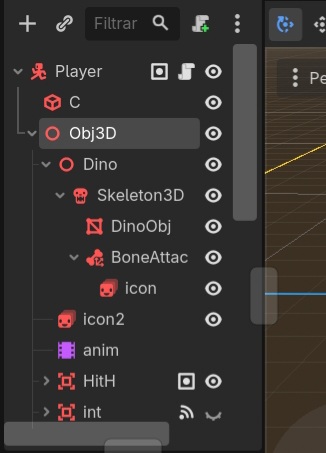
Godot Version: 4.6.2
I have an animal and I need the node to follow a bone on the y-axis. I tried using BoneAttachment3D and did node.rotation.y = BoneAttachment3D.rotation.y, but the result wasn’t the same as the child of BoneAttachment3D. I also tried using global_rotation.y. I’ve been stuck on this for days, can anyone help me?
No, I’m using a CharacterBody3D
What’s the scene tree look like? (Screenshot)
1 Like
And what bone is the BoneAttachment3D node attached to?
1 Like
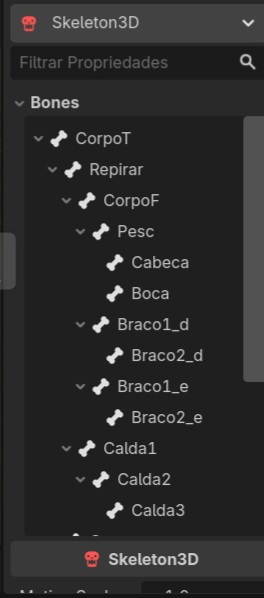
He is connected to the “Pesc”, which is the neck. The “Corpof”, which is the front part of the animal’s body that moves both vertically and horizontally, and the “Repirar” is the breathing. The icon follows the x and y, but for icon2 I need it to follow only the y.
Ok, then I’d try attaching a script to the BoneAttachment3D and just reset the x every frame.
1 Like
It didn’t work. It resets the x-axis, but first it inherits the x-value from the bone and only then resets it. It’s very fast, but noticeable. I tried with global_rotation, rotation , global_rotation_degrees and rotation_degrees. I added an empty child node in BoneAttachment3D with icon2 being a child of that node.
Then you’ll probably have to add a new bone and animate it so it doesn’t move on the x-axis.