Godot Version
4.4.1
Question
I’d like to add my own plugin to the menu. When I activate my plugin, I can see my entry “Options Menu” under Project → Tools, which is great. The entry also disappears correctly when I deactivate the plugin.
However, when I click on it, nothing happens. This is my code:
@tool
extends EditorPlugin

var options_menu_plugin

func _enter_tree() -> void:
	options_menu_plugin = preload("res://addons/options_menu/options_menu_plugin.tscn").instantiate()

	add_tool_menu_item("Options Menu", options_menu_plugin)

func _exit_tree() -> void:
	remove_tool_menu_item("Options Menu")
	options_menu_plugin.free()
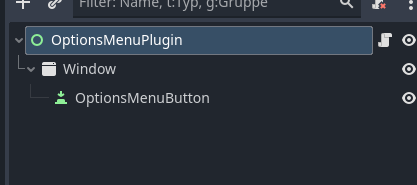
My Node Tree:
I came across this forum post: how does add_tool_menu_item work ?, but I assume it’s still referring to Godot 3 — the function doesn’t seem to accept 3 parameters anymore.