How to use Animation or AnimationLibrary resources for a custom data class

Godot Version

4.5 stable

Question

I have seen many varieties of this question asked in the many places I’ve looked, but no satisfying answers or pointers, as they all end up with issues. I’m hoping I can explain this very clearly here and maybe get some useful insight for me and the community.

If you are kind enough, please read the situation, issues, and solutions I have tried in order to understand what is needed.

The situation:

I have three different types of characters. The only differences between them are a few nodes and their data (like sprites, stats, and animations), so I only have 3 base scenes that I plan to use for all my characters. The base scenes are devoid of the data specific to characters; all of that is set up with a custom resource class called CharacterData. When I instantiate one of the scenes, I assign it a particular character’s data file, which the scene reads and uses to set itself up. I would like to save my animations for each character as resources as well, but there are several issues that seem to make it a very tricky situation.

Animations are played by a character’s states, like Idle or Walk. States are modular and shared between characters, too. For example, one base scene has a state machine with the states Idle, Walk, and Jump. Another has Idle, Walk, and Attack, but no Jump. In my game, each state has a few different animations to pick from, but let’s simplify it and say that each scene has one animation that it needs to play. So, every single character needs an animation for each state that it has, and the 3 types of characters have 3 different state machine setups.

Issue 1: Creating the Animations

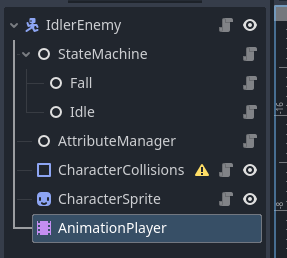
The first pain point is actually figuring out how to go about creating the animations in the first place. Let’s say I use the base scene so I can set it up in the editor: the ideal approach. I go to the AnimationPlayer node to create my first animation for a given character.

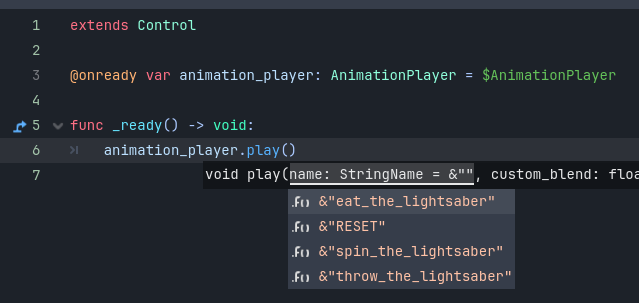
And… I must name it. By hand. By typing in a magic string.

This isn’t really the biggest issue of this post, but it sets off all my programmer alarms. Come to think of it, my states all have this sort of thing in them, too:

animation_player.play("Idle")

It might not seem like a huge problem, but this means I have to just trust myself to not make a typo every time I make an animation, and that it properly matches the code that I have in the corresponding states. Not ideal, not to mention – what happens if down the line, I rename a state? Maybe I change “walk” to “run” for whatever reason. If I had saved 100 animation libraries at that point, they would all break and I would need to go back and fix them.

I would love to type something like “Idle.animation_name” directly in the animation editor as if it were a script, but that’s just not how the engine works.

Bad Solution: Create the animations via code at runtime

You can, of course, make animations in code, at runtime. This might actually work if all you needed to worry about was the sprite. You could just give your data class export variables for the start and end frames of each of the animations, then have the scene make the animations with that info.

But I also need to animate other things, which is why I’m using the AnimationPlayer. I also need to, for example, animate the position of a weapon a character holds as it does its animations, or any other possible thing based on the character. I basically NEED to make my animations visually, in the editor, for this. So this solution doesn’t work.

Issue 2 (The MAIN issue): Animations reference node paths

Let’s put Issue 1 aside for a moment and say I don’t really care about that. I create my animations for a character, then I save the AnimationLibrary so I can use it in the data class. The data class gets this line:

@export var animations: AnimationLibrary

Then I go ahead and instantiate my scene at runtime, it adds the library to the AnimationPlayer, and boom. My states call magic string names for the animations, but it works like a charm. Until… it doesn’t.

Animations are based on node paths from the AnimationPlayer’s root node. So let’s say my scene looks like this:

  • Character
    • Sprite
    • SomeOtherNode
    • AnimationPlayer

Then, after I have all my animations done and saved for a few dozens of characters, during development, I decide… you know what, the Sprite node should actually be a child of SomeOtherNode. So I move it there, and now my scene is:

  • Character
    • SomeOtherNode
      • Sprite
    • AnimationPlayer

Then I run the game again, and… all my animations no longer work. Because the node path from Character to Sprite has changed, and all my animations were saved before that. So now, I have to go through hundreds of animations to fix them all, or write some kind of script or use an addon (there is an addon someone made for this!) to do it all at once. This can’t possibly be a good approach if it’s so brittle.

Bad Solution: Don’t save any animations as resources. Leave them all in the base scenes, in the editor.

This solution kind of works, actually.

Let’s say I want to make animations for my character Timmy. I go into the inspector. Now, this time, instead of calling his idle animation “Idle”, I instead call it “TimmyIdle.”

I make all his animations, then I just leave them there. I don’t save them as resources. Then I go ahead and make another character’s, Bob’s, animations, in the same AnimationPlayer. I name them stuff like “BobIdle” and so on.

Then, I put this in my CharacterData class:

@export var character_name: StringName

Now, what you end up with is one huge AnimationLibrary in the editor, with all the animations inside the AnimationPlayer node, organized by character name. It’s not really hard to sift through – there’s even a built-in filter for animations!

Then, when my character states call the animation they need, they just do something like this:

animation_player.play(character_name + "Idle")

Presto. It works. And why is this a solution to the Issue 2?

Because if you leave all your animations in the editor, then change your node paths around during development, the AnimationPlayer automatically updates all of the node paths for you. So the problem is entirely solved.

You might even be able to have a separate library for each character instead. I just haven’t tested that. But that might be better, assuming it still updates all the node paths for you automatically in each library.

So why is this solution bad?

Well, the most obvious reason is because… well, I don’t actually know if this would cause performance or memory issues under the hood, but isn’t it messy and icky regardless? You just clump all of your hundreds of animations in one spot.

Is it memory-heavy or performance-heavy? I don’t actually know if each scene would have a copy of this huge library at runtime, or if the library would just work exactly like other resources and wouldn’t be duplicated with every instance.

The other reason it’s bad is because, well, it still doesn’t solve issue 1. I can be happy with all my animations, until one day I rename a state for whatever reason, and then I have to fix ALL of them. And remembering them and typing magic strings as I create them just isn’t good, either.

Another Bad Solution for Issue 1: Save individual Animations, have the scene name them according to the states it has

This might be the smartest solution I can think of, but I haven’t tried it yet.

Instead of one CharacterData class, I would use that as the parent for 3 different data classes: one for each type of character. So I would basically have CharacterData1, CharacterData2, CharacterData3 that all extend CharacterData.

Each class would have nothing but a few variables for each animation, like this:

@export var idle_animation: Animation
@export var walk_animation: Animation
@export var jump_animation: Animation

Then, each base scene could do something like this:

var data: CharacterData1 //set when instantiated
... //other vars
func _ready() -> void:
    var library := animation_player.get_animation_library("") //gets the base library
    library.add_animation(idle_state.state_name, data.idle_animation)
    library.add_animation(walk_state.state_name, data.walk_animation)
    library.add_animation(jump_state.state_name, data.jump_animation)

I assume this would work, and it would eliminate the issue of the magic strings. Now when I create the animations in the editor, I don’t have to worry about whatever I call them as I’m setting them up. (Still a bit awkward that I have to name them something as I create them, but eh, that doesn’t matter)

But there’s still the elephant in the room. Issue 2. There would be no way to fix Issue 2 this way, either.

And now there’s a whole other issue, albeit it’s a much slighter issue: Now I’ve created 3 more classes I didn’t need before, AND they all have overlapping variables. Remember that my states are modular? So if two classes have a Jump state, that means I need to put a variable “jump_animation” in those two, but not the other one. Duplicated code for no real good reason.

But… maybe I could just put every animation variable in the base class instead, and just keep those variables null for the characters that don’t need them. Anyway, since this approach doesn’t solve Issue 2, I don’t think I’ll be doing this, though.

My plea for help

Is there no way to solve both of these issues in a clean, elegant way? I have seen that quite a few people have asked this question over the years, but every thread I read either ends with them giving up, or people not giving good answers, or them saying “thanks!” and closing the thread, thinking they’ve solved the issue, when they haven’t. I want to leave my thread here up until I hopefully find an answer. And if I find it myself, I’ll update this.

For the time being, I’ll be going with the “one giant library in the editor without saving resources” approach. If you don’t know a good solution to both issues, but you could at least tell me whether the giant library approach would be okay or would use a bunch of memory/tank performance (assuming I’m instantiating about 30 or more characters in a scene at once), then I would appreciate that, too.
1 Like

How many different characters in total?

I guess I just don’t see what the problem is…

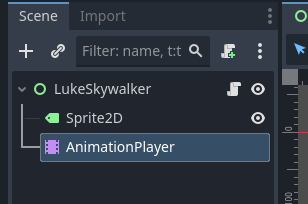
You have a Scene (in your case, a character):

You create your animations in the AnimationPlayer node using the Editor:

You have to access the animations in code via Strings, but the Editor will help you with autocomplete:

And if you ever reparent said Node, the AnimationPlayer will not break:

Maybe around a hundred to start, hopefully more for a very long time to come.

The scene has no data in it. It cannot know what the animation names are, because they are not in the scene. They are saved separately, as Resources in the data class. So there is no autocomplete.

  1. Create animations
  2. Save the AnimationLibrary as a Resource to the disk
  3. Put it in the data class for the character
  4. Attempt to have the character read the data class in order to set up its animations
  5. If you reparented nodes, it no longer works, because the character is using an AnimationLibrary that was saved from when the node paths were different. It is not using anything in that was in the editor.

The scene logic should be separate from the data.

1 Like

Store matching metadata in nodes and animations when creating animations, and re-target based on metadata when assigning animations.

Seems to me like you are using a deeply flawed design for your needs.

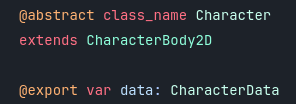
The simplest approach that comes to mind is to have one Character class (that can be made @abstract in Godot 4.5) which every character inherits from. That is the one and only base class you will need. You will declare common properties inside: name, age, level, whatever it is that your characters need.

You can have yet another custom class used for stats, that inherits from Resource inside this base Character class.

Every time you want to make a new character, you create a new scene that inherits from it. You add an AnimationPlayer node where you create all animations for said character. Since each character has different animations, you need to create one distinct node with distinct animations for each. Likewise, each character looks different, so you will have a Sprite2D node that points to a different sprite for each. The same for Stats and for every other unique character feature.

I see no advantage in this case for creating everything from scratch using code (an empty scene that you then make into a Character). Even if you were to want randomly generate characters, that would still not be the ideal approach.

1 Like

Yeah. Every problem that takes that much text to explain almost certainly indicates a bad architectural approach.

So, I went through a whole arc of asking around the internet for how to structure my scenes, and this seemed to be the most agreed-upon approach by a lot of experienced devs. My post has a lot of text to explain the situation, not the scene structure, lol.

The issue with scene inheritance that I was told: apparently, it’s really brittle. If you’re inheriting scenes, then change anything about the base scene, you can break things in all of the inherited scenes. Someone who helped develop the engine told me they wish they never added the option to inherit scenes, lol.

It’s really simple: you just have one scene with all the right nodes in it, and then a custom Resource to define things like stats, etc. You save those separately as .tres files.

The base scene isn’t “empty” per se; it has nodes and stuff, just no actual character-specific data. Base scene:

Then you just have a class as a Resource that does this:

class_name CharacterData
extends Resource

@export var attributes: CharacterAttributes
@export var collision_shape: Shape2D
@export var sprite_texture: Texture2D
@export var sprite_hframes: int
...etc

So, exactly like you were saying: a Resource to define things like the stats. In your approach, why create a Resource for the stats if you’re going to have a different scene for each character anyway? I would just put the stats in the base scene for each character in that case, and not save any .tres files.

If you’re using Resources, then use them for everything that is character-specific. So in my mind, that includes Animations, too.

However, I’m not trying to fight you here; I think you are totally correct that if the Animations are different for each character, then it might just be the case that you need a whole new scene for each character, because inherently, Animations are based on node paths. If the Animations need to know the node structure of the scene, then you should maybe just make them in individual scenes.

Still, I’m not sure what I would do about my modular states. Let’s say I do exactly as you say, and I just inherit the base scene for each character. That would include the states. Or, maybe the base scene doesn’t have the states, and I just add a state machine Scene in after inheriting the base scene, depending on which state machine I want the character to have. Then I go to make the animations.

This would result in Issue 1 in my post, right? Because the states already have the logic in them for how they play animations. If the Idle state says:

animation_player.play("Idle")

Then when I make a new animation, I MUST name it “Idle” if I want it to be played during the Idle state. If I ever change that string in the base Idle node, then I have to go through every scene for every single character I created and change the names of all of their animations to reflect that. Not to mention needing to remember what each animation must be called as I make them. Just seems really inflexible and brittle to me.

So what would be the way around that? I genuinely do not mind the idea of a different scene per character, so long as it’s not prone to breaking easily or flimsy and super open to human error.

1 Like

I would just use scenes as lightweight objects, they are data containers and they dont have to be enormous sprawling worlds, they can also be rows in a database table.

It is true that scene inheritance has some issues, however I was not suggesting inheriting scenes. You simply inherit the class.

# character.gd
@abstract class_name Character extends Node

@export var character_name: String
@export var stats: Stats
# stats.gd
class_name Stats extends Resource

@export var strength: int
@export var agility: int
@export var mana: int

Every time you need to create a new character, you create a new scene and you inherit from Character:

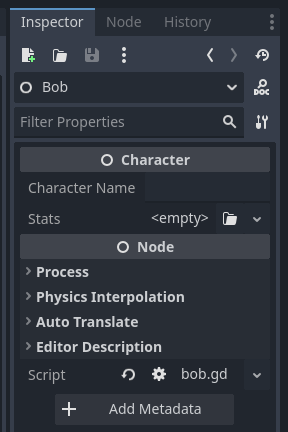
In the above example, each node added is unique, because each scene is unique. Thanks to the @export variables, you can also edit that scene’s properties in the inspector:


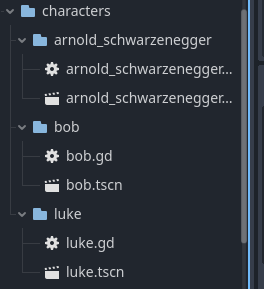
You then have one scene per unique character, so your project folder might look like this:

You might also store all assets tied to a character in their specific directory (sprite sheets, audio, etc.).

1 Like

If you need any additional connectivity information, as you obviously do - store it in object’s metadata, as I said above. Use tool scripts to relink whatever you need relinked whenever you need it relinked, based on that connectivity metadata. Problem solved.

I actually started out doing this, but came around to doing it the current way instead, since I didn’t see the reason to create a whole new scene if all the nodes were the same in every one of them. Let’s say the only difference between characters is their animations and sprites. Doesn’t it seem folly to make a new scene with unique nodes for each?

I’m also instantiating my characters procedurally and randomly on the maps of my game. So I save their data file (like bob.tres), then for a specific map, I store an array of these .tres files inside a Map resource. Then all the map spawner has to do is say, “randomly pick a data file from the Map resource, instantiate the base scene, and then give the data file to the base scene”. Extremely clean and easy.

So, Bob, Arnold, and Luke all have, say: a Sprite, an AnimationPlayer, an Area2D, a CharacterBody, a CollisionShape, a StateMachine, and all their states are the same, too. Are you saying I should create that scene over and over again for each of them? It makes more sense to me to just use one scene.

And then if I were to make a different scene for each character, how would I give them to each Map resource? By exporting arrays of PackedScenes instead? Those are less type-safe, so it seems not as great…?

Or, are you suggesting that I only create a new scene for each set of animations?

So, basically, the base scene just has the Area2D, CharacterBody, CollisionShape that all characters share and never get animated… and then anything else that needs to be animated, like the Sprite, Weapons, etc., all get their own animation scenes? Like the Bob one you created there.

EDIT:
By the way, I’m already doing this, so I do indeed know how this works:


The data has things in it like the stats, sprite, etc. Just to show you that I am on the same page as you with the resource thing.

1 Like

I mean, I already considered using a tool script for this, but it just sort of seemed like overkill to create a whole tool just to rename animations or node paths whenever I change a name or node path. It just felt like there had to be a simpler way to just have it work by setting it up intelligently. I mean, the editor already fixes the node path issue for you, too, if you just keep the animations in the editor instead of using them as resources.

I do know that someone has already made an addon for changing the node paths of saved animations to make it easer – so someone else out there had this same issue and made a tool for that part.

My other issue with the named states just seems like it should be really stupidly simple, though. A state might be programmed to play animations named “A,” “B,” and “C”. How do I ensure that when I make new animations, I give them the right names?

Yeah, I could make a tool like the addon I mentioned, where I could input some animation libraries and loop through the keys to change their names, but… again, just seems so complex for no reason.

I’ve actually already made this game on a smaller scale, in a different engine. Now I’m coming to Godot because I just love it way more, and I wanted to remake my game at a higher quality than before. But I’m just stuck on this animation thing. Everything else has been super simple.

So I’m not sure what you’re really getting at or mean here, and how it applies to this. Maybe you could elaborate on how it’s related?

I know this is probably not related to what you’re talking about here, but I did actually try the pure code approach, where each base scene is a single class that takes required _init parameters, and then they construct themselves in the scene tree based on the data you pass to them. But this way, it’s kind of impossible to set up animations in the editor.

Each node is the same, but each node hold different data. It does not seem folly to make a new scene with unique nodes for each, because that is exactly the same thing you are doing in your code. I’m simply saying the better way in this case is to do it in the editor instead.

A couple of reasons for that:

  • In general, if you can do something in the editor that you can do in scripting, it is more performant to do it in the editor (since it runs C++ directly). It will often not matter, but I’ve included this so I can have more bullet points.
  • You get easy access to everything you don’t have in your current setup, like autocomplete for animation names and custom inspector properties. And animations not breaking if you rearrange a scene.
  • It is arguably cleaner and easier to keep track of. You have one scene for each character, which means if you want to adjust anything or add anything to any character, you don’t have to touch anything else but that one character.

Now, on the issue of creating random characters, you can use templates. The exact same idea but instead of Bob.tscn, Arnold.tscn and Luke.tscn you would have Builder.tscn, Actor.tscn and Swordsman.tscn.
You then have an array of data (for example) that you use to generate said characters:

var npc_scenes: Array[PackedScene] = [
    load(res://builder.tscn),
    load(res://actor.tscn),
    load(res://swordsman.tscn),
]

for i: int in randi_range(5, 25):
    var npc_type: PackedScene = npc_scenes.pick_random()
    var npc: Character = npc_type.instantiate()
    npc.character_name = npc_names.pick_random() # From an array of Strings
    npc.stats = Stats.new().randomize() # Custom method of custom Resource
    # Do something with the NPC (add_child to map node, to manager, etc.)

You could also use composition to create more complex components. Have a look at this video for inspiration (also look at how other devs structure their characters/entities):

So, I’m already using composition and understand how all that works. Using the editor and making separate scenes for each character is all well and good, and maybe I will try it then (it just seems tedious to have to remake the same exact scene a hundred times, and if I want to change how it works, I have to change all of them…)

But I still have my Issue 1, then. My states are components, yes? So for example, my Walk state says this:

animation_player.play("Walk")

So, now I go and create the scene for Bob. I add all the nodes he needs. Then I start making his animations. I have to be sure, though, to name the animations correctly. That’s the problem here. My Walk state is being used by, let’s say 90% of my characters. So I create 500 characters with an animation called “Walk”. Then one day I decide, “Actually, Walk should be called Run” or something, whatever. But I’ve dug myself a hole, so I’m stuck; I can’t rename it without breaking everything. Or, even if I don’t rename anything ever, let’s say I’ve got 20 different animation names to keep track of. I need to just trust myself to type in the all the names correctly every time I make animations.

So the issue is not that I don’t have autocomplete. I have predetermined animation names.

Maybe I could do this instead, in the state:

animation_player.play(animation_name)

But what would set the name?

Maybe the state itself exports an Animation resource:

@export var idle_animation: Animation
@export var animation_player: AnimationPlayer

var animation_name: StringName

func _ready():
     animation_name = animation_player.find_animation(idle_animation)

So then I just save the animations that I make in the editor as .tres files, then hook them up to the states for each character. If I reparent some nodes later and end up changing node paths in that one scene, then I can just re-save the animation. So basically, it doesn’t matter what I name it in the editor. How does that sound?

I still have a major gripe with making a scene for every character separately, though. What if I want all of my characters to have the same exact node structure? I make 100 characters, and then I realize, “Oh… this node should be here, not there” or “Oh, I should add this node to all of my scenes.” Now I have to change it manually in every single scene. Seems like a really bad idea…

No im really giving my most simple answer to the question. It seems to me that data re-use and all that has overcomplicated your task. There really is essentially a unique set of data for each character, so i would go ahead and just create a scene for each unique character. Then i’d maybe try compressing, and only do that if neccessary.

You have to create a new scene that represents a character for every unique character, yes. They all have things in common (at the class level: properties, methods, constants). You can extract those common things into a class. If you want to change something about a single character, you simply change stuff in that character’s scene (if you want one specific character to also have a hat, you add that hat to the scene). If you want to change something about every character, you simply change stuff in the class.

If you suddenly want every single character to also have an animated cape, then you create a scene for the cape, animate it there, and either add that specific scene to every character scene manually (what you want to avoid), or instantiate it in the base class:

# character.gd
class_name Character extends Node

const CAPE: String = "res://cape.tscn"

func _ready() -> void:
    add_child(load(CAPE).instantiate())

Why I don’t recommend doing the same things with the AnimationPlayer is that in this case, the cape is the same for every character, whereas animations are not (I am assuming unique animations for each character).

You could build your characters from scratch by manually adding every component with code:


const SPRITE: String = "res://sprite.png"

func _ready() -> void:
    var sprite_node: Sprite2D = Sprite2D.new()
    sprite_node.texture = load(SPRITE)
    add_child(sprite_node)

But you’re really wasting a lot of time here for no gain. And it’s also slower than building the scene in the editor and loading it at runtime. I see no benefit to doing this in this particular case.

You want to figure out your state machine design for this. Does every single character have the exact same possible states? The exact same state switch conditions? For example you might want a Berserker class that has a Rage state that other characters do not.
You can solve this in a multitude of ways, most of which will have you adding a state machine to each character scene (as you’ve shown above) and setting up the states. Of course you don’t want to do this every single time in the exact same way (which is why you might want general states that you set up for each subclass), but some level of scene setup will be necessary. At the very least setting up some signals (see the video in my previous post).

You don’t. Godot autocompletes animation names. If this is an insurmountable potential problem that you have, store the names in a constant at the top of each character script. The debugger will print an error when the name is wrong as well (during runtime, so test your stuff!).

You are really overthinking things. Everything is done in each character script. Pass the names to the state machine, or have the state machine signal when it’s time to do something (depends on your design).

You don’t really have to do it this way. I was simply presenting another way which seems to me better suited for your needs as you’ve described them.

1 Like

Ive actually had similar problems on a 3d project. I dived into Godot without knowing much about gdscript and just started messing about with addons and visual editing. I had learned blender about 12 years ago and it was simple to import mixamo animations. The animations in 3d can actually be loaded into other characters so long as they share the same skeleton profile produced in the postimport step.
I never needed to switch animations into different animation players with script, and ive always got animations that simply arent used or are work in progress because some script needs to be added to trigger them and adjust things in the scene.

So, when i load a 3d animated character GLB into godot it always has its own animation player. I then always import an animation tree that i use to define how animations blend together. I can save an animation tree and ive also copied and pasted them in the file view to give one unique properties … this is because i sometimes name animations differently, like “jump, or jump01.01” etc.

The problem i encountered is that i did have to copy the entire character scene file to change the animated model. So i simply duplicated the scripts and programmed in the unique behaviours - its a script and thats its job.

I think probably an architectural improvement would be to have an NPC script that controls a character, so for example a random pedestrian could use the same character model as another.

The answer to this, as far as i can tell right now, is to import the character, add all the bone attachments and collision shapes, then stick it under a node and save as packed scene. Then when i need that again i should be able to load the packed scene and connect up the signals - use the “editable children” setting in the drop down box.

One thing i wanted to mention … often the NPC root node is a CharacterBody3D, (always on my code), so the animated GLB is added as a child node to that …

-CharacterBody3D
    -importedGLB

So it arrives, i unpack, then i make local and save as a packed scene. Then for variables, signal targets etc i would have a script, on the ‘importedGLB’ with variables like

@export var damageSignalTarget 

Then set those up when its imported into any unique character.

Then of course … the problem is that the CharacterBody3D seems to have a script with all the same stuff, like path following, move and slide, etc. That could be done with a base class, or with components, functions that call ‘make_up_your_mind()’ then just access the component and do it.

The state change code could be sent to the script on the ‘importedGLB’ script, so you could just call on its functions from the Character, or the component could do it … but the actual animations dont need to be referenced anywhere else.

2 Likes