Ask your question here! Try to give as many details as possible.
If you share code, please wrap it inside three backticks or replace the code in the next block:
func _ready() -> void:
    print("hello world")
Hello friends from the Godot forum, I am a game development enthusiast from China who has just started using Godot. Currently, I am working on a remake of a game called DNF. When I migrated the project from version 4.4 to 4.6, the following issues arose, and I am seeking your assistance. This is my first time seeking help on the forum, so please forgive me if I have not followed the forum guidelines.
The issue that emerged after upgrading the replication project from Godot 4.4 to version 4.6 is demonstrated in the video below. The window on the left shows a 4.4 version where the character moves to the edge of the map without any jitter. The window on the right shows a 4.6 version where the character moves to the far right of the map and wanders back and forth, causing the map to jitter. What is this issue? Can someone help me understand it?
I have tried both 2D transform-adsorbed pixels and 2D vertex-adsorbed pixels, but neither solved the problem. Is there still something I haven’t chosen properly?
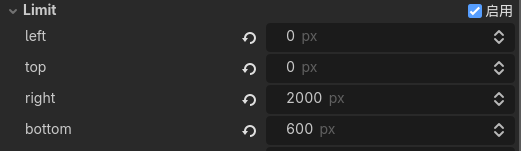
Currently, it has been tested that as long as the size of the map’s x-axis does not exceed the range of 1500px, the character will not experience jittering when moving to the edge. This is incredible
extends CharacterBody2D

func _process(delta: float) -> void:
	var fx = Input.get_vector("ui_left", "ui_right", "ui_up", "ui_down")
	velocity = fx * 250.0
	move_and_slide()
I have rewritten a project, which only includes the code for character movement, with no code control for other nodes. However, the problem still persists.
Try making them slightly smaller, see if the problem goes away. Then try removing them. See if the problem goes away. The point of this is to try and find the problem - these are not recommended solutions.
Currently, after testing, as long as the x-axis size of the map does not exceed a range of 1500px, there will be no jitter when characters move to the edge. This is incredible, but if all maps are limited to an x-axis size of 1500px, it will restrict the playability of the game.
Thank you for providing the step-by-step inspection method. Currently, this issue has been submitted to the official and identified as a problem with camera related code after version 4.5. It may be fixed in the future.