## I built 4 free browser tools for game art — no install, no watermark
Ten years as a game art director, and I still spend more time wrestling with tools than making art. Every “free” online tool either watermarks your output, limits exports, or ships your files somewhere.
So I built my own. Four tools, all free, all run in the browser — nothing installs, nothing uploads. Here’s what each does, with Godot-specific notes.
### 1. Sprite Atlas Packer
![Sprite Atlas Packer]
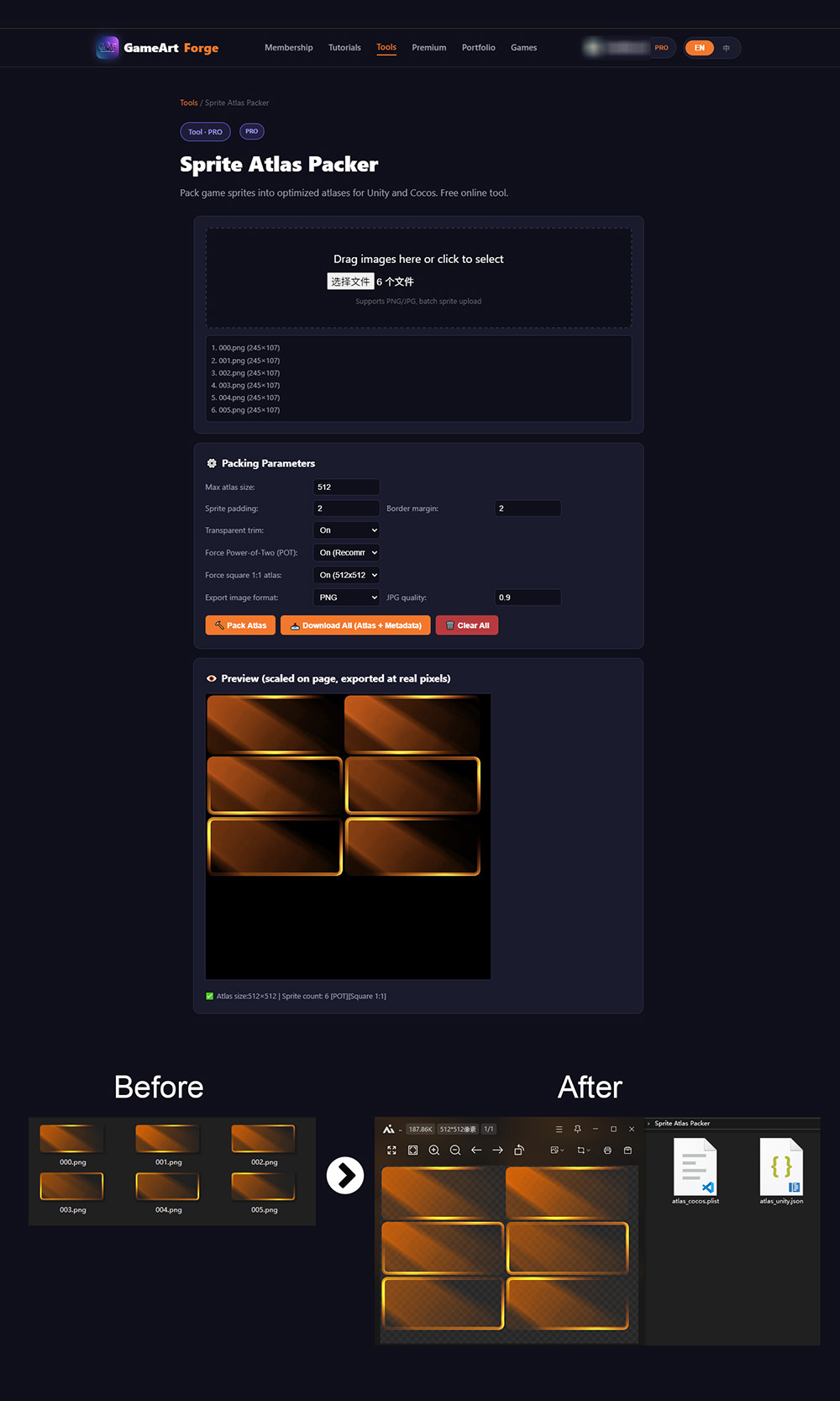
Drag & drop a folder of PNGs, get back a power-of-two atlas + coordinate file. Exports **Godot JSON format** — load it with `AtlasTexture` or parse the JSON in GDScript to set region rects.
- 2px padding + 1px extrude built in (extrude kills edge halos that padding alone doesn’t fix)
- Auto-trims transparent pixels
- Also exports Unity JSON, Cocos Plist, generic XML
> Godot tip: Generate the atlas, import the texture, then create `AtlasTexture` resources in the editor using the JSON coordinates. Or write a small `@tool` script that reads the JSON and creates AtlasTextures automatically.
### 2. PBR Converter
![PBR Converter]
Upload one albedo texture, get roughness, normal, metallic, and AO maps generated in-browser. Adjustable strength per channel.
> Godot tip: The generated maps plug straight into StandardMaterial3D’s Albedo / Normalmap / Roughness / Ambient Occlusion channels. Works in Godot 4’s Forward+ and Mobile renderers.
### 3. Color Palette Generator
![Color Palette Generator]
Upload concept art or a screenshot, extract a harmonious palette via K-means clustering. Exports ASE (Adobe Swatch), CSS variables, JSON, or a PNG swatch sheet. WCAG contrast checker built in.
> Godot tip: Export as JSON and load it in GDScript with `JSON.parse_string()` — perfect for generating UI themes programmatically.
### 4. Icon Exporter
![Icon Exporter]
Drop one 1024×1024 PNG, get a full icon set: iOS, Android, Web favicon, Windows ICO. All standard sizes, structured zip download.
> Godot tip: Drop the generated icons into `Project Settings > Application > Config > Icon` and the platform-specific export presets.
### Why browser-based and free?
1. **No install** — open a tab, drag a file, done.
2. **Privacy** — everything runs client-side. Your art never leaves your machine.
3. **Indie devs are broke** — paid toolchains are a real barrier. These will always have a usable free tier.
### Roadmap
Batch PBR processing, normal-from-heightmap, sprite sheet splitter, animation preview. Tell me which one you want first.
-–
All four tools are live and free: GameArtForge - Online Art Tools
No sign-up for core features. Full tutorials at GameArtForge - Game Art Tutorials
What’s the game art tool you wish existed but can’t find? I’m always looking for the next thing to build.
-–