I appreciate your honesty, so harsh criticism is perfectly fine too! 
Watch the process on youtube:

Scalalable Vector Shapes 2D in the asset library:
And on github:
I appreciate your honesty, so harsh criticism is perfectly fine too!
Watch the process on youtube:
Scalalable Vector Shapes 2D in the asset library:
And on github:
That seems neat. Can you add a Skeleton2D to it and animate it?
At the end of the video I illustrate how you can animate curves and rotation/position using property tracks with an AnimationPlayer.
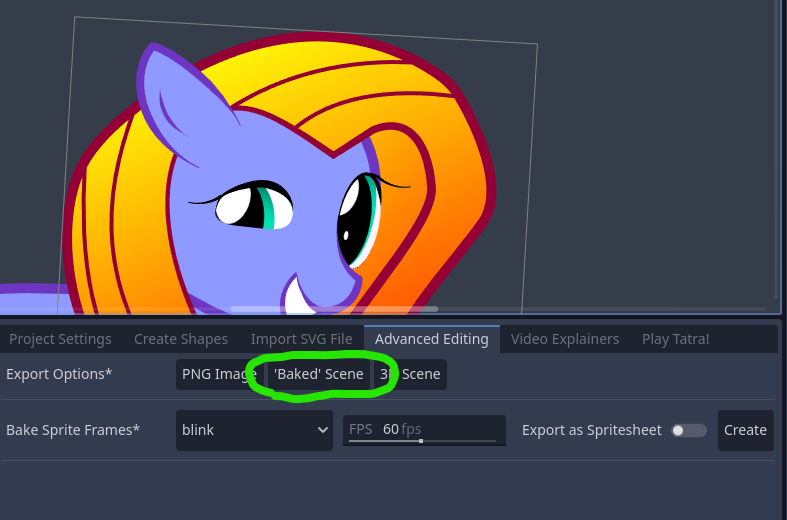
I considered trying to integrate something special for Skeleton2D, but I think the optimal workflow for that would be to use the Export as ‘Baked’ scene button under ‘Advanced Editing’ when you’re done drawing:
This button turns your shape (and children) into just the Polygon2D and Line2D nodes, allowing you to get rid of the dependency on my plugin and use the resulting polygons with Skeleton2D
Alternatively, you can export your animations as a rasterized sprite sheet in that same tab.
The next release of the plugin also ships the pony with some sample animations.
I also have a playlist with video’s about animating, but right now I just wanted to show off my pony a bit  :
:
https://www.youtube.com/playlist?list=PL5lf_BvgORcg1YndZOi9wR_GaAbxqsujh
Depends whether you include building the entire plugin  and all the practice I had with it since.
The drawing took me 3 hours, but I used a visual reference (eye-balling).
Editing and narrating the YouTube video took me more like 40 hours, though, using kdenlive and obs…
Things like layers and opacity are natively built-in into all 2D Godot nodes (CanvasItem), so you do not need to have any plugin for that.
Tracing over a rough drawing or photo is what I do often, but not in this case.
Would you like me to record a short video with a hand-drawn sketch? …I am not a professional artist so it would take quite a while..
..well, I have not followed your course, so could be that some of the terminology you are using does not match my understanding of it…
So in stead of layers, I might say node-hierarchy?
That being said, I can give it a try.
The plugin also has an SVG file importer that I tested a lot in combination with Inkscape SVG files. Thing is that the layers that are in svg are not a one-to-one match to how nodes work, so I end up rearranging the shapes in the scene tree before I get to animating.
Ah thank you. I have heard mention of Krita via a comment on YouTube, which was later deleted, so I forgot all about it.
The comment went: “what you’re building already exists. It’s called Krita and it’s behind a paywall now” .. which I didn’t quite understand, but did feel a little discouraging somehow.
What do you think? Knowing that I’m not in it for the money, but for the joy (and will never make a Krita or Inkscape all by myself), how should I proceed with this hobby?
Ah. But I see now. I have used layers in this way in the gimp to apply effects to raster images in a stacked way… It would be a very cool challenge to build this into the plugin.
But such a layer setup would probably be better in a separate plugin so it could be used with anything in stead of just the scalable vector shapes stuff.
A worthwhile challenge when it comes to code-architecture! …there I go again, because I keep ending up programming tidbits I will never take time to learn art 
Thanks! That’s a really cool suggestion! It’s always a gamble if I will have time or not, but I do think getting inspiration from Krita to do layers is a great idea.
That’s why I love this forum/community.
Ah, I remember now. I think what they mentioned was ‘rive’, which looks like really professional grade animation software, which could be imported if someone would want to build all that..
..I still think my in-editor stuff is useful: there’s lot’s of stuff low hanging fruit that I just do not get to, that are less about drawing and more about quality of life while designing levels:
I’m still chafing at the SVG file importer as well and SVG exporter is on the Todo list as well.
Anyway… I am having a very hard time combining this with a full time job and with fun like making an actual game: