Godot Version
v4.6.1.stable.official [14d19694e]
Question
I might be leaning too hard into the retro style, but I want a lot of my characters to have animated palettes, so I have a shader for that. The problem: my player character is animated through an AnimationTree, and when it’s active, any other AnimationPlayers can’t play their animations, even if the frames have nothing to do with what the other player is animating, so there shouldn’t really be any conflicts. What do I do?
You need to provide more context.
Uh, what context exactly? I’m not sure.
Describe your problem in more details and post relevant code and scene structure.
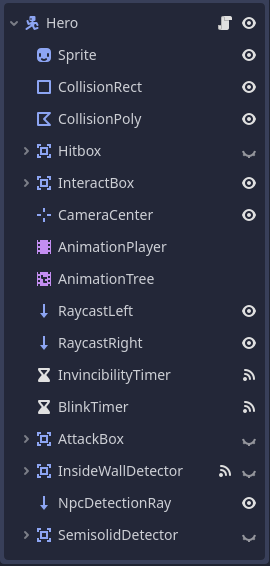
Uh, so, scene structure goes like this:
(if that’s a lot for the player character, plz don’t kill me

)
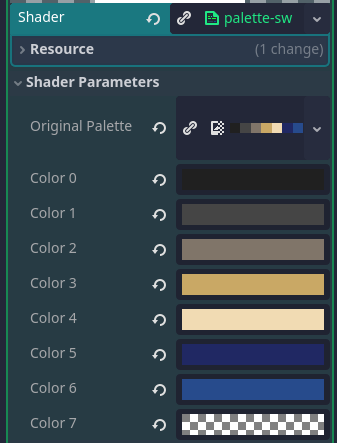
Root node has a shader material attached that works as follows: you throw in a palette image, it gives you an array of colors you can individually replace. I wanna make the character light up for a bit (with new colors chosen from a fixed palette) whenever the player’s energy is fully restored. Since this can happen during any animation, I want it to be separate from them. So I tried making a separate animation in the AnimationPlayer (but not attached to the AnimationTree) and then doing this:
func _ready() -> void:
	PlayerStats.energy_fully_restored.connect(_play_energy_restored_anim)

func _play_energy_restored_anim() -> void:
	$AnimationPlayer.play("full_energy_blink")
I assumed since full_energy_blink consisted of nothing but colors being replaced and didn’t interfere with the sprite’s frames at all, it would work. It didn’t. Then I tried making a dedicated player for the palette animation only, and that didn’t work either. When I try playing it in the editor, the character lights up for a frame before being overwritten by the next frame of the idle animation. I’m starting to think about just doing it in code with a timer or something (but idk how to set up a timer that reliably triggers at intervals less than a second, and also the AnimationPlayer interface seems so much more convenient for this kind of stuff).
Yeah, you can’t do that - as you have discovered. What you can do is either Modulate the Sprite to change the color, or attach a Shader to it and manipulate the Shader through code.
But like, I already have a shader attached to the root node, wouldn’t the two interfere with each other?
What do you mean by that? Which color are replaced with what? How do you “replace colors”?
Like this
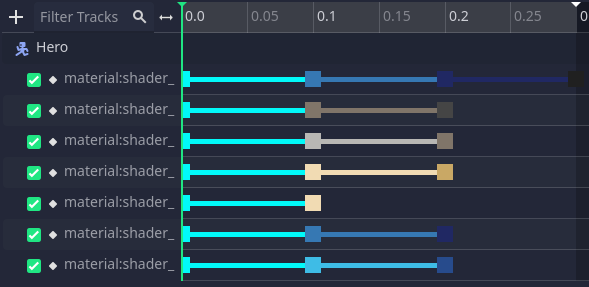
Then I keyed these to the animation track
Just in case, shader code:
shader_type canvas_item;


uniform sampler2D original_palette;
uniform vec4 color0 : source_color = vec4(vec3(0.0), 1.0);
uniform vec4 color1 : source_color = vec4(vec3(0.0), 1.0);
uniform vec4 color2 : source_color = vec4(vec3(0.0), 1.0);
uniform vec4 color3 : source_color = vec4(vec3(0.0), 1.0);
uniform vec4 color4 : source_color = vec4(vec3(0.0), 1.0);
uniform vec4 color5 : source_color = vec4(vec3(0.0), 1.0);
uniform vec4 color6 : source_color = vec4(vec3(0.0), 1.0);
uniform vec4 color7 : source_color = vec4(vec3(0.0), 1.0);


void fragment() {
	vec4 palette[] = {color0, color1, color2, color3, color4, color5, color6, color7};

	int color_count = textureSize(original_palette, 0).x;

	for (int i = 0; i < min(color_count, 8); i++) {
		vec4 color_orig = texture(original_palette, vec2((float(i) + 0.5) / float(color_count), 0));
		if (COLOR == color_orig) {
			COLOR = palette[i];
		}
	}

}
If you want to animate/transition the palette, plug two palette textures into the shader, sample both, and use the mix() function to blend between the two samples. If you turn the mixing factor into an uniform, you can crossfade the palettes any way you like by animating only that mixing factor.
2 Likes
No. The main one may affect the second one, but it’s already affecting the sprite anyway in that case, so no change.