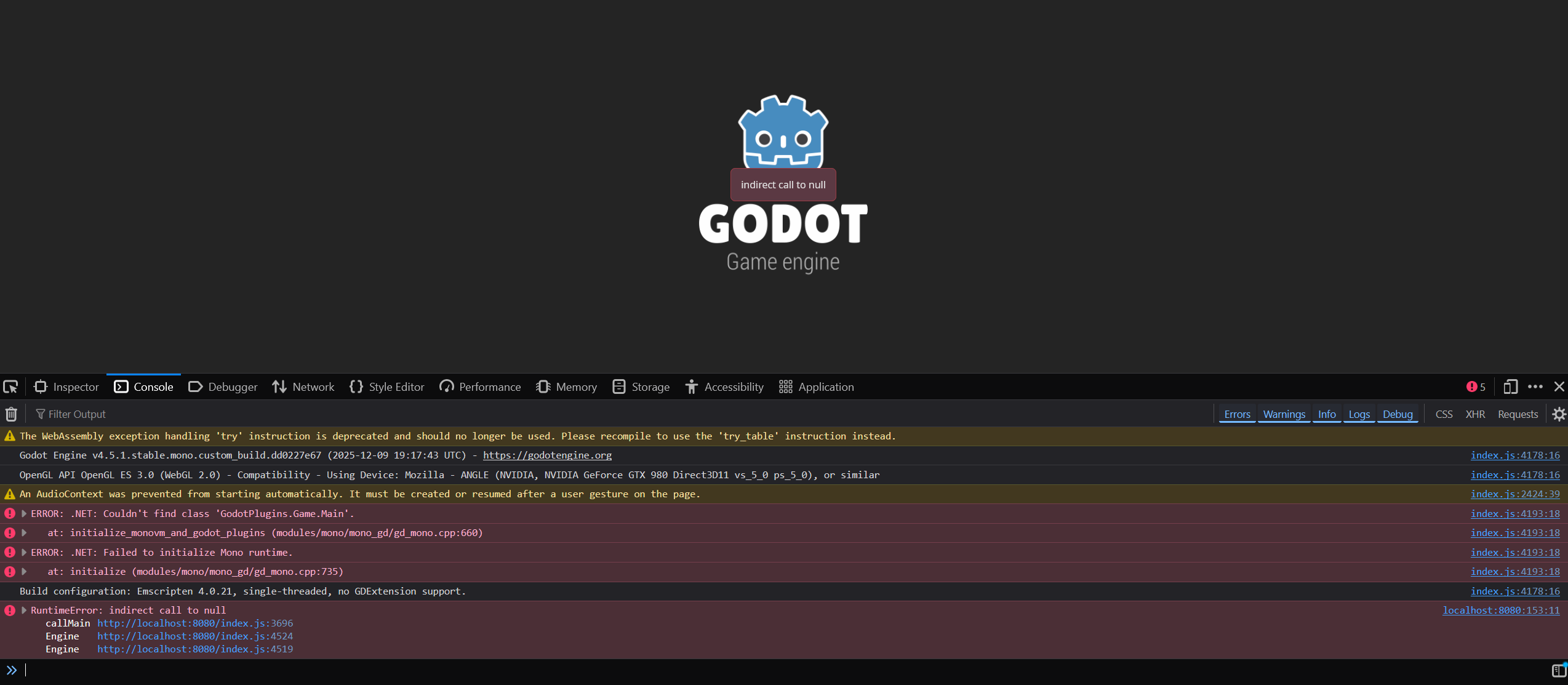
I exported an empty 3d project (just a camera with env and light) but when I run the index.html through a simple local python http server I get this error in the image in my browser (firefox).
My scene is made of Main and then a Camera3D, WorldEnvironment and a global light nothing else. The main node is a Node3D with a script (class Main) nothing inside.
Just as the PR says I removed the DOTNET.Setup call.
I also copy pasted the MainJs.cs from the PR’s demo project. I’m not sure where to go from here though, please?
It looks like it can’t find the class GodotPlugins.Game.Main. Can you check if the class exists in your exported assembly? It’s possible that the export failed, so check if there were any errors in the console when you exported the game.
That was the first thing I searched through and there was no Main. I also did not get any errors. I’m a bit lost at this since I’m unsure without anything what could be going wrong. I tried a verbose mode too but it didn’t lead to anything but I’ll double check and get back to you here, if you are ok with it?
Thanks for replying :-).
EDIT: Could it be that I’m trying to build nothreads editor and the PR works only with threads build? I use my separate test project which as mentioned is just an entirely empty scene with no scripts other than the main and the mainjs from the PR’s demo project. I think I had the same issue with the threads=yes but I can’t remember perfectly right now.
That was the first thing I searched through and there was no Main. I also did not get any errors.
Something went wrong if the Main class was not generated. Make sure the Godot.NET.Sdk used by the C# project is the one you actually built. Although, the SDK published to NuGet.org should also generate a Main class. Perhaps you have the Godot.SourceGenerators disabled (or specifically the GodotPluginsInitializer generator).
You could try generating a binary log when building, so you can inspect what happened. If you decide to share the binary log, keep in mind it may contain sensitive details like environment variables that you may want to redact first.
Also, just to confirm because I think I wasn’t very clear earlier, the Main class is generated so you won’t find it in the source code. I was asking about looking inside the exported assembly, the .dll file (for example with a tool like ILSpy).
Could it be that I’m trying to build nothreads editor and the PR works only with threads build?
Either should work but the threads option must match the <WasmEnableThreads> property in Godot.NET.Sdk/Sdk/Browser.targets and GetRuntimePack.csproj. But if this was the issue, it would manifest in a different way.
Yep, I understood what you main about the exported assembly.
I’m using WSL on win 11 with ubuntu for the export since I had issues building the editor in windows for web export in case it matters. I haven’t had errors so far, i checked yesterday with a --verbose flag and it didn’t give much but I’ll do it again over the weekend and reply to you with what I get, oki?