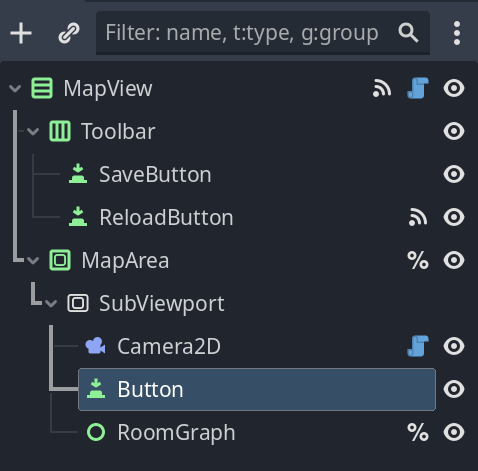
The Idea is to have a viewport i can scroll around in similar to the 2D scene editor.
The problem im facing is that inside of the SubViewport no input events are registered. When launching through “run current scene” everything works fine though.
Disable Input on the viewport is off.
I tried both with Handle Input Locally on and off.
I tried setting focus to the viewportContainer or a node inside but it didn’t seem to do anything.
I believe the approach is to manually call viewport.push_input(@event) from a top-levelled MainSubViewport
e.g. I’m using this code
using Godot;
using System;

public partial class MainSubViewport : SubViewport
{
	public Viewport alternativeViewport;
    public alternativeViewportActive = false;

	public override void _Input(InputEvent @event)
	{
		base._Input(@event);

		if (alternativeViewportActive)
		{
			alternativeViewport.PushInput(@event);
		}
	}
}
where this “MainSubViewport” is just at the top level of my game (i.e., this is a child of the invisible root viewport that godot automatically generates, so its logically/effectively replacing the default root subviewport)
and where the alternativeViewport is the Viewport (not subviewport) that you want to handle the input
Hope that helps! I don’t know of any other approaches for this at the moment, but maybe someone else knows another method?