When I started to my game, character going to left, and i can t control it. When I press to Left/right buttons, character just looking to each side, isnt moving. and space bar doesnt working. How can i solve this problem. There is a video about topic Watch Ekran Kaydı 2026-07-22 11.26.14 kopyası | Streamable
Please copy/paste code into a message using a code block when you share it, that way we can test it on our end without having to retype it or use an image-to-text tool. Also, some people (me, for example) live in the UK where Imgur is blocked, so I can’t help you at all since I can’t see your images. You can just embed images directly into forum posts here anyway, no need to link them.
Also, the video in your original post links to nothing on my end, just says “video not available”.
If i understood correctly, you start the game, character goes left, and when you press button to go right it just stops?
Does it happen when you hold left input before starting the game, if so then you might just locked input so it’s pressed when you start and when you press other input you reset it
Simple fix to that problem is making additional check, e.g You can stop moving when you already move, or you can’t move if you’re moving, if it’s not the problem tho, you need to show the code
I need to go now, so I can’t look at this too in-depth, but it appears you’re using _physics_process() to handle the movement code of a CharacterBody2D, which have their physics controlled manually. Changing that to just process() may fix your issues, since you’re already overriding the physics with your code.
What this change does is switch from running your movement code every physics update, to running your code every frame. Since the default value for both is the same, I’m not 100% sure why the distinction makes a difference to CharacterBodys, I think it may be something to do with the fact that CharacterBody physics is programmed manually. physics_process()is intended for RigidBodys afaik.
The other thing I noticed is in the video your animations aren’t playing, but the character is turning. Try printing is_on_floor() to check if your player is registering they’ve made contact with the floor. (this might get fixed by switching to process() but I don’t have time to recreate the bug to check myself.)
I removed the physics , but it didn’t change anything. Before, when I pressed the right or left keys, my character would simply face right or left while staying in place; now, those keys are inactive and the character does nothing. Also, the movement animation plays while the character remains stationary. And honestly, I didn’t quite understand what to do regarding the “is on floor” part. Thanks anyway.
It could be that the player is stuck due to the form of the collision shapes (floor tiles and player).
What happens if the player jumps and then moves while in the air?
If the player can move in this case it is the collision shapes. You could then try to change the collision shapes of the floor tiles so that the floor has a flat collision surface.
it cant able to jump. I tried both putting it on the ground and air. In the air, it is not affected by gravity, just moves like in the video that i shared
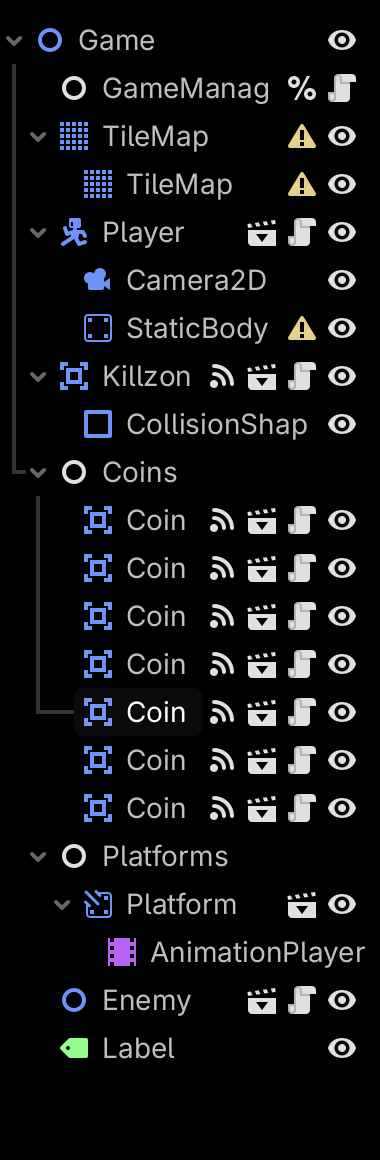
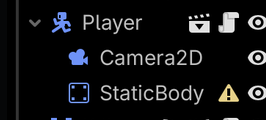
Your Player node appears to be a CharacterBody2D that contains a StaticBody2D and no CollisionShape2D. It has no way to detect whether it is on the ground or in the air since it has no collision, so all your is_on_floor()-derived movement and physics code won’t work. You need to give your player, and all objects it’s intended to interact with, some kind of collision. You did this for your “Killzone”, so just do it the same way you did it there, adding a CollisionShape2D as a child of the node.
Both the Player and the floor will need collision shapes or collision polygons for this to work, and be on the same collision layer.