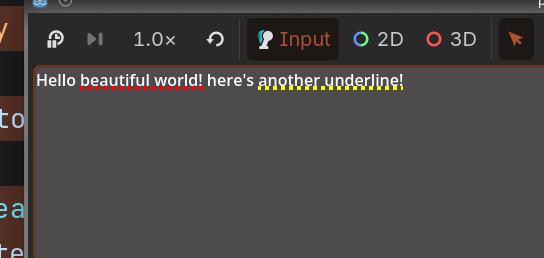
I don’t think you can do that with just a RichTextLabel … AFAIK the options are limited to bold/italic/underline and things like that, not any more customization.
If you don’t mind using an extension, you could use something like godot-HTML to render a CSS/HTML version of your labels, then the sky’s the limit.
extends Control


@onready var rich_text_label: RichTextLabel = $RichTextLabel

var custom_underline = CustomUnderline.new()

func _ready() -> void:
	rich_text_label.install_effect(custom_underline)
	rich_text_label.bbcode_enabled = true

	# use a [zwnj] tag at the end to insert a zero-width non joiner character to account
	# for the width of the last character
	rich_text_label.text = "Hello [u2]beautiful world![zwnj][/u2] here's [u2 color=yellow]another underline![zwnj][/u2]"

	# queue_redraw any time the rich_text_label gets drawn
	rich_text_label.draw.connect(queue_redraw)


func _draw() -> void:
	for offset in custom_underline.offsets:
		draw_set_transform(Vector2(0, 2))
		draw_dashed_line(offset.start, offset.end, Color(offset.color), 4.0, 4.0)
		draw_set_transform(Vector2.ZERO)


class CustomUnderline extends RichTextEffect:
	var bbcode = "u2"

	var last_start_range: int = -1
	var last_relative_index: int = -1

	var offsets = []
	var current_offset = -1

	func _process_custom_fx(char_fx: CharFXTransform) -> bool:
		# the start index in the full string of the character
		var start_range = char_fx.range.x
		# the relative index to the start of the effect
		var relative_index = char_fx.relative_index

		# if last range is bigger than the start range it means that we are restarting the effect
		# so we need to clear the offsets array
		if last_start_range > start_range:
			offsets.clear()
			current_offset = -1

		if relative_index == 0:
			#  we are starting a new tag append a new offset
			offsets.append({
				"start": char_fx.transform.origin,
				"end": char_fx.transform.origin,
				"color": char_fx.env.get("color", "red")
			})
			current_offset = offsets.size() - 1
			last_relative_index = -1
		elif last_relative_index <= relative_index:
			# we are continuing the last offset so update the end value
			offsets[current_offset].end = char_fx.transform.origin

		last_start_range = start_range
		last_relative_index = relative_index

		return true