Godot Version
Godot 4.5.1
Question
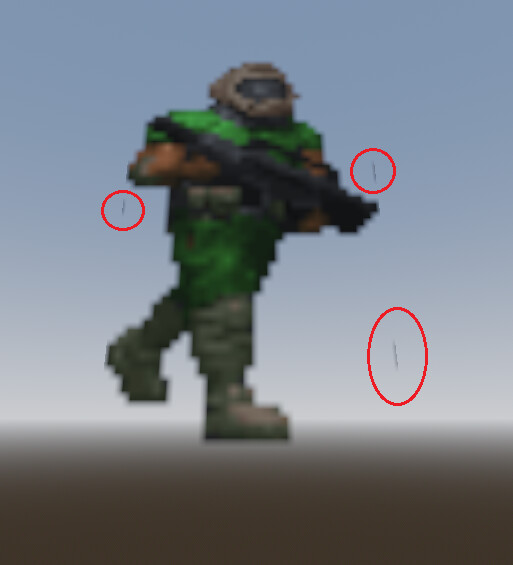
Is there anyway to get rid of these floating artifacts when using a transparent image for a Sprite3D node? Also, is it possible to make the sprite look crisper?
Godot 4.5.1
Is there anyway to get rid of these floating artifacts when using a transparent image for a Sprite3D node? Also, is it possible to make the sprite look crisper?
The artifacts might be in the sprite itself and not an issue with Godot’s transparency rendering specifically. Try double checking your sprite. Also, I believe you can change the Flags > Texture Filter of the Sprite3D to Nearest in order to have crisp, pixel art sprites.
For Project wide crispness
Under ProjectSettings > Rendering > Textures > Default Texture Filter (search for texture filter)
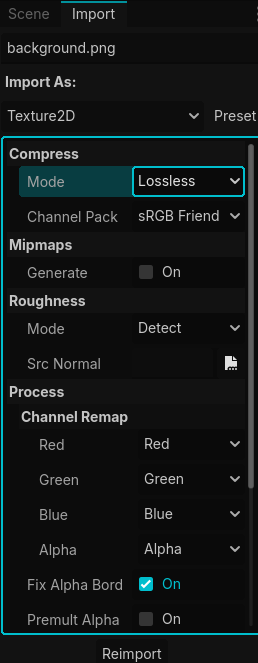
The artifacts could be from compression from the import settings
select your imported image from the FileSystem
and change the setting in the Import tab to lossless
this might not fix it if the artifacts are from the original sprite image
Setting everything to Nearest got rid of the artifacts for me, and it looks as crisp as Doom’s official sprites. Thanks, both of you.