Godot Version
Godot 4.6.stable
Question
I’ve tried to change cursor by Input.set_custom_mouse_cursor(), but it seems rendering in the Windows resolution. That makes the cursor very tiny since my game is only 480*270.
I also tried to hide the cursor and let a sprite following mouse position in _process, but it has one frame latency, that feels weird.
I want my cursor image is the same pixel size as the other sprites in my game . Is there any better way to do that?
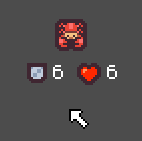
this is the second way i used. The cursor has exactly the same pixel size as other textures.
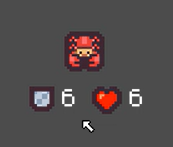
And this is the Input.set_custom_mouse_cursor function does. You can see the cursor is much smaller because it is rendered in Windows11 resolution. In this way, I can’t capture the cursor by print screen key because Windows11 screenshot will ignore the system cursor. So I have to record a video, then take a screenshot. It seems linear because of the video compression.
My english is not very good and I found some replies can’t get it. I mean, if I draw just one white pixel for my mouse icon, it should be the same size as the other pixels in my game.
What exactly do you mean by that?
Could you explain what happens vs. what you want to happen with your cursor?
Maybe it helps to show us a screenshot of what you have vs a screenshot/drawing of what you expect.
this is the second way i used. The cursor has exactly the same pixel size as other textures.
And this is the Input.set_custom_mouse_cursor function does. You can see the cursor is much smaller because it is rendered in Windows11 resolution.
That looks more like a scaling issue rather than a mouse cursor issue. In your first screenshot you also have the texture filter method set to nearest, while in the second screenshot it’s linear.
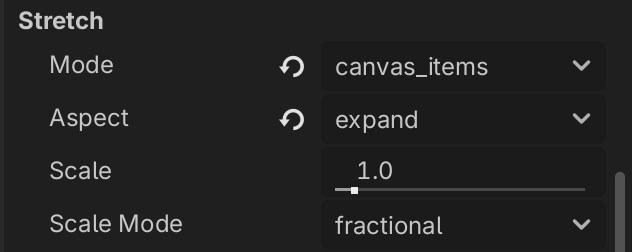
Try to fiddle with the display settings in your project settings.
In the second screen shot, I can’t capture cursor by print screen key because Windows11 screenshot will ignore the system cursor. So I have to record a video, then take a screenshot. I thought it seems linear because of the video compression.
I have a 16x16 px image for a custom cursor and my game uses 640x360 px resolution with integer scaling. When the window size changes, I make a new scaled version of the cursor. So for example when then screen resolution is 1920x1080, the cursor image is scaled 3x.
# In my game this "root" is a Control node in main window.
# size_changed is emitted only when the control size is changed by the integer
# scaling, i.e. 2x, 3x, etc.
get_tree().root.size_changed.connect(on_window_resized)

const CURSOR_ARROW_16_PX = preload("res://ui/cursors/cursor-arrow-16px.png")

func on_window_resized() -> void:
	var window_size = DisplayServer.window_get_size()
	var scale = min(window_size.x / 640, window_size.y / 360)
	var cursor_image: Image = CURSOR_ARROW_16_PX.get_image()
	cursor_image.resize(16 * scale, 16 * scale, Image.INTERPOLATE_NEAREST)
	DisplayServer.cursor_set_custom_image(cursor_image)