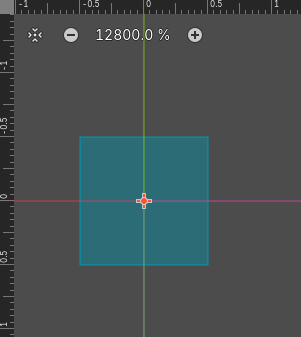
In the 2d editor the scale of the game world is in pixels by default. Is it possible to change the measurements in the editor to use a normalized coordinate system with arbitrary pixel scale (i.e. one where the unit 1 doesn’t mean 1 pixel but rather 1 unit)? Using pixels as the base unit makes normalized coordinates very difficult because you can’t zoom in any further in the editor when you’re at the pixel scale, and everything snaps to integer multiples of 1 so you seemingly can’t have fractional units?
You can see here the zoom is at 12,800 %. And while there are ruler markings for smaller distances, the editor seemingly doesn’t let you go smaller than this.
Another concern I have is that if the zoom is at 12,800 %, is this number being used in calculations? This seems like a recipe for unstable floating point arithmetic if you want to used normalized coordinates
What would be the point of arbitrary “normalized” coordinate systems? It’d just complicated the engine and introduce a need for coordinate conversion in almost every conceivable operation.
You can disable 2D editor pixel snapping in the toolbar.
I mean, use any game engine that’s not godot and you’ll see the benefit. Being able to define what you call 1 is tremendously useful. Plus if your assets are already normalized there’s really no need for conversions. You just start out with a normalized base and don’t have to worry about weird unintuitive scaling factors that come from the units being in pixels.
It’d add more internal calculations needed for unit conversion.
2D games typically operate in pixels. I don’t see how using arbitrary units would bring anything but confusion.
You’re better off embracing godots engine unit
(1 unit = 1 meter = 100 pixels)
Unity allows you to adjust unit scale but the engine still uses 1 meter internally. When you change the scale it performs the scale conversion under the hood.
It might seem convenient to see units other than 1 meter in the editor but its actually just misleading because the engine is hard coded to use the 1 meter unit for everything.
Godot uses the metric system for everything in 3D, with 1 unit being equal to 1 meter. Physics and other areas are tuned for this scale. Therefore, attempting to use a different scale is usually a bad idea (unless you know what you are doing).
It would at most add one more layer on the transform hierarchy…
Literally so many. Do you want me to write a whole blog post about it? Why should I devote so much time to try to convince some random person who’s decided to be dismissive on a forum?
You can elaborate here. Regardless of what I’m saying, there are no custom units. Complaining about it here on the forum - won’t materialize them. I’m pretty sure working around not having custom units is trivial in almost every conceivable case. So describe your problem in detail and we can suggest a workable solution.
You also ignored the fact that you can disable pixel snapping in 2D viewports. Looking at the thread title, the initial question was phrased in a way that suggests this would also be an acceptable alternative solution to your problem.
Are you just incapable of saying things in a nice way? Do you treat every new community member this way? The point of this forum post was not to ask for a solution to a problem, but to say “hey, Godot is missing something that I already use in my workflows in other engines (including toy engines that I’ve built myself).” I just want the measuring ticks to be in the units I want them to be, not in pixels. I think complaining about it on a forum actually is a great way to bring it to peoples attention who may agree with me and want this feature as well. Maybe enough to have someone (if not myself) actually implement it within the engine and submit a PR
I am under no obligation to conform to your expectations of niceness.
Yes I do. New and old.
Then you shouldn’t have posted it as a question in the help section.
If you want to discuss features or make feature requests - the best place for that is Godot’s github.
I know what an XY problem is and that’s not the issue here. The issue is that Godot lacks what I consider a fundamental feature of game engines, that in normalized own words I would consider “trivial” to implement (I should know because I’ve done it in my own projects). There’s also another issue here in that as a new community member I’m being met with dismissive language and then being told that actually no one’s being dismissive they’re just trying to help. No, the language that’s being chosen here is dismissive, and it’s doing a great job of convincing me that maybe the Godot community isn’t all that it’s chalked up to be
Sure, but then why reply in the first place? If you don’t want to be nice to people who you’re trying to help, then why try to help them in the first place?
If you can’t demonstrate the issue then it’s much harder to help find a solution. Otherwise we can only say “no, sorry”
If we answered every “can you do Y?” question with a yes/no response this community would not be much of a resource to anyone. We try to dig into the X problem because that’s where the meat is.
Assume positive intent online, our questions are not jabs at you, we are intrigued by the problem you’ve presented, we want to help and solve this together.
Me “not being nice” is your subjective interpretation of the text I typed. If you think my posts break community guidelines - flag them. Otherwise - deal with it. Don’t go around tone policing people. To use your own qualification - It’s not nice.
If you want to discuss any topic, be ready to hear something you don’t like.
Back on topic: In the context of game engines, custom units are pure bloat. If a game needs custom units - it should implement them on its own.
You don’t want to waste system resources on needless fluff like unit conversion in high performance realtime applications, unless you absolutely must do it.
Deviating from 1 pixel per unit only reduces your floating point precision, since one will be rendering to pixels at the end of the day using a different unit brings no benefit besides adding another step to your own calculations and the computer’s. I’ve also worked in every major game engine and built my own games without an engine, personally never had the thought to use a non-pixel scale for 2D interfaces. I’m surprised to hear other game engines have this, I understand CAD software and Blender (maybe?) do, but that is more of a display change to show mm instead of m without changing the underlying storage.
Sure it can be implemented, but what is gained? (and that seems to be @normalized and my major question). Extra float multiply instructions on nearly every operation adds up, nanoseconds become milliseconds pretty quickly. And float precision is important to retain, we only have ±8192 units before noticeable precision is lost, if you used a scale of 1000x then you only have ±8 units.