Godot Version
Godot Mono 4.7, Arch Linux
Question
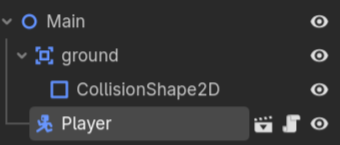
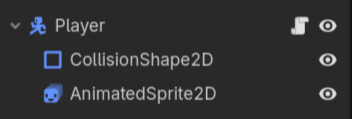
The template code for CharacterBody2D isn’t working as my player phases through other objects that have a CollisionShape2D, and the “on floor” message is never printed. I’ve made sure that:
- both colliders are on the same mask & layer
- player’s UpDirection is set to (0, -1)
- player’s motion mode is set to grounded
Here’s my code:
public partial class Player : CharacterBody2D
{
	public const float Speed = 300.0f;
	public const float JumpVelocity = -400.0f;

  /*public override void _Ready()
  {
    UpDirection = new Vector2(0, -1);
  }*/

	public override void _PhysicsProcess(double delta) //called each "physics tick" which is separate from fps - this is to ensure that speed of physics processes doesn't depend on user's hardware
	{
		Vector2 velocity = Velocity;

		if (!IsOnFloor()) //type of collision determined by UpDirection attribute
		{
			velocity += GetGravity() * (float)delta;
		}
        else
        {
           GD.Print("on floor");
        }

		// Handle Jump.
		if (Input.IsActionJustPressed("ui_accept") && IsOnFloor())
		{
			velocity.Y = JumpVelocity;
		}

		// Get the input direction and handle the movement/deceleration.
		// As good practice, you should replace UI actions with custom gameplay actions.
		Vector2 direction = Input.GetVector("ui_left", "ui_right", "ui_up", "ui_down");
		if (direction != Vector2.Zero)
		{
			velocity.X = direction.X * Speed;
		}
		else
		{
			velocity.X = Mathf.MoveToward(Velocity.X, 0, Speed);
		}

		Velocity = velocity;
		MoveAndSlide();
	}
}
Idk what the issue is, help is appreciated