Godot Version
4.4
Question
Hi,
I’m trying to display damage, evades, blocks, etc., using a scene that contains two labels (this is just for testing—I’m experiencing the same issue even with a single label).
Sorry when its obviouse but I am very new to godot.
The Scene:
DamageLabelNode
-Control 1
–Label
-Control 2
–BlockLabel
-Timer
For some reason, even though I’m setting different colors for the labels, they both appear with the same color (as shown in the screenshot).
My DamageLabelNode script:
class_name DamageLabel extends Node2D

const OWN_SCENE = preload("res://Graphics/Labels/DamageLabelScene.tscn")

@onready var control: Control = $Control
@onready var label: Label = $Control/Label
@onready var timer: Timer = $Timer
@onready var block_label: Label = $Control2/BlockLabel


var target_direction: Vector2
var to_set_text: String
var type: String
var is_blocked: bool = false
var to_set_color: Color


func _ready() -> void:
	timer.wait_time = 0.5
	timer.one_shot = true
	timer.start()
	timer.connect("timeout", Callable(self, "_on_timeout"))
	label.text = to_set_text
	label.label_settings.font_color.a = 1
	print("<<<<<<<<<<Type: ", type)
	match type:
		"hit":
			to_set_color = Color.RED
			label.label_settings.font_color = Color.RED
			label.label_settings.outline_color = Color.BLACK
			label.label_settings.outline_size = 1
			target_direction = Vector2(0,-1)
			is_blocked = false
		"blocked":
			to_set_color = Color(0x4292bb)
			block_label.text = to_set_text
			block_label.label_settings.font_color = Color(0x4292bb)
			block_label.label_settings.outline_color = Color.WHITE
			block_label.label_settings.outline_size = 1
			target_direction = Vector2(-0.5,1)
			is_blocked = true
		"evaded":
			to_set_color = Color.LIGHT_GREEN
			label.label_settings.font_color = Color.LIGHT_GREEN
			label.label_settings.outline_color = Color.WHITE
			label.label_settings.outline_size = 1
			target_direction = Vector2(0.5, 1)
			is_blocked = false
		"missed":
			to_set_color = Color.ORANGE
			label.label_settings.font_color = Color.ORANGE
			label.label_settings.outline_color = Color.WHITE
			label.label_settings.outline_size = 1
			target_direction = Vector2(-1,-0.5)
			is_blocked = false
	print("<<<<<<<<<<label.label_settings.font_color: ", label.label_settings.font_color)
	print("<<<<<<<<<<block_label.label_settings.font_color: ", block_label.label_settings.font_color)
	print("<<<<<<<<<<to_set_color: ", to_set_color)

	if !is_blocked:
		block_label.hide()
	else:
		label.hide()
	self.position.y -= 16
	pass


func _process(delta: float) -> void:
	if is_blocked:
		print("is_blocked")
		block_label.label_settings.font_color = Color(0x4292bb)
	else:
		print("NOT is_blocked")
		label.label_settings.font_color = to_set_color
	self.position.x += target_direction.x
	self.position.y += target_direction.y
	label.label_settings.font_color.a -= 0.05
	print(self)
	print("<<<<<<<<<<label.label_settings.font_color: ", label.label_settings.font_color)
	print("<<<<<<<<<<block_label.label_settings.font_color: ", block_label.label_settings.font_color)


static func new_damage_label() -> DamageLabel:
	var iDamageLabel = OWN_SCENE.instantiate()
	return iDamageLabel


func set_text(text: String) -> void:
	to_set_text = text

func _on_timeout() -> void:
	self.is_blocked = false
	self.queue_free()
Where I call it:
func hurt(amount: float) -> void:
	add_child(new_damage_label(str(int(amount)), "hit"))
	health_points -= amount


func blocked(amount: float) -> void:
	var blockLabel = new_damage_label("Blocked:"+str(int(amount)), "blocked")
	add_child(blockLabel)
	hurt(amount)
The output:
+blocked
Temp Array: ["blocked", 4.16666666666667]
<<<<<<<<<<Type: blocked
<<<<<<<<<<label.label_settings.font_color: (0.0, 0.2588, 0.5725, 0.7333)
<<<<<<<<<<block_label.label_settings.font_color: (0.0, 0.2588, 0.5725, 0.7333)
<<<<<<<<<<to_set_color: (0.0, 0.2588, 0.5725, 0.7333)
<<<<<<<<<<Type: hit
<<<<<<<<<<label.label_settings.font_color: (1.0, 0.0, 0.0, 1.0)
<<<<<<<<<<block_label.label_settings.font_color: (1.0, 0.0, 0.0, 1.0)
<<<<<<<<<<to_set_color: (1.0, 0.0, 0.0, 1.0)
is_blocked
DamageLabelScene:<Node2D#69508007712>
<<<<<<<<<<label.label_settings.font_color: (0.0, 0.2588, 0.5725, 0.6833)
<<<<<<<<<<block_label.label_settings.font_color: (0.0, 0.2588, 0.5725, 0.6833)
@Node2D@5:<Node2D#69675779870>
<<<<<<<<<<label.label_settings.font_color: (1.0, 0.0, 0.0, 0.95)
<<<<<<<<<<block_label.label_settings.font_color: (1.0, 0.0, 0.0, 0.95)
is_blocked
DamageLabelScene:<Node2D#69508007712>
<<<<<<<<<<label.label_settings.font_color: (0.0, 0.2588, 0.5725, 0.6833)
<<<<<<<<<<block_label.label_settings.font_color: (0.0, 0.2588, 0.5725, 0.6833)
@Node2D@5:<Node2D#69675779870>
<<<<<<<<<<label.label_settings.font_color: (1.0, 0.0, 0.0, 0.95)
<<<<<<<<<<block_label.label_settings.font_color: (1.0, 0.0, 0.0, 0.95)
is_blocked
How it looks like:
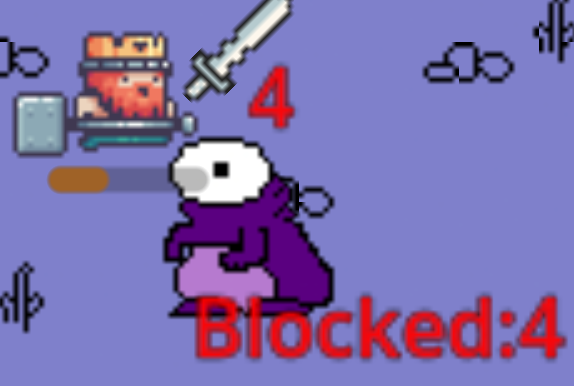
As you can see, I want to display:
A) The blocked amount in a bluish color
B) The damage taken in red
In my opinion, something might be going wrong with add_child(). However, the labels are positioned correctly (with different directions), which makes it even more confusing why the color isn’t applied correctly.
Both DamageLabelNodes are added to the current scene tree (remote tree), but I can’t see the actual color in the IDE—it just shows the default color for both labels.