Godot Version
4.4.1
Question
Hi. I’ve been hard at work for hours battling Godot’s lightmap baking solution.
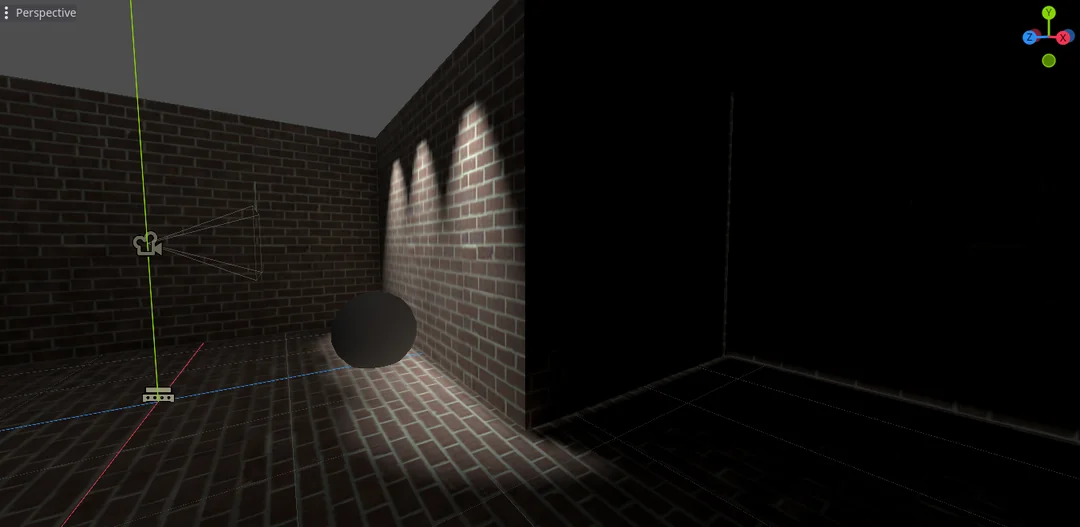
When baking lightmaps, Godot appears to create these odd “glowy edges” on certain edges/corners of my level.
I am importing the level as a .gltf from Blender 4.0.2. I am using Compatibility mode on Godot 4.4.1.
I have tweaked every possible setting, from the lightmap bias, number of bounces, denoiser settings, quality, max texture size, and texel scale. I have also tried to change the compression mode on the generated .exr lightmap image. These “glowy edges” never go away.
I have also tried exporting a custom UV2 layout with no avail to the removal of the “glowy edges”
Is Godot’s lightmapper worth using? Can anyone recommend an alternative lightmapping solution? I’m currently looking into using Blender as my lightmapper of choice.