Godot Version
4.4
Question
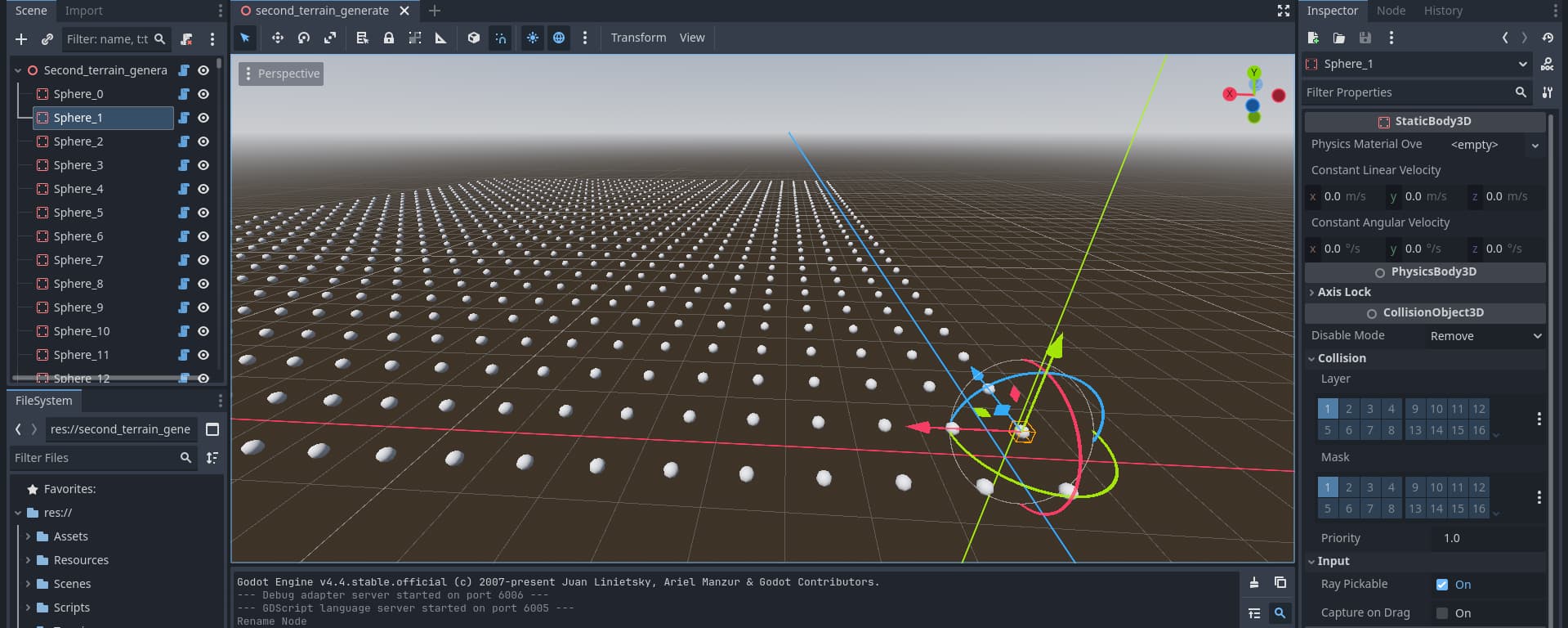
Hi all, I have a sphere primitive object that is spawned into my world in the editor (not durring runtime when the game is running) and I want to be able to click on it in the 3D window so I can adjust the height. Only problem is, when I click it acts as though the object isn’t there. I can see the object in the hierarchy, and I can see it in the 3D window.
# --------------------------------------------------------------------
# 1. Spawn spheres as a separate class so we can emit a signal when they move
# --------------------------------------------------------------------
class SphereObject:
	extends StaticBody3D

	# When a sphere is moved we will emit this signal
	signal moved

	# Quads that share this sphere (indices into `quads` in parent)
	var quad_indices : PackedInt32Array = PackedInt32Array()

	# ----------------------------------------------------------------
	# We use a simple delta check each frame to catch user moves
	# ----------------------------------------------------------------
	var _last_global_pos : Vector3

	func _ready() -> void:
		_last_global_pos = global_position
		input_ray_pickable = true

	func _process(delta: float) -> void:
		if global_position != _last_global_pos:
			_last_global_pos = global_position
			emit_signal("moved", self)  # ask the parent to refresh

	# This callback is fired when the node receives an input event (e.g. a click)
	func _input_event(camera: Camera3D, event: InputEvent, click_position: Vector3, click_normal: Vector3, shape_idx: int) -> void:
		if event is InputEventMouseButton and event.button_index == MOUSE_BUTTON_LEFT and event.pressed:
			print("Sphere clicked at ", global_position)

# --------------------------------------------------------------------
# 2. Spawn initial spheres
# --------------------------------------------------------------------
func spawn_spheres() -> void:
	# Clear any existing terrain to avoid duplicate nodes.
	erase_terrain()

	spheres.clear()
	for x in range(chunk_size.x):
		for y in range(chunk_size.y):
			var s = SphereObject.new()
			s.position = Vector3(x - 0.5, 0, y - 0.5)

			# Add the sphere first so that self is an ancestor.
			#self.add_child(s)
			add_child(s)
			s.owner = self

			# Basic collision & visual mesh
			var col = CollisionShape3D.new()
			col.shape = SphereShape3D.new()
			s.add_child(col)

			var mesh = MeshInstance3D.new()
			mesh.mesh = SphereMesh.new()
			mesh.mesh.radial_segments = 8
			mesh.mesh.radius = 0.1
			mesh.mesh.height = 0.2
			s.add_child(mesh)


			spheres.append(s)

			# Connect the moved signal
			s.connect("moved", Callable(self, "_on_sphere_moved"))
Any ideas on how I can fix this?
Post a screenshot of your node hierarchy. I suspect it’s nothing to do with your code, and instead is something else intercepting the mouse inputs.
Here is an image after spawning everything.
This is after selecting a sphere in my hierarchy. But can’t click in the 3D view still.
Ok, so not what I thought at all. My next guess would be your processor or RAM usage is too high and it’s taking a while to select the object and you’re not being patient.
How long should I be waiting to test this out? I have tried clicking and making sure not to move the mouse or anything and after a whole minute nothing is selected. Its a bit of an odd mystery.
I am suspecting that something hasn’t fully updated in the 3D viewer. Like the model is instantiated but the rest needs a new frame or something, but it doesn’t update. I tried adding new models after this to test and nothing changes.
Did you try restarting the project?
Several times.
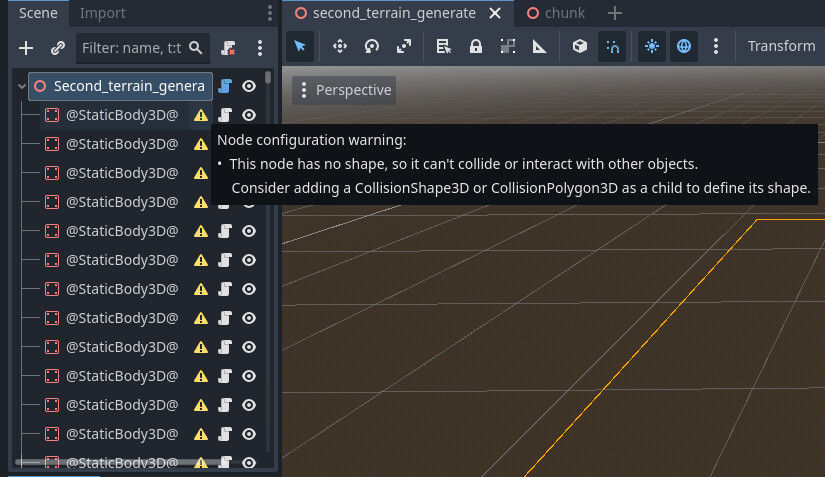
Though an interesting thing, if I spawn all this stuff, save, then restart, when I open the scene I get errors on the spheres that says there’s no Collision. Which seems odd.
That part isn’t odd. You didn’t add a CollisionShape3D to them.
Basic collision & visual mesh
		var col = CollisionShape3D.new()
		col.shape = SphereShape3D.new()
		s.add_child(col)
Actually there is a collision shape that gets added. Its one of the first things that gets added when a sphere generates 
Then why isn’t it showing up in the scene node tree?
P.S. Unrelated but you should consider using full variable names. Things like s and col are needlessly short. Variable name length hasn’t been an issue for a long time, and when future you or others are reviewing your code, you’re increasing the cognitive complexity of your code to no real benefit.
I mention this because I was about to tell you that you never added it to the sphere when I realized s was the sphere.
Just now this has led me to look at your code above. Which I admit I skipped before because I’m lazy (see P.S. above).
So here’s your problem. When you create an object through code like that in the editor, you can only manipulate the parent. And because of that if you want the underlying children on the node to move, you have to update them whenever you update your parent object.
Two possible solutions:
- Update your code so that it is a @tool script, and whenever the StaticBody3D is moved, update the MeshInstance3D. This should work.
- Change the SphereObject script to a scene. Manually add in the MeshInstance3D and CollisionShape3D nodes. Save the scene, and instantiate that. When you move it around you won’t have issues.
Personally I’d do #2 because then the engine will handle all the boilerplate stuff for you.
Well that does do the trick! Switching it to loading a packed scene rather than trying to generate it from code works. No idea why, but I’m not going to question it right now. Thanks for that tip!
And yeah I need to get out of the habbit of using super short variables. Its not the first time its been a problem! It was how I was taught and haven’t been able to shake it 
1 Like
It was how I was taught too because I learned in the 80s. Originally compilers couldn’t process them. only the first 6 to 8 characters of a variable name were processed. Also each character in a name represented a whole byte of data, so using short variable names made your code smaller on disk and in RAM and actually made your code faster. So it became a standard to shorten variable names because it actually improved the performance and footprint of your code.
Now we live in a world of 64-bit processors. That means that the smallest thing a processor can handle efficiently is something 64 bits in size. (If you add two 32-bit integers on a 64-bit processor, it’s actually slower than adding two 64-bit integers.)
We also live in a world of optimized compilers that link under the hood - even with interpreters. The name of a variable has no effect on the speed of the code being executed, because the variable is assigned a new efficient name at runtime.
So the only thing that matters in modern programming is the readability of code. It’s why things like ternary operators, while elegant have gone by the wayside. Ternary operators used to be more efficient. Now the compiler makes your code more efficient than you can. It’s the same with if/else vs switch/case/match statements. It used to be that switch statements were actually more efficient due to a lookup table being created. Now modern compilers will turn and if/else chain into a lookup table under the hood. Still, switch statements are much more readable so they stayed around.
1 Like
Short names for local throwaway variables can make code more readable though. Perfectly fine to use in small scopes.
How does a cryptic variable name make code more readable?
Short is not equivalent to cryptic. Brevity reduces visual clutter of the text and time needed to read it. Long descriptive names are not ideal in every context. They can cause redundant repetition of words.
Sure, but I thought we were discussing this within the context of the code in this thread which uses s and col as variable names. Those are IMO, cryptic. They increased the cognitive complexity of reading and understanding the code. In this case specifically for me because when I saw col I thought “column” because I’ve been doing web programming for decades. So I had to go find the variable definition to understand what the variable does. Same with the s variable, which I had to refer to the other code snippet to know what it was.