Managing 3D characters' facial expressions from Blender to Godot

Godot Version

4.5

Question

There are plenty of tutorials that teach creating multiple pre-baked facial expression and using UV Mapping to map the expression you want such as https://youtu.be/E96m9Z4iTcc and in Godot side, we can create a .gdshader Shader script and set the UV mapping from there accordingly. But this is not what I am after.

I am thinking of this: https://www.youtube.com/watch?v=ryMxta27dj4 . I believe the eyes and the mouth of this character are like stickers that got attached to the face, but on 0:10, I can see that this “sticker” eyes could look downward. On 0:23 to 0:39, the eyes could look to the side and also blink and also do other expressions. We can also see the mouth changing from O shaped to a grin in a smooth way, too.

How to do something like this in Godot? Or a better question would be how to do this in Blender first, then how can this be transferred and programmed this in Godot so I could make the character’s eyes look at any specified coordinates in the game?
Of course, it can be done. I’ll get started on it soon. It’s a little more complicated than what I’ve already done, but the principle is the same. You can try it yourself using MakeHuman.

2 Likes

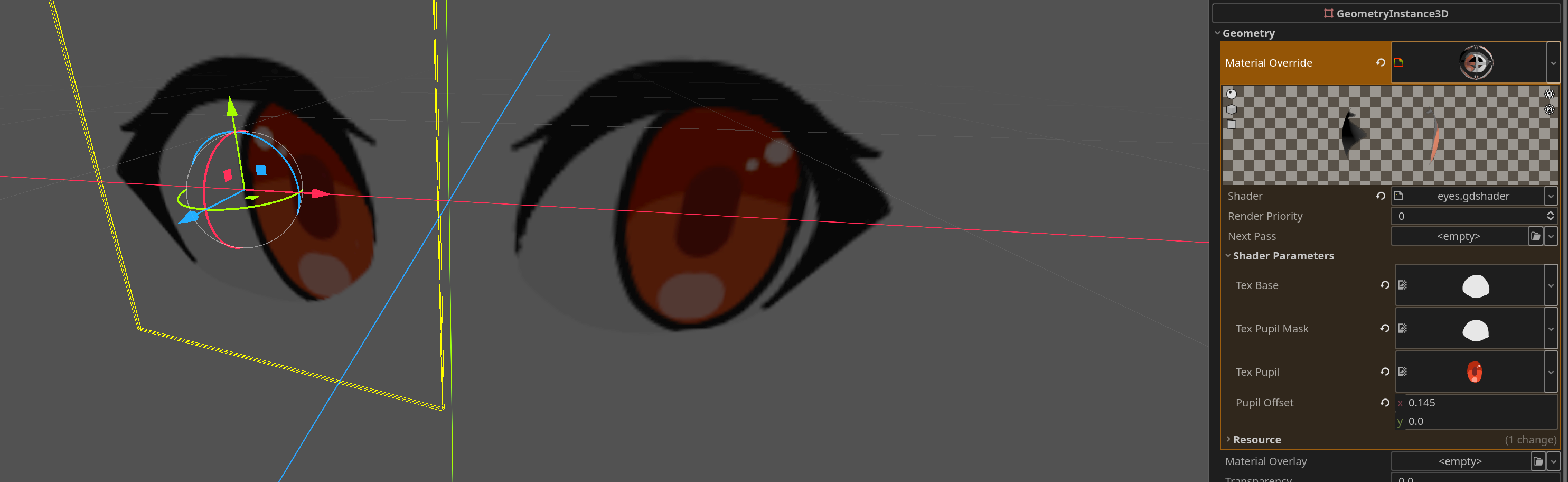
You can do eyes by layering/masking pupil and offsetting its UV, like:

shader_type spatial;

uniform sampler2D tex_base;
uniform sampler2D tex_pupil_mask;
uniform sampler2D tex_pupil;
uniform vec2 pupil_offset;

void fragment() {
	vec4 base = texture(tex_base, UV);
	vec4 pupil = texture(tex_pupil, UV+pupil_offset);
	float mask = texture(tex_pupil_mask, UV).a;
	
	float final_mask = min(min(base.a, mask), pupil.a);
	
	ALBEDO = mix(base.rgb, pupil.rgb, final_mask);
	ALPHA = base.a;
}

(I can share texture too if you’d need them)

Though I’m not good with math so I can’t help you how to make them look exactly where you need to…

There’s also game Atlys that has sticker eyes, but I’m pretty sure it uses static texture and switches them similar to first video you linked, but it has eyes and mouth as separate textures, and uses squash-and-stretch for transitions between the textures, so it looks smoother. Player can look to sides there, but it’s pre-made texture, so they can only look from, left, or right, I believe.

To edit emotions inside Blender, you can have them in that “sticker” form and shrink them inside the head when not needed (e.g. by attaching them to bones, which would also make it easier to animate that squad-and-stretch effect). Maybe also Blendshapes (called Shape Keys in Blender) could be useful for mouth, or for hiding those face feature planes. Many MMD models use those to add overlays like sweat or blush to stylized models.

If emotion transitions in your project are quick, you can also pre-bake 1-4 transition frames and switch to them before going to final emotion.

It was curious to look into that, I like 2D sticker eyes over 3D models, and I hope it was useful.

3 Likes

there are many tricks that can be used and these need to be combined to get effects like in the video.

for a videogame, I would avoid shapekeys/morphs, they are limiting and would have to be coded for use in godot.

starting with the eyes, those can be flat polygons or flat planes with texture with transparency (use scissor so they write into the depth buffer). rig them to bones in order to rotate and move them for the animations.
any additional eye shapes could be rigged to additional bones and hid inside the head. when a change is needed, swap the eyes quickly, possibly with instant transition.

The iris is interesting, maybe you could make a circle and use a stencil shader to keep it inside the eye. and rig it to a bone and use a skeletonModifier with it to make the character look at a target.

another method is to use polygons with a shader, or just with the normals inverted, maybe both.

try using stencil shaders to fix clipping and modeling the parts so you can deform them using bones.